Memory for Graphics Resources
During the runtime of a Mini Game, excessive memory usage is one of the most challenging issues for developers. When a Mini Game consumes too much memory, the operating system's memory management mechanism may cause the app to crash or fail to run, leading to user churn.
Statistics show that over a thousand Mini Games have poor memory usage efficiency, resulting in a high crash rate attributed to memory issues.
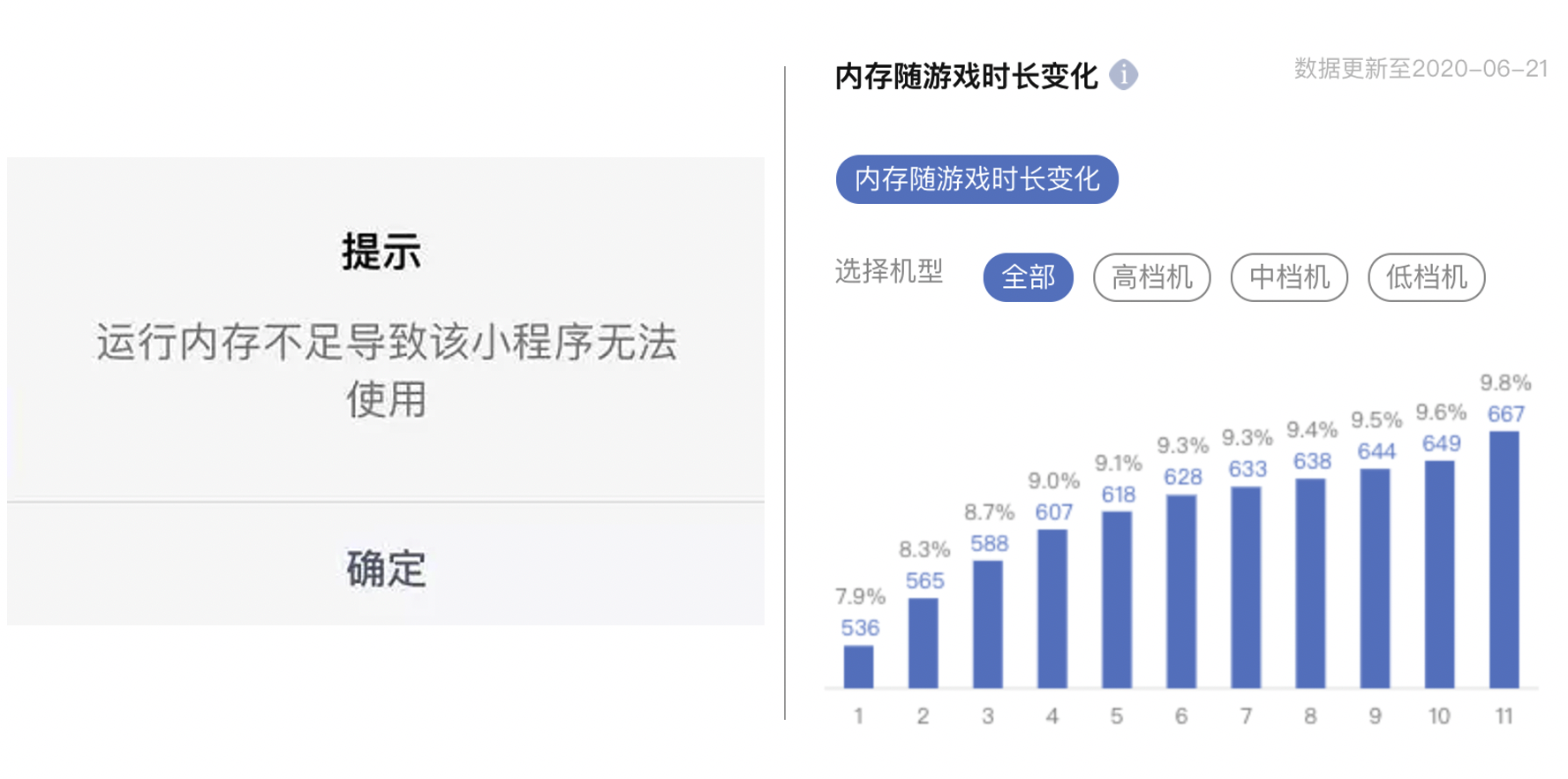
The chart above also reveals that, over time (in minutes), the memory footprint is likely to grow significantly if resource release is not properly managed.
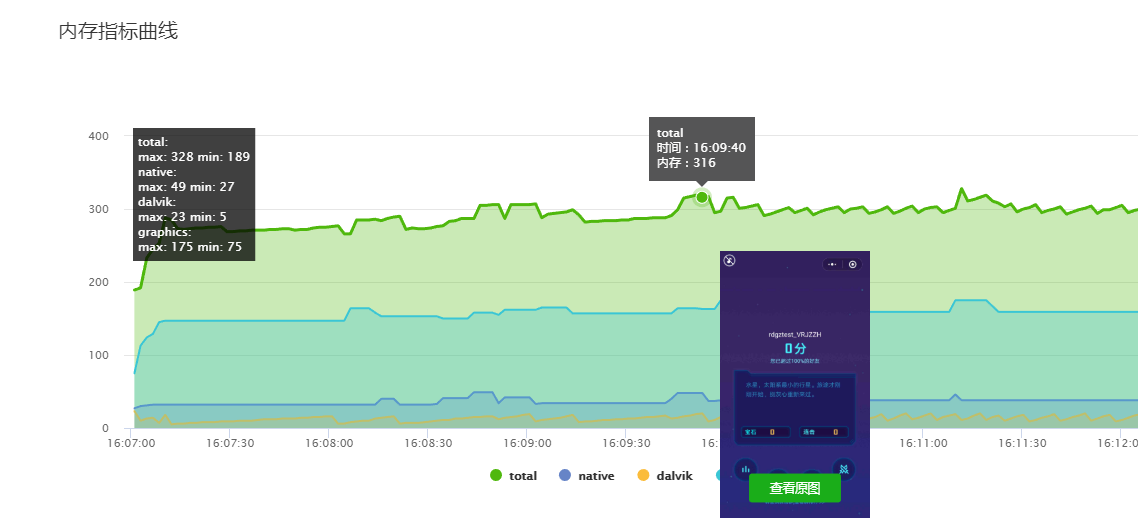
Memory usage of Xing Tu (from Mini Game Cloud Testing Service).
In terms of memory usage, graphic memory is often the primary contributor to total memory consumption in games. For heavy-duty games, we have observed that memory used for graphic rendering constitutes a larger proportion. Therefore, optimizing graphic memory is essential for reducing overall memory usage.
Texture Compression
Is there an effective approach to reducing the memory usage of graphics rendering resources? Texture compression is an image compression technique specifically designed for storing textures in computer graphics rendering systems. Unlike standard image compression algorithms, texture compression algorithms are optimized for random access to texels.
Compression Algorithms and Performance
Compressed Texture Compatibility
Based on the compression formats supported by the WeChat Mini Game platform, the compressed texture formats that can be supported on various device platforms are shown in the table below. This table represents the maximum set of compressed texture formats supported on each platform.
| Device Platform | Compressed Texture Format |
|---|---|
| iOS | ASTC, PVRTC, ETC1 (high-performance mode only) |
| Android | ASTC, ETC1, ETC2 |
| Windows/Mac | DXT5, DXT3, DXT1, BC4/5/7 |
| Developer Tools | DXT5, DXT3, DXT1, BC4/5/7 |
Typically, ASTC is recommended for mobile device platforms, while DXT5 is recommended for PC and Mac scenarios.
During development, developers should also fully consider several factors, including the support of different compressed texture formats across different device platforms, the OS versions on those platforms, and chip support. By selecting the compressed texture format with the highest compatibility, developers can ensure a smooth gaming experience for users.
Performance Advantages of Texture Compression
The test device is a OnePlus 3T. In the experiment, 30 JPG images, each 584KB, were used for rendering.
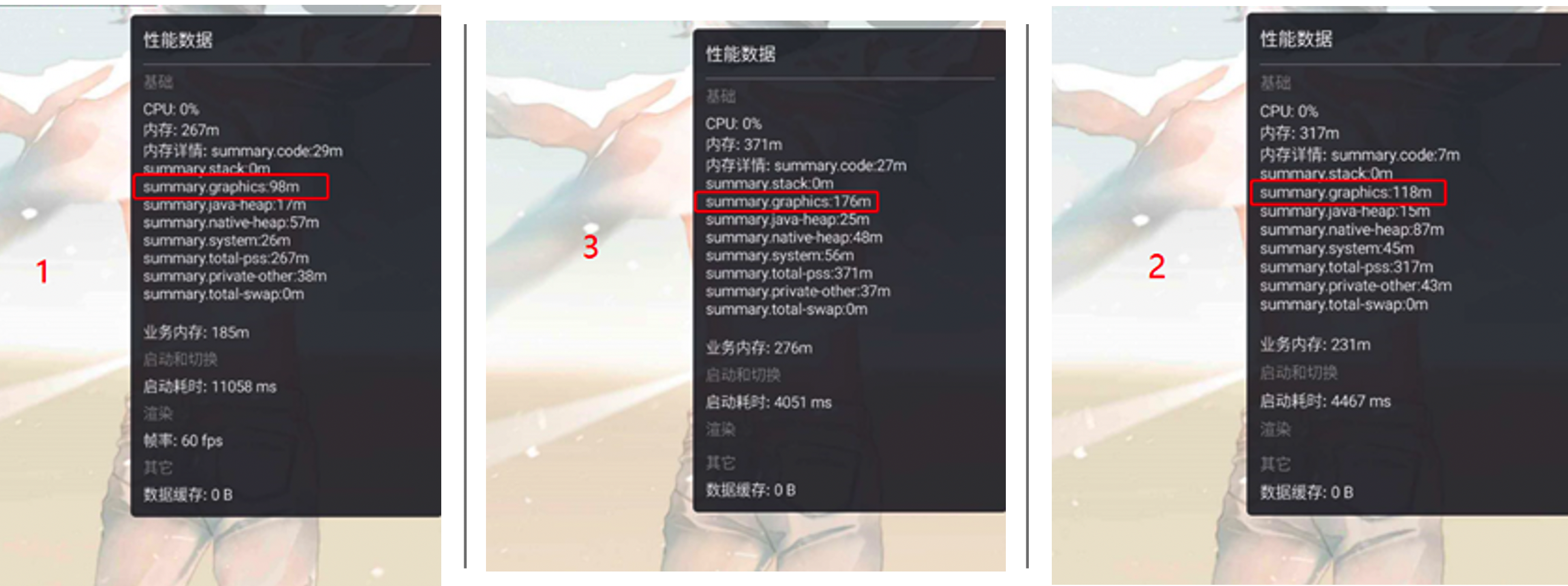
Figure 1: Initial memory before the experiment
Figure 2: Total GPU memory consumption when rendering images with texture compression.
Figure 3: Total GPU memory consumption when rendering images in JPG format.
Memory Comparison: When using texture compression, memory decreased from 78 (176MB-98MB) to 20MB (118MB-98MB), resulting in an approximately 70% reduction in graphic resource memory consumption.
The following are some test data collected using the Snapdragon Profiler tool. Test data with texture compression:
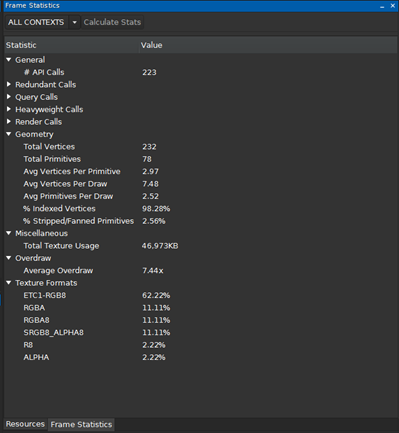
Total Texture Usage is only 46M
Test data without texture compression:
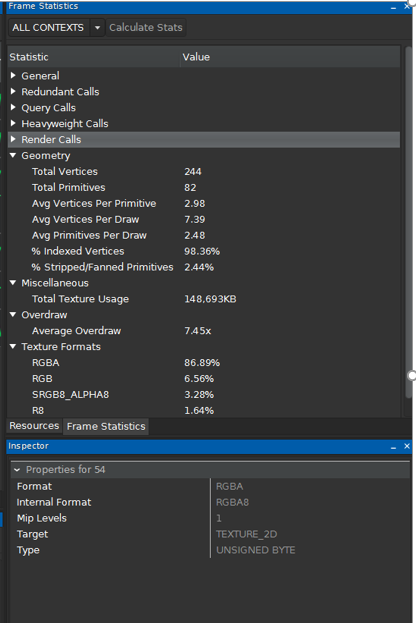
Total Texture Usage is 148M. This also corroborates that texture compression significantly reduces graphic memory usage.
Unity WeChat Mini Game Texture Compression
Texture Compression Practices for WeChat Mini Games in Cocos Creator
With simple configuration in Cocos Creator, you can compress textures for images during the Mini Game packaging process.
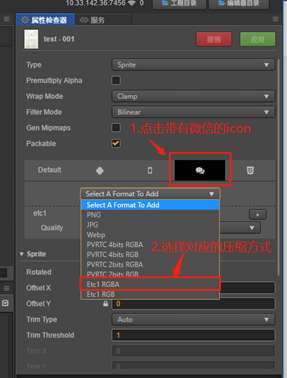
You can not only select the compression algorithm but also adjust parameters such as compression quality, which is very convenient. However, the engine's built-in settings currently do not support batch operations (although there are ways to solve the issue of lacking batch operations, you may need to look for solutions in the Cocos community).
Laya WeChat Mini Game Texture Compression in Practice
Currently, the texture compression feature provided in the LayaAir 2.x version is available exclusively to VIP member accounts. You can perform batch conversion operations as follows.
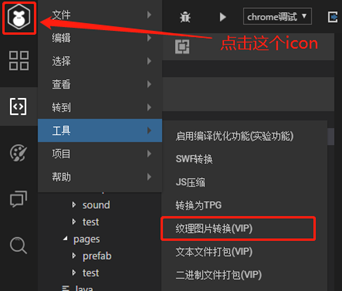
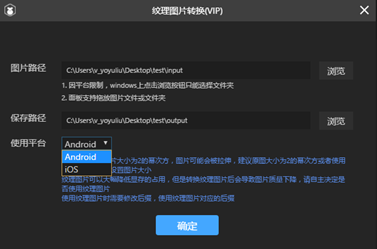
Select the folder containing the images for texture compression and the save path for the converted files, then choose the target platform and click OK.
Practical Application of Texture Compression in Egret WeChat Mini Games
Egret does not provide built-in configuration options similar to Cocos Creator; instead, manual conversion is required. The official Egret team provides four tools for creating compressed textures:
We selected the texture-compressor tool for the conversion process, as it supports batch operations.
Install it using npm install texture-compressor.
Directory structure:
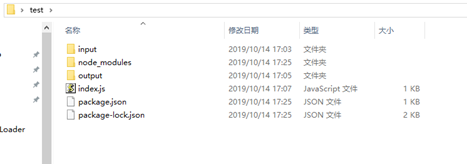
The input folder stores the original images prior to texture compression, while the output folder stores the generated .KTX files resulting from texture compression. index.js is the execution script.
To load and use compressed textures during runtime, refer to the demo in the aforementioned Engine Documentation.
Considerations for Compressed Textures
From the practices mentioned above, we have observed:
- Compressed textures significantly reduce graphics resource memory, thereby optimizing memory usage for our Mini Games.
- The engine's authoring tools provide support, allowing us to efficiently utilize compressed textures during resource creation and packaging.
However, are compressed textures suitable for all scenarios? Are there any issues to be aware of when using them?
Resource Size
The file size of texture-compressed resources is often larger than that of resources compressed with conventional algorithms. Hardware imposes specific requirements on the dimensions for different compression algorithms, which is one of the most significant factors affecting the developer's production workflow. Typically, the ETC1 texture compression algorithm on Android requires width and height dimensions to be powers of 2, while PVRTC on iOS requires dimensions to be powers of 2 and also square. For example, an original image with dimensions of 228x380 will become 512x512 when converted to PVRTC KTX format. Let’s consider an example of creating a resource that does not strictly adhere to these specifications, where the original image size is: 879 x 1242. In this case:
 As you can see, the file size after compression with ETC1 and PVRTC is significantly larger than before (when considering mipmaps, it increases by approximately 30% more). Therefore, when using texture compression, one of the biggest challenges for developers is ensuring that art resources conform to the standard dimensions required by the compression algorithms. Art resources should ideally have dimensions that are powers of 2, and under iOS PVRTC, the width and height must be equal.
Alpha Channel Transparency
ETC1 on Android does not support the alpha channel, requiring additional space to store this alpha channel data separately. PVRTC, however, supports it by default.