Why Is Performance Optimization Necessary?
Game performance is a fundamental element of creating a positive user experience. The core drivers behind operational metrics such as new active users, retention, payments, and session duration are user experience itself, and game performance is one of the most significant factors influencing it. When users enter a Mini Game, excellent launch performance reduces the initial wait time, allowing them to see the game screen sooner and interact with it earlier, which can significantly improve retention rates. Smooth runtime performance provides an optimal gaming environment, ensuring an enjoyable experience.
Performance Matters for User Acquisition and Conversion
Startup performance determines whether players can actually enter the Mini Game. If the game startup is not optimized, it takes a long time to see the game visuals. It is highly likely that many players will churn before the game finishes loading.
According to an analysis of the overall startup retention rate for Mini Games, the first-screen open retention rate for Mini Game players is approximately 75%. What does this mean? It means that from the moment a player clicks on a Mini Game to the point where the first screen is rendered, approximately 25% of players churn.
The typical process for players opening a Mini Game is illustrated in the figure below:
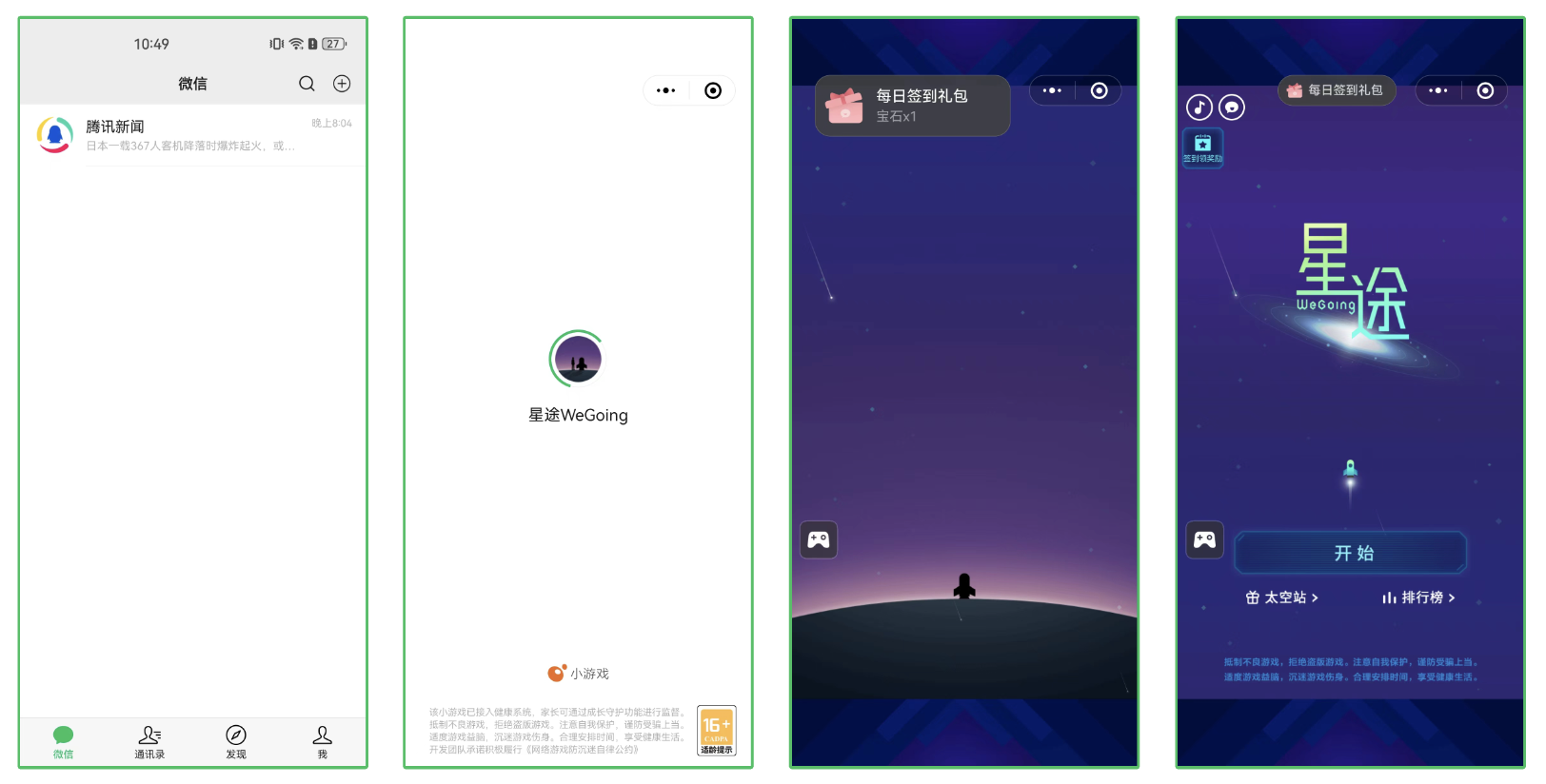
- Figure 1. Players discover and open Mini Games through various entry scenarios
- Figure 2. Startup loading, including initial code package loading, code injection, and initial logic execution
- Figure 3. Loading of additional business resources for the game, such as custom Loading animations and CDN resource loading
- Figure 4. The interactive phase for Mini Game players. We found that many Mini Games experience issues such as prolonged loading times and black screens during this startup process.
So, when exactly do players leave our Mini Games?
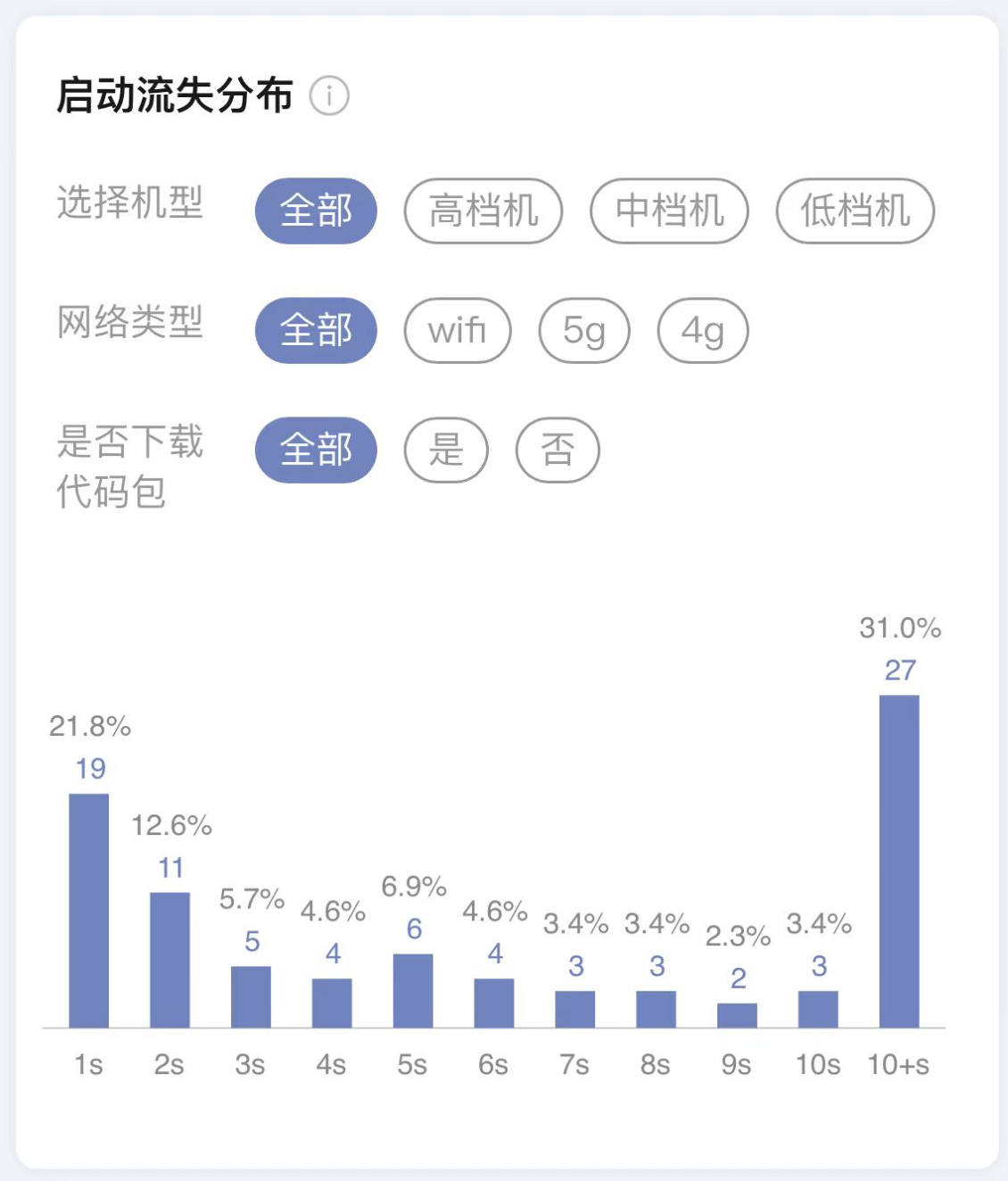
According to the distribution of churn time during the code package loading phase, as shown in the "Data - Performance Analysis" section of the Mini Game Data Assistant app, reducing the time to within 4 seconds can decrease player churn by approximately 40%.
Performance Impacts User Retention
Some Mini Programs feature highly engaging gameplay and high-quality production, yet cause devices to overheat within minutes of play. Others offer stunning visuals but suffer from crashes due to excessive memory usage. These performance issues are significant enough to drive players away, regardless of how compelling the gameplay mechanics may be.
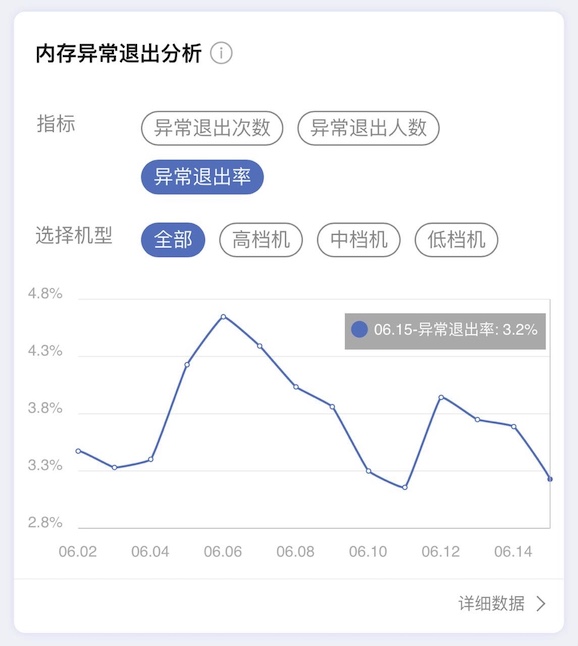
According to the memory-related crash analysis in the "Data - Performance Analysis" section of the Mini Program Data Assistant, approximately 2% of Mini Program exits are attributed to memory issues. For heavy-duty games, this figure can range from 5% to 8%.
How to Improve Mini Game Performance?
Game performance is a complex topic. The causes can range from factors such as package size, game logic, and backend service stability, to elements outside the developer's control, such as players' network conditions and device models. Therefore, to optimize game performance, we need to break down the game development process and identify relevant solutions.
For a typical Mini Game, the development process is generally illustrated in the following diagram:

We will then discuss how developers can utilize the tools provided by the platform, combined with their own optimization experience, to diagnose and optimize game performance at each stage of the development process.
Technical Research
"A good start is half the battle." Before commencing game development, it is typically necessary to select an appropriate technical solution based on the game's characteristics and platform features. Beyond determining standard game engines and other core solutions, developers should also consider the runtime environment (i.e., the Mini Game platform) as a key factor in technology selection. You should evaluate whether your current technical solutions and tools are suitable for the specific runtime platform and opt for solutions and tools that offer greater extensibility and flexibility.
Regarding platform considerations, we have conducted an integrated analysis of large-scale data and released the Technical Manual - Device Compatibility. This resource provides multidimensional data references across three main modules: device hardware, platform feature compatibility, and networking, offering developers more comprehensive decision-making information for technology selection.
Performance Tuning
Improving game performance relies not only on the continuous optimization of platform capabilities but also on developers' dedication to refinement. During the development phase, meticulous attention must be paid to code quality, resource management, and other aspects.
"Only with sharp tools can a worker do good work." Effectively utilizing the platform's existing tuning tools allows for faster and more precise identification of performance issues in games, while also facilitating easier access to relevant optimization techniques. Below are the tuning tools provided by the platform:
- Performance Evaluation Tool — An automated detection tool for analyzing and improving Mini Game performance, assisting developers in precisely locating issues and providing optimization suggestions.
- Cloud Testing Tool — A comprehensive and easy-to-use online testing service for developers, helping them conduct automated game performance testing and compatibility testing more efficiently and comprehensively.
- Best Practices — Best practice guides related to game optimization
- Real-Device Performance Panel - Provides real-time monitoring of game performance data during the debugging phase.
Performance Monitoring
In addition to completing necessary performance tuning during the R&D phase, after a game is released, it is essential to monitor online real-world runtime data and set up abnormality alerts, while also paying attention to player feedback. The platform currently provides the following tools to help developers grasp and understand the online operational status of their games:
- Performance Monitoring — Provides developers with a relatively comprehensive performance data monitoring system, helping them quickly understand the overall performance of the game, obtain optimization guidelines, and configure abnormality metric monitoring.
- Evaluation Standards — Serves as the reference standard for developers' performance feedback and tuning.
- Data Assistant - Provides developers with real online user runtime data across multiple dimensions and metrics.
- Player Feedback — By recording critical path information of the game using LogManager.log, you can guide players to report related issues when anomalies occur.
If you want to learn more about performance and ways to enhance the Mini Game experience, please browse our performance documentation for guides on various topics. We will continuously add new guides and update existing ones, so please stay tuned!