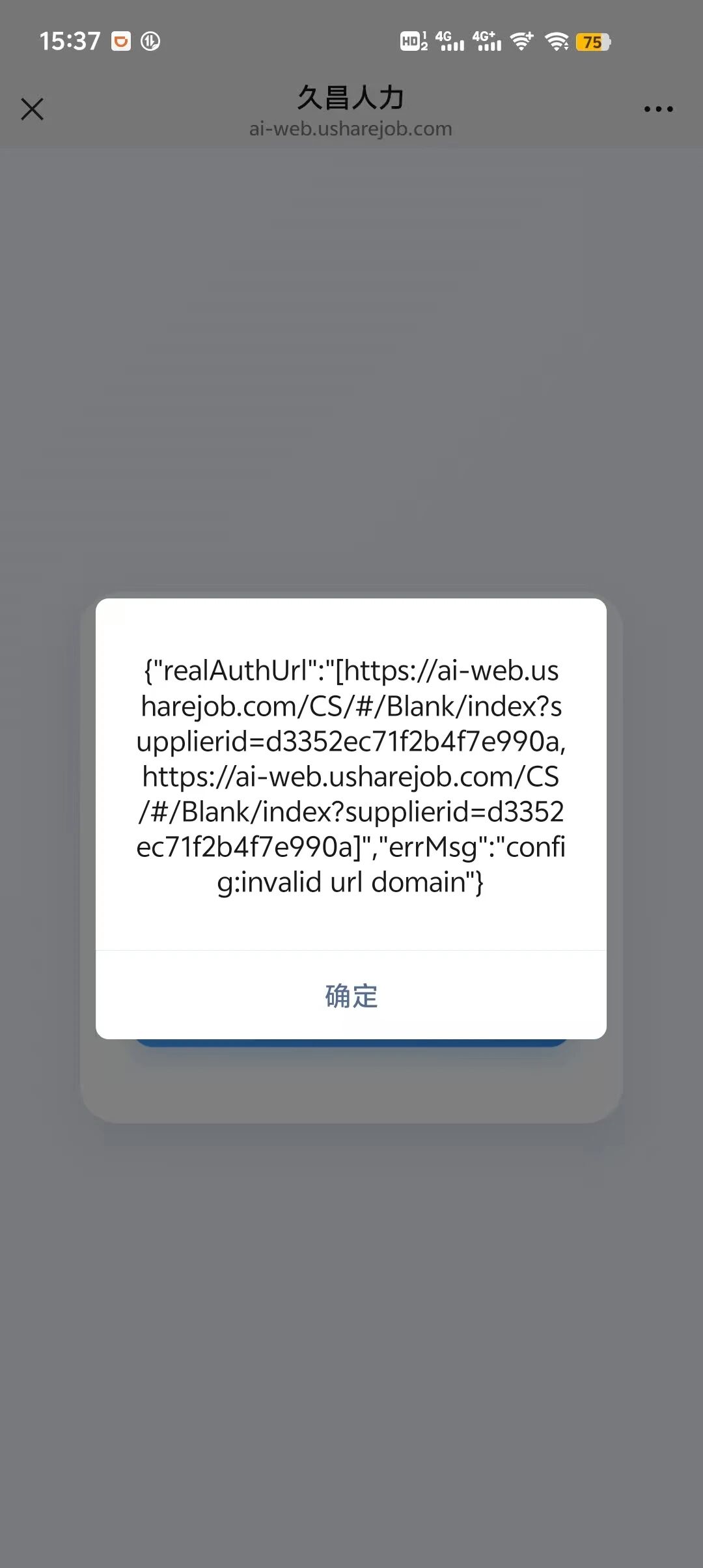
在服务号里已经配置了安全域名,但是页面上点击按钮依旧打不开小程序
<template>
<div class="scan-redirect-container">
<div class="content-card">
<div v-if="loading" class="loading-box">
<div class="loader"></div>
<p class="loading-text">加载中<span class="dot-animation">...</span></p>
</div>
<div v-else class="success-box">
<div class="success-icon">✅</div>
<h2 class="title">已完成扫码验证</h2>
<p class="desc">请点击下方按钮打开小程序继续操作</p>
<wx-open-launch-weapp
v-if="isWechat && wxReady"
id="launch-btn"
:appid="appid"
:username="username"
:path="path"
:env-version="envversion"
>
<component :is="'script'" type="text/wxtag-template" style="display: block;">
<button class="open-btn">打开小程序</button>
</component>
</wx-open-launch-weapp>
<div v-else class="non-wechat-tip">请在微信内打开以跳转小程序</div>
<div v-if="isWechat && !wxReady && wxError" class="error-tip">
<p>微信SDK初始化失败</p>
<p class="error-detail">{{ wxError }}</p>
<p class="error-help">请检查:</p>
<ul class="error-list">
<li>1. 当前页面URL是否在微信后台配置的JS安全域名中</li>
<li>2. 微信后台是否已配置JS接口安全域名</li>
<li>3. 签名接口是否正常工作</li>
</ul>
</div>
</div>
</div>
</div>
</template>
<script setup>
import { ref, onMounted, onUnmounted } from "vue";
import { useRouter, useRoute } from "vue-router";
import { get_account_qr_count, wx_app_wx_app_get_sign } from "../../api/index3";
import wx from "weixin-js-sdk";
const router = useRouter();
const route = useRoute();
const loading = ref(true);
const isWechat = ref(false);
const wxReady = ref(false);
const wxError = ref(null);
const appid = "wxfba4fb70169159ea";
const username = "gh_b6a2692ad259";
const path = ref("");
const envversion = ref('trial');
onMounted(() => {
checkWechatEnv();
initPage();
});
onUnmounted(() => {
wx.error(() => {});
});
async function initPage() {
try {
const supplierId = route.query.supplierid;
if (!supplierId) {
loading.value = false;
return;
}
path.value = `/pages/index/index`;
checkWechatEnv();
if (isWechat.value) {
await initWxConfig();
const maxWaitTime = 5000;
const startTime = Date.now();
while (!wxReady.value && Date.now() - startTime < maxWaitTime) {
await new Promise(resolve => setTimeout(resolve, 100));
}
if (!wxReady.value) {
console.warn("微信SDK初始化超时,继续显示页面");
}
}
await getApiData(supplierId);
} catch (err) {
console.error("页面初始化异常:", err);
loading.value = false;
}
}
function checkWechatEnv() {
const ua = navigator.userAgent.toLowerCase();
isWechat.value = ua.includes("micromessenger");
}
function generateNonceStr(length = 16) {
const chars =
"ABCDEFGHIJKLMNOPQRSTUVWXYZabcdefghijklmnopqrstuvwxyz0123456789";
let str = "";
for (let i = 0; i < length; i++) {
str += chars.charAt(Math.floor(Math.random() * chars.length));
}
return str;
}
async function initWxConfig() {
if (!isWechat.value) {
console.log("非微信环境,跳过微信SDK初始化");
return;
}
const noncestr = generateNonceStr();
const timestamp = Math.floor(Date.now() / 1000);
const currentUrl = window.location.href.split("#")[0];
console.log("开始微信SDK初始化,当前URL:", currentUrl);
console.log("参数 - noncestr:", noncestr, "timestamp:", timestamp);
try {
const res = await wx_app_wx_app_get_sign({
noncestr,
timestamp,
url: currentUrl,
});
console.log("微信签名接口返回:", res);
if (res.code !== 200) {
wxError.value = `签名获取失败: ${res.message || "未知错误"}`;
throw new Error(res.message || "签名获取失败");
}
wx.config({
debug: true,
appId: res.data.appId,
timestamp: String(timestamp),
nonceStr: noncestr,
signature: res.data.signature,
jsApiList: ["wx-open-launch-weapp"],
openTagList: ["wx-open-launch-weapp"],
});
wx.ready(() => {
console.log("✅ 微信SDK初始化成功");
wxReady.value = true;
setTimeout(() => {
const launchBtn = document.getElementById('launch-btn');
if (launchBtn) {
console.log("✅ 微信开放标签元素已找到:", launchBtn);
} else {
console.warn("⚠️ 未找到微信开放标签元素");
}
}, 100);
});
wx.error((err) => {
console.error("❌ 微信配置失败:", err);
wxError.value = `微信配置失败: ${JSON.stringify(err)}`;
wxReady.value = false;
});
} catch (err) {
console.error("微信初始化异常:", err);
wxError.value = `微信初始化异常: ${err.message}`;
wxReady.value = false;
}
}
async function getApiData(supplierId) {
try {
const res = await get_account_qr_count(supplierId);
if (res.code === 200) {
console.log("业务数据:", res.data);
if (res.data.qr_count == 0) {
router.replace(`/Pages/TsUser?shareopenid=${supplierId}`);
}
}
} catch (err) {
console.error("接口请求失败:", err);
} finally {
loading.value = false;
}
}
</script>
<style scoped>
.scan-redirect-container {
width: 100vw;
height: 100vh;
display: flex;
justify-content: center;
align-items: center;
background: linear-gradient(135deg, #f0f4ff 0%, #eef2f9 100%);
padding: 20px;
box-sizing: border-box;
}
.content-card {
width: 100%;
max-width: 340px;
background: #ffffff;
border-radius: 24px;
padding: 48px 32px;
box-shadow: 0 12px 32px rgba(0, 42, 123, 0.1);
text-align: center;
box-sizing: border-box;
}
.loading-box {
display: flex;
flex-direction: column;
align-items: center;
gap: 20px;
}
.loading-text {
font-size: 16px;
color: #555;
font-weight: 500;
margin: 0;
}
.dot-animation {
display: inline-block;
width: 20px;
overflow: hidden;
animation: dot-blink 1.4s infinite step-start;
}
@keyframes dot-blink {
0% {
width: 0;
}
33% {
width: 6px;
}
66% {
width: 12px;
}
100% {
width: 18px;
}
}
.loader {
width: 48px;
height: 48px;
border: 4px solid #f3f4f6;
border-top-color: #409eff;
border-radius: 50%;
animation: loader-rotate 1s linear infinite;
}
@keyframes loader-rotate {
to {
transform: rotate(360deg);
}
}
.success-box {
animation: fadeIn 0.4s ease forwards;
}
.success-icon {
font-size: 56px;
margin-bottom: 20px;
}
.title {
font-size: 22px;
color: #1f2937;
font-weight: 600;
margin: 0 0 12px;
}
.desc {
font-size: 15px;
color: #6b7280;
margin: 0 0 40px;
line-height: 1.6;
}
.open-btn {
width: 100%;
height: 52px;
background: linear-gradient(90deg, #409eff 0%, #3388ee 100%);
color: #fff;
border: none;
border-radius: 14px;
font-size: 16px;
font-weight: 500;
cursor: pointer;
transition: all 0.2s ease;
box-shadow: 0 6px 16px rgba(64, 158, 255, 0.3);
}
.open-btn:active {
transform: scale(0.96);
box-shadow: 0 3px 10px rgba(64, 158, 255, 0.25);
}
.non-wechat-tip {
padding: 14px;
background: #fff4e6;
color: #ff8c00;
border-radius: 12px;
font-size: 14px;
margin-top: 20px;
}
.error-tip {
padding: 16px;
background: #fee;
color: #d32f2f;
border-radius: 12px;
font-size: 14px;
margin-top: 20px;
text-align: left;
}
.error-detail {
font-size: 12px;
color: #666;
background: #fff;
padding: 8px;
border-radius: 6px;
margin: 8px 0;
word-break: break-all;
font-family: monospace;
}
.error-help {
font-weight: bold;
margin: 12px 0 8px 0;
color: #333;
}
.error-list {
margin: 0;
padding-left: 20px;
font-size: 13px;
color: #555;
}
.error-list li {
margin-bottom: 4px;
line-height: 1.4;
}
@keyframes fadeIn {
from {
opacity: 0;
transform: translateY(12px);
}
to {
opacity: 1;
transform: translateY(0);
}
}
</style>



你好,提供下控制台打印的config参数,跳转的小程序appid截图和复现链接
复现链接(这个链接是属于第二次扫码的情况):https://ai-web.usharejob.com/CS/#/Blank/index?supplierid=d3352ec71f2b4f7e990a
至于参数什么的我全都有打印在控制台,但是微信浏览器没有控制台。。。