This document primarily describes how to call the server-side APIs of the WeChat Open Ecosystem, including how to obtain the AppID and AppSecret, generate an access_token, select the API domain name, and check the API calling quota.
1. Retrieve AppID and AppSecret
The WeChat Developer Platform supports managing basic information, development information, and binding and authorization relationships for most services.
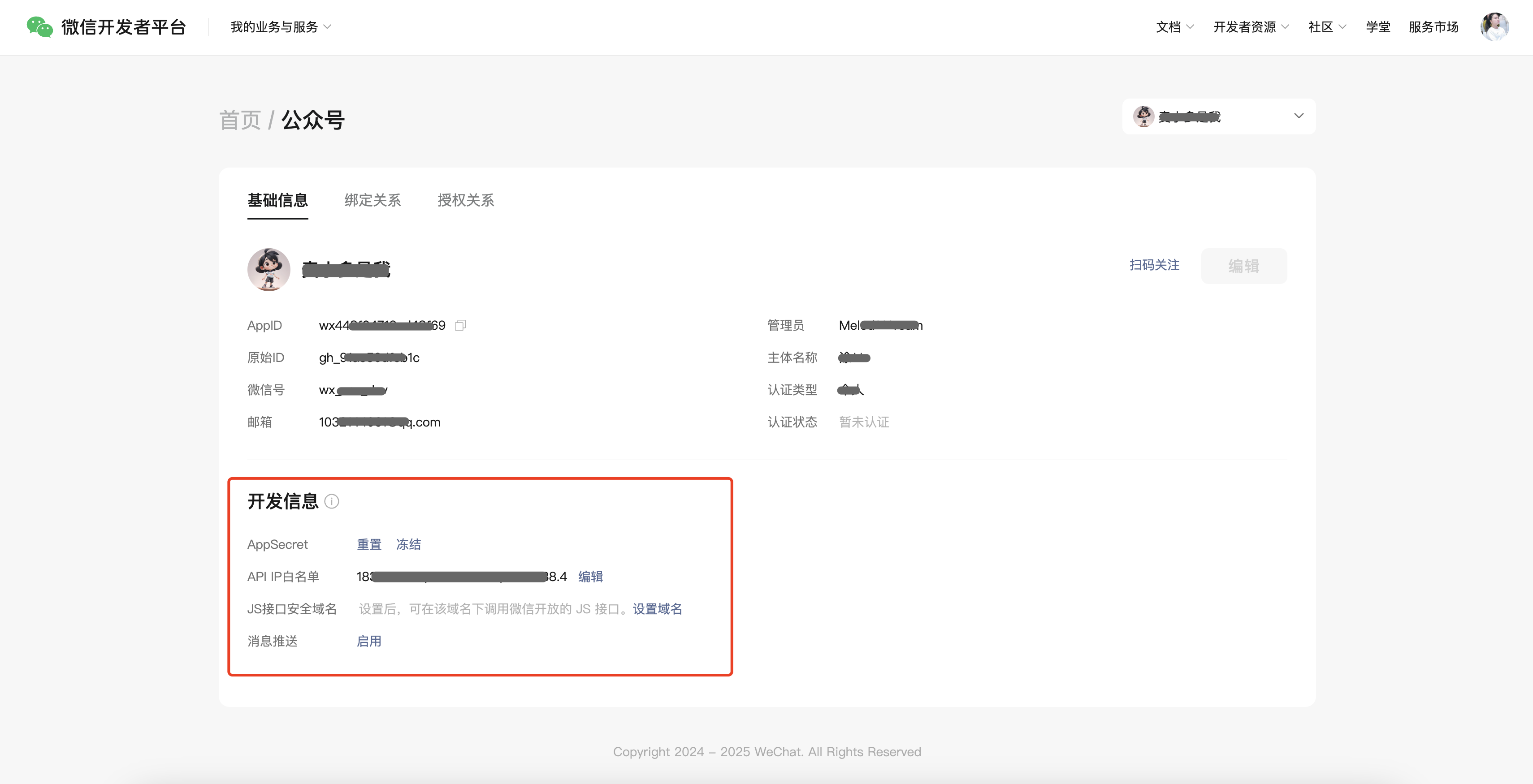
Navigation Path
- WeChat Developer Platform - Log in with WeChat QR code scan - My Services - Select the corresponding service
After entering the management page, developers can directly modify the AppSecret, API IP whitelist information, JS interface secure domains, and message push configurations here (the configuration details vary depending on the specific service).
2. AppSecret Management
Supports operations to enable, reset, freeze, and unfreeze. Note that freeze and unfreeze operations take effect after a delay of 10 minutes.
If there is no long-term need to use the AppSecret, developers can freeze the AppSecret to enhance account security.
After the AppSecret is frozen, developers cannot use the AppSecret to obtain an access_token (the API returns error code 40243). This does not affect the normal use of basic account functions, does not affect calling backend APIs through third-party authorization, and does not affect calling backend APIs via Cloud Development.
| Business Name | AppSecret Management Features | Operation Path |
|---|---|---|
| Mini Program | Enable, Reset, Freeze, Unfreeze | WeChat Official Accounts Platform - Scan QR code with WeChat and select Mini Program to log in - Manage - Development Management - Development Settings |
| Mini Games | Enable, Reset, Freeze, Unfreeze | WeChat Official Accounts Platform - Scan QR code with WeChat and select Mini Games to log in - Manage - Development Management - Development Settings |
| Official Accounts | Enable, Reset, Freeze, Unfreeze | WeChat Developer Platform - Scan QR code with WeChat to log in - My Businesses - Official Accounts - Basic Information - Development Keys |
| Service Accounts | Enable, Reset, Freeze, Unfreeze | WeChat Developer Platform - Scan QR code with WeChat to log in - My Businesses - Service Accounts - Basic Information - Development Keys |
| Mobile Apps | Enable, Reset | WeChat Open Platform - Log in with email account and password - Management Center - Mobile Apps - Details |
| Web Apps | Enable, Reset | WeChat Open Platform - Log in with email account and password - Management Center - Web Apps - Details |
| Third-Party Platforms | Enable, Reset | WeChat Open Platform - Log in with email account and password - Management Center - Third-Party Platforms - Details |
| Multi-End Apps | Enable, Reset | WeChat Developer Platform - Scan QR code with WeChat to log in - My Businesses - Multi-End Apps - App Overview |
| WeChat Mini Shop | Enable, Reset | WeChat Mini Shop Platform - Scan QR code with WeChat and select Mini Shop account to log in - Service Marketplace - Business Tools - My Services - Self-Developed |
| Mini Shop Affiliate Assistant | Enable, Reset | WeChat Developer Platform - Scan QR code with WeChat to log in - My Businesses - Affiliate Assistant - Basic Information - Development Keys |
| Alliance Affiliate Organization | Enable, Reset | Alliance Affiliate Organization Management Platform - Scan QR code with WeChat and select Alliance Affiliate Organization account to log in - Settings - Open Information |
| Video Account Assistant | Enable, Reset | Video Account Assistant - Scan QR code with WeChat to log in - Live Streaming - Live Stream Management - Open Capabilities |
3. API IP Whitelist
| Business Name | API IP Whitelist Feature Description | Operation Path |
|---|---|---|
| Mini Program | Once enabled, only IPs in the whitelist can call APIs that require AppSecret as a parameter |
WeChat Official Platform - Scan QR code with WeChat and select Mini Program to log in - Management - Development Management - Development Settings |
| Mini Game | Once enabled, only IPs in the whitelist can call APIs that require AppSecret as a parameter |
WeChat Official Platform - Scan QR code with WeChat and select Mini Game to log in - Management - Development Management - Development Settings |
| Official Account | Only IPs in the whitelist can call Server APIs (not limited to APIs that require AppSecret as a parameter) |
WeChat Developer Platform - Scan QR code with WeChat to log in - My Business - Official Account - Basic Information - Development Keys |
| Service Account | Only IPs in the whitelist can call Server APIs (not limited to APIs that require AppSecret as a parameter) |
WeChat Developer Platform - Scan QR code with WeChat to log in - My Business - Service Account - Basic Information - Development Keys |
| Mobile App | Configuring API IP Whitelist is not yet supported | / |
| Web App | Configuring API IP Whitelist is not yet supported | / |
| Third-Party Platform | Only IPs in the whitelist can call Server APIs (not limited to APIs that require AppSecret as a parameter) |
WeChat Open Platform - Log in with email account and password - Management Center - Third-Party Platform - Details |
| Multi-platform App | Configuring API IP Whitelist is not yet supported | / |
| WeChat Store | Once enabled, only IPs in the whitelist can call APIs that require AppSecret as a parameter |
WeChat Store Platform - Scan QR code with WeChat and select Store Account to log in - Service Marketplace - Business Tools - My Services - In-house Development |
| Store Affiliate Assistant | Once enabled, only IPs in the whitelist can call APIs that require AppSecret as a parameter |
WeChat Developer Platform - Scan QR code with WeChat to log in - My Business - Affiliate Assistant - Basic Information - Development Keys |
| Alliance Affiliate Institution | Once enabled, only IPs in the whitelist can call APIs that require AppSecret as a parameter |
Alliance Affiliate Institution Management Platform - Scan QR code with WeChat and select Alliance Affiliate Institution Account to log in - Settings - Open Information |
| Channels Assistant | Once enabled, only IPs in the whitelist can call APIs that require AppSecret as a parameter |
Channels Assistant - Scan QR code with WeChat to log in - Live Streaming - Live Streaming Management - Open Capabilities |
Note
- Third-Party Platform Accounts: If API IP Whitelist is enabled and an API is called from an IP not in the whitelist, the returned error code is
61004 - For other account types, the returned error code is
40164
4. Generating the access_token
Refer to the Get API Call Credentials or Get Stable Version API Call Credentials endpoint. Pass in the AppID and AppSecret obtained in the previous step to retrieve the access_token. Both methods are valid, but we recommend using the stable version interface.
The retrieved access_token can be used for calling business "Server-side APIs".
Here are some important notes:
-
The
access_tokenis currently valid for 2 hours. It must be refreshed periodically. Fetching it repeatedly will invalidate the previously obtainedaccess_token. We recommend that developers use a central server to uniformly handle the retrieval and refreshing of theaccess_token. Other business logic servers should retrieve theaccess_tokenfrom this central server rather than refreshing it independently. This avoids conflicts that could causeaccess_tokenoverwrites and disrupt business operations. -
The validity period of the
access_tokenis indicated by theexpires_infield in the response, which is currently a value within 7200 seconds. The central server should proactively refresh theaccess_tokenbefore it expires. During the refresh process, the central server can continue to serve the oldaccess_token. The WeChat Open Platform backend guarantees that both the old and newaccess_tokensremain valid for 5 minutes, ensuring a smooth transition for third-party businesses. -
The validity period of the
access_tokenmay be adjusted in the future. Therefore, the central server should not only perform internal scheduled active refreshes but also provide an interface for passiveaccess_tokenrefresh. This allows business servers to trigger theaccess_tokenrefresh process when they detect that theaccess_tokenhas expired during an API call. -
The
access_tokenis a globally unique API call credential and must be used when calling various interfaces. Developers must store it securely. -
The storage space allocated for the
access_tokenmust be at least 512 characters.
Here is a simple access_token storage and usage scheme:
-
The central server should periodically (recommended: every 1 hour) call the WeChat API to refresh the
access_tokenand store the newaccess_tokenin the storage. -
Other working servers should retrieve the
access_tokenfrom MySQL (or other storage) when calling the WeChat API. They may also cache it in memory for a short period (recommended: 1 minute).
5. API Domains
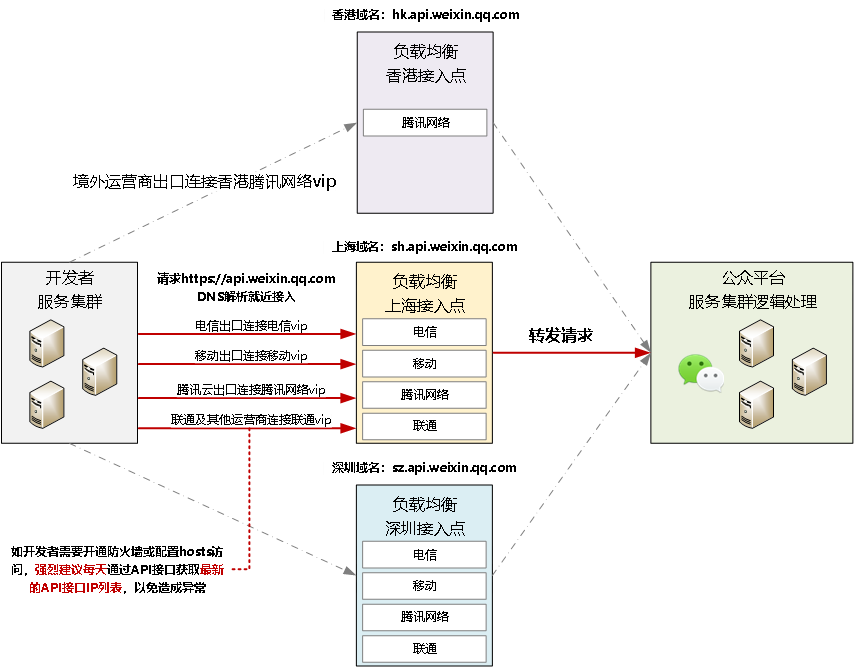
Developers can select the optimal domain for integration based on their server deployment (resulting in lower latency and higher stability).
Additionally, other domains can serve as disaster recovery backups. In the event of network link failures, consider switching to an alternative domain. Developers should use domains for API requests instead of IP addresses. If network policies require IP whitelisting, developers can regularly retrieve the latest IP information via the Get WeChat Server IP Addresses API.
-
General domain (
api.weixin.qq.com): Using this domain routes traffic to the nearest official access point. -
General disaster recovery domain (
api2.weixin.qq.com): Use this domain if the primary domain becomes inaccessible. -
Shanghai domain (
sh.api.weixin.qq.com): Using this domain routes traffic to the Shanghai access point. -
Shenzhen domain (
sz.api.weixin.qq.com): Using this domain routes traffic to the Shenzhen access point. -
Hong Kong domain (
hk.api.weixin.qq.com): Using this domain routes traffic to the Hong Kong access point.
6. API Call Quota
The APIs on the WeChat Open Service-side ecosystem are not unlimited. To prevent abnormal load on WeChat servers caused by program errors, each API has a default limit on the number of calls. For specific limits, please refer to the API rate limiting documentation for each service.
If the number of API calls exceeds the available daily quota, an error code 45009 will be returned. When encountering this issue, developers can reset the API call count using the following interfaces. Refer to the interface documentation for detailed call instructions:
7. Troubleshooting
If you encounter issues while calling APIs, refer to API Alerts and Troubleshooting Guide.
Additionally, if you encounter errors when calling APIs, you can use the API Error Diagnosis tool on the WeChat Developer Platform to precisely locate and resolve issues with one click.
- Navigation path: WeChat Developer Platform - Console - Toolbox - API Error Diagnosis