
# Guide to the use of customer service messages
To enrich the service capabilities of Weixin Mini Program and improve the quality of service, WeChat provides customer service messaging capabilities to the Mini Program so that the Mini Program's customers can communicate with the Mini Program's service providers easily and quickly.
# Features Description
Users can use the Weixin Mini Program customer service message function to communicate with the guest and service personnel of the Mini Program.
There are two entrances to customer service message conversations:
In Weixin Mini Program: the developer adds the customer service message button component within the Mini Program, and users can evoke the customer service session page inside the Mini Program to send a message to the Mini Program;
- Used Weixin Mini Program customer service messages are aggregated and displayed in the WeChat session "Picicle customer service messaging" box, where users can view historical customer service announcements outside the picicle and send messages to the piculum.
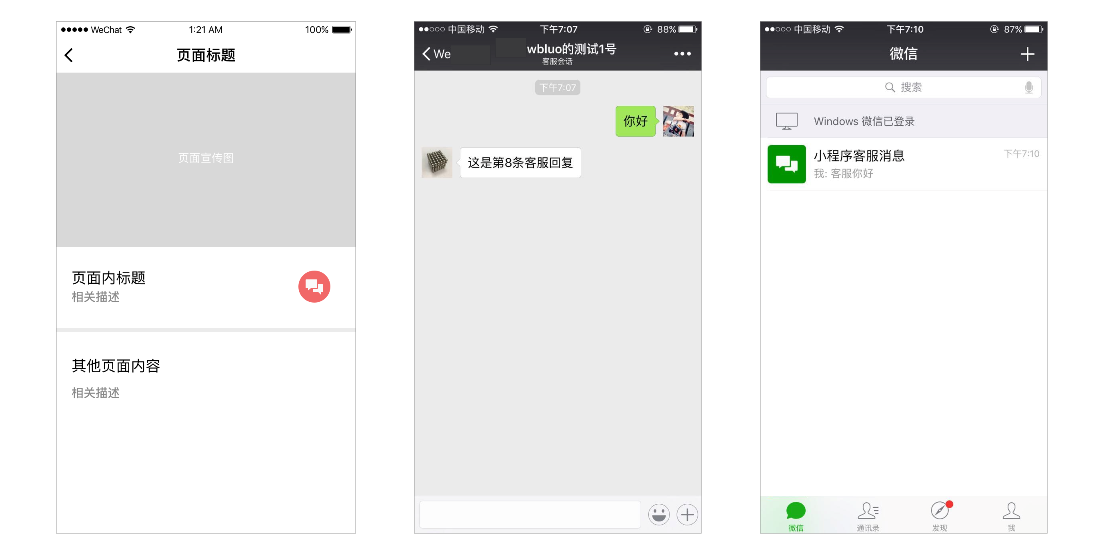
Conditions for sending customer service messages: Weixin Mini Program The user either calls the customer service session in the Mini Program or sends a message to the Mini Program customer service. See the customer service message for the specific time and period of sending and the limit of message entries. Dxplaination of sending conditions
Customer service message types: text, picture, Weixin Mini Program card type messages are currently supported.
In order to meet the needs of Weixin Mini Program developers, the Mini Program can send customer service messages in the following three ways: 1. Call the interface to send customer service messages;2. Use web-based customer service tools; 3. Use the mobile customer service assistant Mini Program.
# Dxplaination of the conditions for issuance
When the user and Weixin Mini Program customer service produces a specific action interaction (see below for a list of specific actions), the Mini Program can send customer service messages to the user.
The list of currently allowed actions is as follows, and the number of messages allowed to be downed and the duration of the downing differs when triggered by different actions. An error code is returned when the maximum number of messages is reached.
| User actions | Limit on the number of messages allowed | Time limit for issuance |
|---|---|---|
| Users send information | 5 Rules | 48 hours |
| Users enter customer service messages | 2 Rules | 1 minute |
The number of messages that can be sent is not accumulated, and the above user action will trigger the update of the number of messages that can be sent and the update of the time limit that can be sent. The number of messages that can be sent is updated to the maximum value of the current limit of the number of messages that can be sent, and the limit of the effective time that can be sent is also updated to the maximum valid time.
# Call the customer service message interface to send customer service messages
When a user sends a message to the Weixin Mini Program customer service, the WeChat server POSTs the packet (JSON or XML) of the message (or event) to the [[PIPS-1]] populated by the developer.Developers can call the interface to reply asynchronously after receiving a request.
If the customer service message permissions set of Weixin Mini Program has been authorized to Third Party Platform, all customer service messages will be pushed to the servers of third-party platforms and no longer to the server of the developer or to the web-based customer service tool
# Fill in the message push configuration
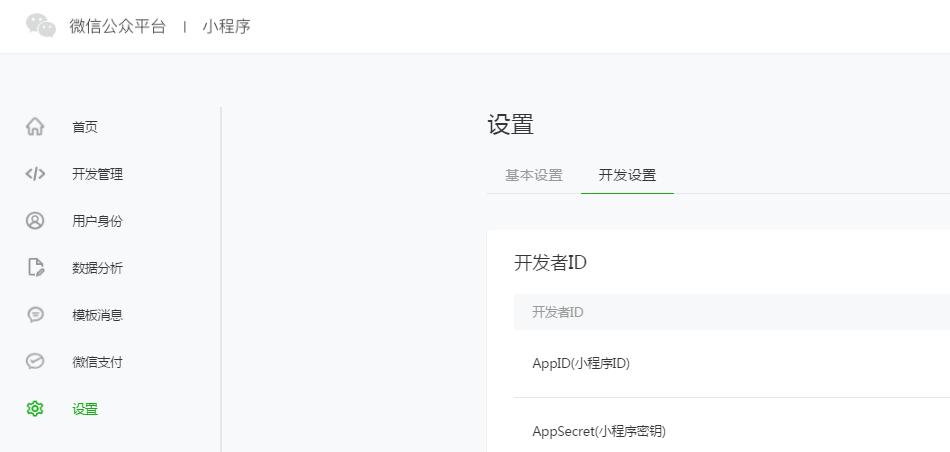
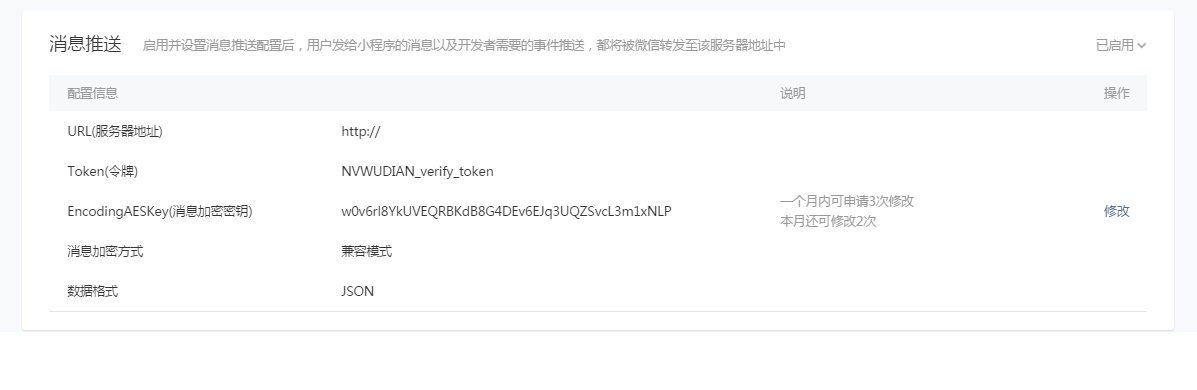
Log in to Weixin Mini Program and enable the message push function in Settings - Development Settings - Messaging and complete the information configuration (including server address, token, encryption, etc.).
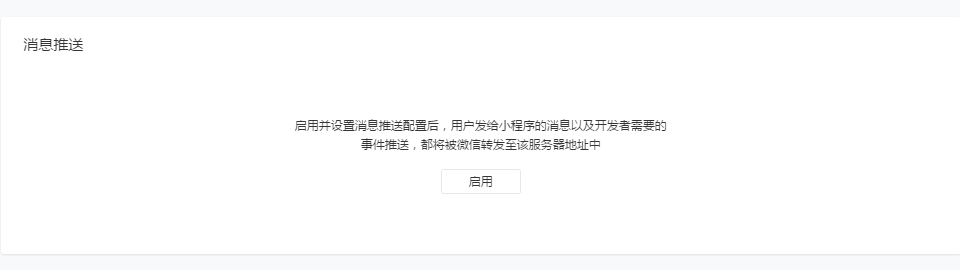
When the server configuration is enabled and set, messages sent by the user and events pushed by the developer will be forwarded by WeChat to URL to the developer.
# Interface calls
Weixin Mini Program Customer Service Messaging API Documentation
# Customer Service Tools Weixin Mini Program
Weixin Mini Program can also directly use web-based Weixin Mini Program customer service or the mobile "customer assistant" Mini Program to respond to customer service messages.
Customer service assistant Weixin Mini Program code
If Weixin Mini Program does not enable message push, messages sent by the user will be forwarded to the webpage Weixin Mini Program Customer Service and Mobile Customer Service Assistant, where customer service officers can access and respond to users in a web-based WeChat Mini Program customer service and mobile customer service assistant.
If the customer service message permissions set of Weixin Mini Program is authorized to Third Party Platform, all customer service messages will be pushed to the servers of third-party platforms and not to the server of the developer or to the web-based customer service tool.
Note that the "User enters a session through the customer service message button" event will not be forwarded to the web-side customer service tool.
# Bind customer service staff
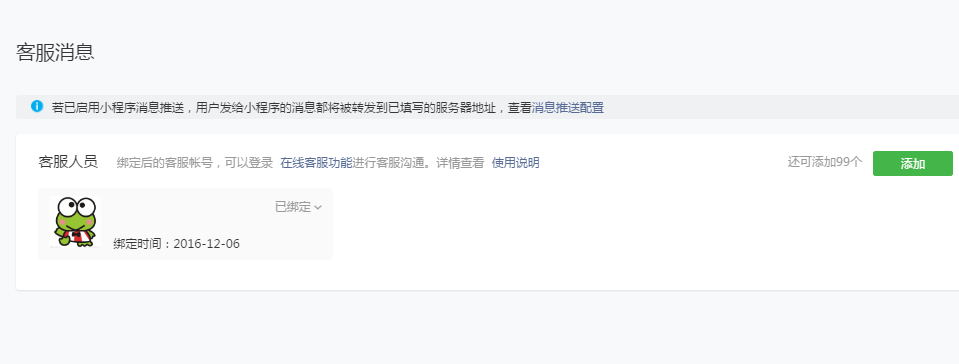
Before using the web and mobile customer service tools, the Mini Program administrator needs to complete the binding of guests in the Mini Program background. At present, the Mini Program supports no more than 100 customer service staff.
# Mobile terminal "customer service assistant" Weixin Mini Program
# Log in and access
Binding Weixin Mini Program Customer service officers can search for "Customer Service Assistant" or scan to log in to the "Customer Service Helper" Mini Program and select the corresponding Mini Program account. After logging in, the user who is talking to the Mini Program can be seen and they can choose to access the conversation.
# Switch customer service status
Click on online status, and you can choose customer service online status or customer service offline status: After selecting customer service online status, even if you quit customer service Weixin Mini Program, you can still receive the message reminder of user consultation in the "service notice"; After selecting customer service offline status, you will not be able to receive customer service messages and message alerts.
# Receive and send messages
After opening "Customer Service Assistant" Weixin Mini Program, enter the "Pending Access List" to select user sessions for access;In a session that has already been connected, customer service agents can have a conversation with the user within 48 hours, and currently supports text, pictures, and small card types of messages.
# Weixin Mini Program Customer Service Tool Instructions
# Log in and access
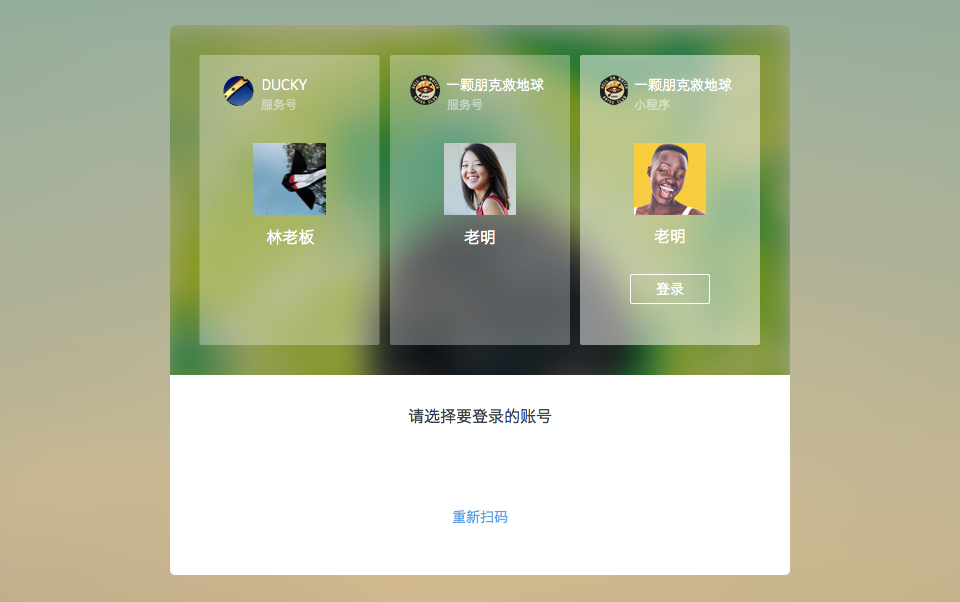
Customers who are bound Weixin Mini Program can scan to sign in to web page Weixin Mini Program customer service and select the corresponding Mini Program account. After signing in, you can see the user who is talking to the Mini Program, and you can choose to access the conversation.
# Switch customer service status
Click on online status to choose online status and offline status
# Receive messages
Manual access: After the customer service staff is online, they can manually access the user session that is awaiting a response in the "To be accessible" list.
Automatic Access: When there are too many user sessions for access, you can turn on automatic access in Settings - Access & Reach.
# Send a message
Already connected to the session, guests can talk to the user within 48 hours, and currently supports sending text, picture, Weixin Mini Program card type messages.
# Use specifications
Weixin Mini Program customer service message usage must comply with [Weixin Mini Program Platform Operating Standard]]]6 and must not violate the following rules, including but not limited to:
- Do not allow malicious efforts to induce users to perform actions that might trigger the downing of customer service messages in order to achieve the purpose of sending customer service messaging to users
- No malicious harassment or posting of messages that are not related to the message sent by the user that cause harassments to the user
- No malicious marketing is allowed, and the content posted is suspected of being false, exaggerated or illegal.
- Customer service messages are not allowed to send false, pornographic, violent or other information to users that violates national laws.
# Customer Service Message Development Documentation
# Customer Service Messages
# Use customer service messages on the page
Need to set the value of thebuttoncomponentopen-typetocontact, when the user clicks it will enter the customer service session. If the user clicks the Weixin Mini Program message in the session,This returns to the Mini Program, where the developer can obtain the page path of the user's clicked message bybindcontactevent callbackpathand corresponding parameters [[TAG-4-Start]]query, developers need to jump according to the path.In addition, developers can transmit the source of the session to customer service by settingsession-from.
sample code
<button open-type="contact" bindcontact="handleContact" session-from="sessionFrom"></button>
Page({
    handleContact (e) {
        console.log(e.detail.path)
        console.log(e.detail.query)
    }
})
Return parameter explaination
| parameter | type | Introductions |
|---|---|---|
| path | String | Path specified by Weixin Mini Program message |
| query | Object | Query parameter specified by Weixin Mini Program message |
# Access messaging services in the background
When a user sends a message to Weixin Mini Program customer service, or enters a session, etc.,The server URL that the developer fills out (or, if cloud development is used, a configured cloud function) gets messages and events pushed by the server WeChat that the developers can respond to according to their business logic.For access and usage, please refer to Message Push .
# Check back-end access messages for errors
# Report Error Behavior
The user sent the message "The service provided by Weixin Mini Program failed. Please try again later."
# Reasons for reporting the error
Weixin Mini Program When a callback is configured, the message sent by the user is pushed to a third-party server, and an error is reported if the push fails.
# Methods of self-examination
# 1.Weixin Mini Program Open message push (Mini Program background - development management - development settings - message push)
# 2.Weixin Mini Program "customer service authority" to Third Party Platform (Mini Program background - settings - third-party settings - third-party platform authorization management)
# * Special Situations
For Weixin Mini Program which has cloud functions turned on and does not have cloud hosting turned on, the message sent by the user is pushed to the cloud function, does not go to the Mini Program customer service system, and doesn't callback to a third-party server or the server address of the Mini Program message pushed.
# forward the message to customer service
If Weixin Mini Program is in development mode, an ordinary WeChat user sends a message to the Mini Program customer service,WeChat server will first POST the message to the url filled by the developer. If you wish to forward the message to customer service, you need the developer to return the message MsgType of transfer_customer_service in the response package. After receiving the response, the WeChat server forwards the message sent to the customer service system.
After the user is accessed by the customer service, and before the customer service closes the session, messages sent by the user are forwarded directly to the customer service system while the session is in progress.When the session is not closed for more than 30 minutes, the WeChat server will automatically stop forwarding to the customer service and will resume the message to the developer's URL.
When the user is in the waiting queue, the message sent by the user will still be pushed to the URL filled in by the developer.
Please note here that only messages sent by WeChat users should be forwarded, and no other events should be forwardable, otherwise the customer service will see some meaningless messages on the customer service system.
Instructions for invoking
<xml>
  <ToUserName><![CDATA[touser]]></ToUserName>
  <FromUserName><![CDATA[fromuser]]></FromUserName>
  <CreateTime>1399197672</CreateTime>
  <MsgType><![CDATA[transfer_customer_service]]></MsgType>
</xml>
Dxplaination of request parameters
| parameter | Do I have to? | describe |
|---|---|---|
| ToUserName | yes | Recipient OpenID Account |
| FromUserName | yes | Developer No. WeChat |
| CreateTime | yes | Message creates a timestamp (integer) |
| MsgType | yes | transfer_customer_service |
# Customer Service Management
# Get basic customer service information
This interface provides a list of all customer service basic information under Weixin Mini Program.
Instructions for invoking
Http request method: GET https://api.weixin.qq.com/cgi-bin/customservice/getkflist?access_token=ACCESS_TOKEN
Dxplaination of request parameters
| parameter | Do I have to? | Introductions |
|---|---|---|
| business_id | no | Put the url query, customer service sub-merchant business_id, for ordinary Weixin Mini Program customer service does not need to fill in business_id |
Return instructions
Return data example (JSON return result when correct)
{
      "kf_list" : [
         {
            "kf_account" : "",
            "kf_headimgurl" : "http://mmbiz.qpic.cn/mmbiz/4whpV1VZl2iccsvYbHvnphkyGtnvjfUS8Ym0GSaLic0FD3vN0V8PILcibEGb2fPfEOmw/0",
            "kf_id" : "1001",
            "kf_nick" : "ntest1",
            "kf_wx" : "kfwx1",
            "kf_openid": "kfopenid1"
         },
         {
            "kf_account" : "test1@test" ,
            "kf_headimgurl" : "http://mmbiz.qpic.cn/mmbiz/4whpV1VZl2iccsvYbHvnphkyGtnvjfUS8Ym0GSaLic0FD3vN0V8PILcibEGb2fPfEOmw/0",
            "kf_id" : "1002",
            "kf_nick" : "ntest2",
            "kf_wx" : "kfwx2",
            "kf_openid": "kfopenid2"
         },
         {
            "kf_headimgurl" : "http://mmbiz.qpic.cn/mmbiz/4whpV1VZl2iccsvYbHvnphkyGtnvjfUS8Ym0GSaLic0FD3vN0V8PILcibEGb2fPfEOmw/0",
            "kf_id" : "1003",
            "kf_nick" : "ntest3",
            "kf_openid": "kfopenid3"
         }
      ]
}
Return parameter explaination
| parameter | Introductions |
|---|---|
| kf_nick | Customer Service nickname |
| kf_id | Customer Service Number |
| kf_headimgurl | Customer Service Profile |
| kf_wx | Customer Service No. WeChat |
| kf_openid | Customer Support Openid |
# Get an online customer service list
This interface provides access to all online customer service lists under Weixin Mini Program.
Instructions for invoking
Http request method: GET https://api.weixin.qq.com/cgi-bin/customservice/getonlinekflist?access_token=ACCESS_TOKEN
Dxplaination of request parameters
| parameter | Do I have to? | Introductions |
|---|---|---|
| business_id | no | Put the url query, customer service sub-merchant business_id, for ordinary Weixin Mini Program customer service does not need to fill in business_id |
Return instructions
Example of Return Parameters
{
"kf_online_list" : [
    {
        "kf_account" : "test1@test" ,
        "status" : 1,
        "kf_id" : "1001",
        "kf_openid": "kfopenid1"
    },
    {
        "kf_account" : "",
        "status" : 1,
        "kf_id" : "1002",
        "kf_openid": "kfopenid2"
    }
]
}
Return parameter explaination
| parameter | Introductions |
|---|---|
| status | Customer Service Online Status, 1: Web Online |
| kf_id | Customer Service Number |
| kf_openid | Customer Support Openid |
# Add customer service account
This interface adds the given customer service WeChat number as Weixin Mini Program customer service account.
Instructions for invoking
Http request method: POST https://api.weixin.qq.com/customservice/kfaccount/add?access_token=ACCESS_TOKEN
Example of request parameters
{
    "kf_wx" : "test1",
    "business_id" : 1
}
Dxplaination of request parameters
| parameter | Do I have to? | Introductions |
|---|---|---|
| kf_wx | yes | Customer Service No. WeChat |
| business_id | no | Customer service submerchant business_id, for ordinary Weixin Mini Program customer service does not need to fill in business_id |
Return instructions
Example of Return Parameters
// Example of returned data (JSON return result when correct):
{
    "errcode" : 0,
    "errmsg" : "ok"
}
# Delete customer service account
The interface deletes the Weixin Mini Program customer account based on the given customer number.
Instructions for invoking
Http request method: GET https://api.weixin.qq.com/customservice/kfaccount/del?access_token=ACCESS_TOKEN&kf_openid=KFOPENID
Dxplaination of request parameters
| parameter | Do I have to? | Introductions |
|---|---|---|
| kf_openid | yes | Customer Support Openid |
| business_id | no | Put the url query, customer service sub-merchant business_id, for ordinary Weixin Mini Program customer service does not need to fill in business_id |
Example of Return Parameters
// Example of returned data (JSON return result when correct):
{
    "errcode" : 0,
    "errmsg" : "ok"
}
# Set up a customer service administrator
The interface will be Weixin Mini Program customer service number corresponding to the customer account set as customer manager.
Instructions for invoking
Http request method: GET https://api.weixin.qq.com/customservice/kfaccount/setadmin?access_token=ACCESS_TOKEN&kf_openid=KFOPENID
Dxplaination of request parameters
| parameter | Do I have to? | Introductions |
|---|---|---|
| kf_openid | yes | Customer Support Openid |
| business_id | no | Put the url query, customer service sub-merchant business_id, for ordinary Weixin Mini Program customer service does not need to fill in business_id |
Return instructions
Example of Return Parameters
// Example of returned data (JSON return result when correct):
{
    "errcode" : 0,
    "errmsg" : "ok"
}
# Cancel customer service administrator
The interface according to Weixin Mini Program customer service number, remove the corresponding customer account customer administrator identity.
Instructions for invoking
Http request method: GET https://api.weixin.qq.com/customservice/kfaccount/canceladmin?access_token=ACCESS_TOKEN&kf_openid=KFOPENID
Dxplaination of request parameters
| parameter | Do I have to? | Introductions |
|---|---|---|
| kf_openid | yes | Customer Support Openid |
| business_id | no | Put the url query, customer service sub-merchant business_id, for ordinary Weixin Mini Program customer service does not need to fill in business_id |
Return instructions
Example of Return Parameters
// Example of returned data (JSON return result when correct):
{
    "errcode" : 0,
    "errmsg" : "ok"
}
# Main return code
| Return code | Introductions |
|---|---|
| 0 | success |
| 65400 | The API is not available, that is, it has not opened / upgraded to the new customer service feature |
| 65401 | An invalid customer service account |
| 65402 | Customer service account has not been bound WeChat number, can not be put into use |
| 65403 | Customer service nicknames are not legal. |
| 65404 | The customer service account is not legal. |
| 65405 | The number of accounts has reached the limit and cannot be added. |
| 65406 | Customer service accounts that already exist |
| 65407 | Weixin Mini Program Weixin Mini Program |
| 65408 | This Weixin Mini Program already has an invitation to the WeChat |
| 65409 | Invalid WeChat number |
| 65410 | Invitation Object Binding Weixin Mini Program |
| 65411 | The account already has an invitation waiting for confirmation. You cannot repeat the invitation |
| 65412 | This account has been tied to WeChat and cannot be invited |
| 65413 | There is no session information for the corresponding user |
| 65414 | The customer is being received by other customer service |
| 40003 | Illegal openid |
| 40005 | Media types not supported |
| 40009 | Media documents are not legal in length |
# Weixin Mini Program Customer Service Sub-merchant Capability Introduction and Development Documentation
# Features Description
Customer service sub-merchant capability is the customer service capability support provided by WeChat public platform for integrated service platform Weixin Mini Program. A Weixin Mini Program account can create multiple sub-account accounts for merchants within the platform, which can be created to evoke separate sessions of sub-merchants in the Mini Program customer service component.Multiple sub-merchant sessions are independent, providing users with a better customer service experience.
# Scope of Openness
Open to the Weixin Mini Program category [[E-Commerce Platform]].The permission setup process Log in to the Mini Program management back-end, go to "Settings - Interface Settings" to enable the ability to be installed. Maximum number of submerchant accounts After the opening, the maximum number of subtrader accounts can be applied for for a single Mini Program account is 500. If you need to apply for an increase, please send an email to the subject of "Application for an Increase in the number of Mini Program customer service submerchants_Mini Program name" placeofminiprogram@qq.comInclude information on the Mini Program account AppID, the Mini Program name, the background to use, the number of accounts that need to be applied for, and the products already in the business (including apps / websites / Official Account).Once the audit is approved, the maximum number of sub-merchants can be increased.
# Development documentation
# Create a merchant
Dxplaination of Interface Call Request
Http request method: POST https://api.weixin.qq.com/cgi-bin/business/register?access_token=ACCESS_TOKEN
The JSON numbers are as follows
{
    "account_name": "apple",
    "nickname": "苹果",
    "icon_media_id":"media_id"
    "transfer_to_commkf": true
}
Return Example of Message
{ "business_id": 1 }
Parameter explaination
| parameter | Required to fill in | Introductions |
|---|---|---|
| account_name | yes | When creating a merchant, an account_name can only be created once, account_name is 6-30 characters, must be English, numbers, or underscores, case sensitive. |
| nickname | yes | The merchant's nickname, displayed in the client session, is 4-30 characters (Chinese is considered 2 characters), consisting of Chinese, English, and numbers |
| icon_media_id | yes | Avatar, image type, need to use the temporary material interface to get: Added temporary material ;I won't update my profile picture for lack of space. |
| transfer_to_commkf | no | Whether to forward the message to generic customer service. False is not forwarding, true is forwarding. If transfer_to_commkf = true, you can use the previous customer service management API and add business_id to the request parameter |
Return code explaination
| parameter | Introductions |
|---|---|
| 45070 | The account_name corresponding to the account has been created (an account_name corresponds to a business_id) |
| 45077 | The number of sub-merchants has reached a ceiling |
| 45078 | The nickname is not legal, please check that you meet the nickname rules |
| 45079 | The nickname contains illegal words |
| 40007 | Icon_media_id is not a legal media_id |
| 40004 | The icon_media_id type is not correct, it should be the image type |
| 45091 | Account_name is not legal, please check that account_name rules are met |
# Update merchant information
Dxplaination of Interface Call Request
Http request method: POST https://api.weixin.qq.com/cgi-bin/business/update?access_token=ACCESS_TOKEN
The JSON numbers are as follows
{
    "business_id": 1,
    "nickname": "苹果",
    "icon_media_id":""
}
Return Example of Message
{
    "errcode": 0,
    "errmsg": "ok"
}
Introductions
- If the nickname is empty, the nickname is not updated
- Icon_media_id is empty and does not update the avatar
Parameter explaination
| parameter | Required to fill in | Introductions |
|---|---|---|
| business_id | yes | The merchant id you get when you create the merchant |
| nickname | no | The merchant's nickname, which is displayed in the client session, is 4-30 characters (Chinese is considered 2 characters), consisting of Chinese, English, and numbers; No nicknames are updated when they are blank |
| icon_media_id | no | Avatar, image type, need to use the temporary material interface to get: Added temporary material ;I won't update my profile picture for lack of space. |
Return code explaination
| parameter | Introductions |
|---|---|
| 45071 | The corresponding business_id does not exist |
| 45077 | The number of sub-merchants has reached a ceiling |
| 45078 | The nickname is not legal, please check that you meet the nickname rules |
| 45079 | The nickname contains illegal words |
| 40007 | Icon_media_id is not a legal media_id |
| 40004 | The icon_media_id type is not correct, it should be the image type |
# Pull up information for individual merchants
Dxplaination of Interface Call Request
Http request method: POST https://api.weixin.qq.com/cgi-bin/business/get?access_token=ACCESS_TOKEN
The JSON numbers are as follows
{
    "business_id": 1
}
或
{
    "account_name": "apple"
}
Return Example of Message
{
    "business_info":
    {
        "business_id": 1,
        "account_name": "apple",
        "nickname":"苹果",
        "icon_url":"icon_url"
    }
}
Parameter explaination
| parameter | Required to fill in | Introductions |
|---|---|---|
| business_id | no | The merchant id you get when you create a merchant, and the account_name |
| account_name | no | The account_name used to create a business, and the business_id |
Return code explaination
| parameter | Introductions |
|---|---|
| 45071 | The business_id / account_name does not exist |
# Extract multiple merchant information
Dxplaination of Interface Call Request
Http request method: POST https://api.weixin.qq.com/cgi-bin/business/list?access_token=ACCESS_TOKEN
The JSON numbers are as follows
{
    "offset": 0,
    "count": 100
}
Return Example of Message
{
    "list": [
        {
            "business_id": 1,
            "account_name": "apple",
            "nickname":"苹果",
            "icon_url":"icon_url"
        },
        {
            "business_id": 2,
            "account_name": "apple",
            "nickname":"苹果",
            "icon_url":"icon_url"
        }
    ]
}
Dxplaination: The amount of data returned by a request is less than count, indicating that the requested data has reached the end.
Parameter explaination
| parameter | Required to fill in | Introductions |
|---|---|---|
| offset | yes | For paging, starting from 0 |
| count | yes | Number of merchants pulled at a time, up to 200 |
# Receive a message push
Please refer to Customer Service Messages Receive messages and events The push adds a parameter BusinessId, which means that the message came from the session of the child merchant. Take sending text messages as an example:
Example of a JSON format
{
    "ToUserName": "toUser",
    "FromUserName": "fromUser",
    "CreateTime": 1482048670,
    "MsgType": "text",
    "Content": "this is a test",
    "MsgId": 1234567890123456,
    "BusinessId": 1
}
XML Format Examples
<xml>
    <ToUserName><![CDATA[toUser]]></ToUserName>
    <FromUserName><![CDATA[fromUser]]></FromUserName>
    <CreateTime>1482048670</CreateTime>
    <MsgType><![CDATA[text]]></MsgType>
    <Content><![CDATA[this is a test]]></Content>
    <MsgId>1234567890123456</MsgId>
    <BusinessId>1</BusinessId>
</xml>
# Send customer service messages
Dxplaination of Interface Call Request
Http request method: POST https://api.weixin.qq.com/cgi-bin/message/custom/business/send?access_token=ACCESS_TOKEN
JSON Digital Packet
In addition to the request url, postdata can directly refer to the original to send customer service message JSON digital packet, and on this basis with the parameter businesssid.To send out
Send text messages as an example:
{
    "touser":"OPENID",
    "businessid":1,
    "msgtype":"text",
    "text":
    {
    "content":"Hello World"
    }
}
# Customer Service Enter Status
Dxplaination of Interface Call Request
Http request method: POST https://api.weixin.qq.com/cgi-bin/message/custom/business/typing?access_token=ACCESS_TOKEN
JSON Digital Packet
In addition to the request url is different, postdata can directly refer to the original customer service input state interface JSON digital packet, and on this basis to add parameters Businesssid, an example is as follows:
{
    "businessid":1,
    "touser":"OPENID",
    "command":"Typing"
}
# Weixin Mini Program Component initiates a submerchant customer service session
Button adds a business-id attribute that represents the submerchant ID.