
# Service Activation and Technical Integration
To utilize the Tenpay Global service, Merchant must complete the service activation and technical integration process.
# Service Activation
The activation process consists of two steps, both of which need to be completed on the WeChat Official Account Platform. For detailed instructions, please refer to the Tenpay Global Service Activation Manual:
- Tenpay Global Function Activation: Submit information such as the enterprise entity, beneficiary, and business contact to Tenpay Global. After the materials are approved, the global payment service will be enabled.
- Payment Method Activation: Depending on the payment method selected by Merchant, additional details like the settlement bank account and business questionnaire are required to activate the chosen payment method.
# Technical Integration Guide
The following outlines the main integration aspects and steps for the Tenpay Global service. For detailed developer guidelines, please refer to the Tenpay Global API Documentation and Integration Guide:
# Interface Composition
- Tenpay Global Interfaces: For details, see the Interface Description:
Interface Name Call Chain Method Interface Address Payment Pre-order Merchant->Tenpay Global POST /api/payment/v1/checkout-pay Payment Query Merchant->Tenpay Global POST /api/payment/v1/inquiry-payment Order Closure Merchant->Tenpay Global POST /api/payment/v1/close-payment Refund Request Merchant->Tenpay Global POST /api/payment/v1/refund Refund Query Merchant->Tenpay Global POST /api/payment/v1/inquiry-refund Payment Result Notification (WebHook) Tenpay Global->Merchant POST Specified via notify_urlin checkout-payRefund Result Notification (WebHook) Tenpay Global->Merchant POST Specified via notify_urlin refund - Mini Program Interfaces/Objects: For details, see Mini ProgramTenpay Global Objects:
Interface/Object Name Description wx.createGlobalPayment Creates a Tenpay Global object globalPayment.openMethodPicker Displays a payment method selection panel globalPayment.requestGlobalPayment Navigates to the global payment page globalPayment.methodKey The selected payment method
# Scenario-Based Integration
Guidelines for integrating payment, refund, order closure, payment query, refund query, and receiving notifications from Tenpay Global are available in the Technical Integration Guide.
# Participant Relationships
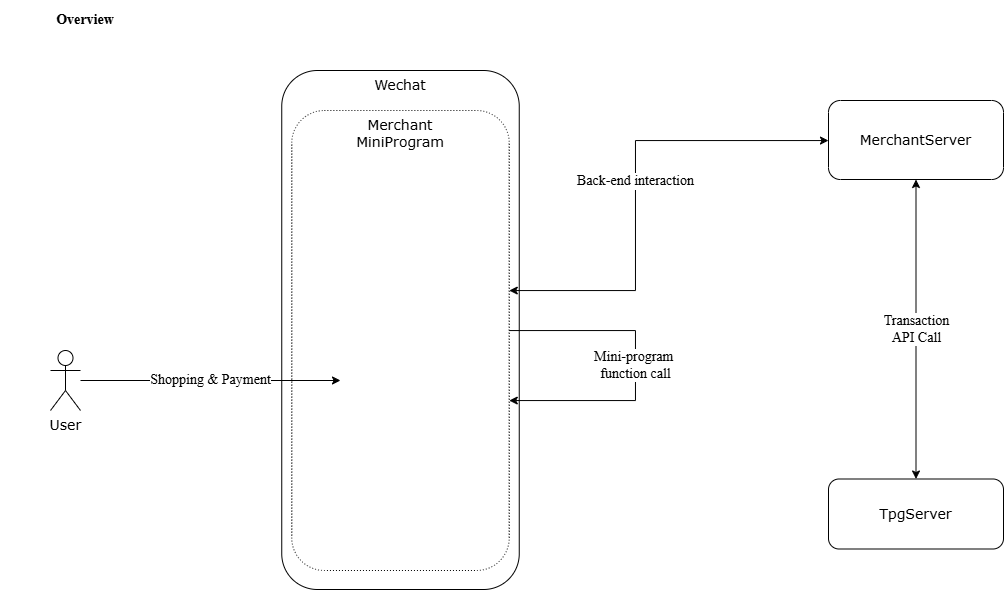
# Development Steps
Step 1: Service Activation
Log in to the WeChat Official Account Platform, navigate to “Tenpay Global”, and complete the service activation. Refer to the Tenpay Global Service Activation Manual for detailed instructions.
After activation, go to the “Settings” module to upload the Merchant API certificate and obtain the Tenpay Global platform certificate for subsequent interface signature verification.
Step 2: Development
Develop the front-end functionality to initiate the payment process using Mini Program and implement the necessary back-end interfaces.
Step 3: Testing
Conduct testing in the UAT environment before migrating to production for validation.
Step 4: Deployment
Once testing is complete, proceed with customer deployment.
If you encounter any issues during development, please contact the Tenpay Global team for technical support.
# Environment Information
# UAT Environment
The domain name is uniformly set to: https://uat.tenpayglobal.com
Example: The UAT domain for the checkout-pay interface is https://uat.tenpayglobal.com/api/payment/v1/checkout-pay
# Production Environment
Once Merchant has successfully registered, configured the keys, and activated the payment methods, you can use the official production environment for testing. Please contact the Tenpay Global team for the specific address.
# FAQ
Q: Is signature verification required for the notification interfaces?
A: Yes, signature verification is mandatory at all times to ensure that the received information is authentic and official.