To meet users' needs for using services in various scenarios, city services offer open interconnection capabilities.
Eligible businesses can configure through the MP interface or APIs to enable jump-to-specific pages of WeChat city services in multiple scenarios.
I. Capability Description
1. Supported Page Types for Jumping To
Currently, external businesses can jump to the city service homepage, special topic pages, service list pages, and service detail pages.
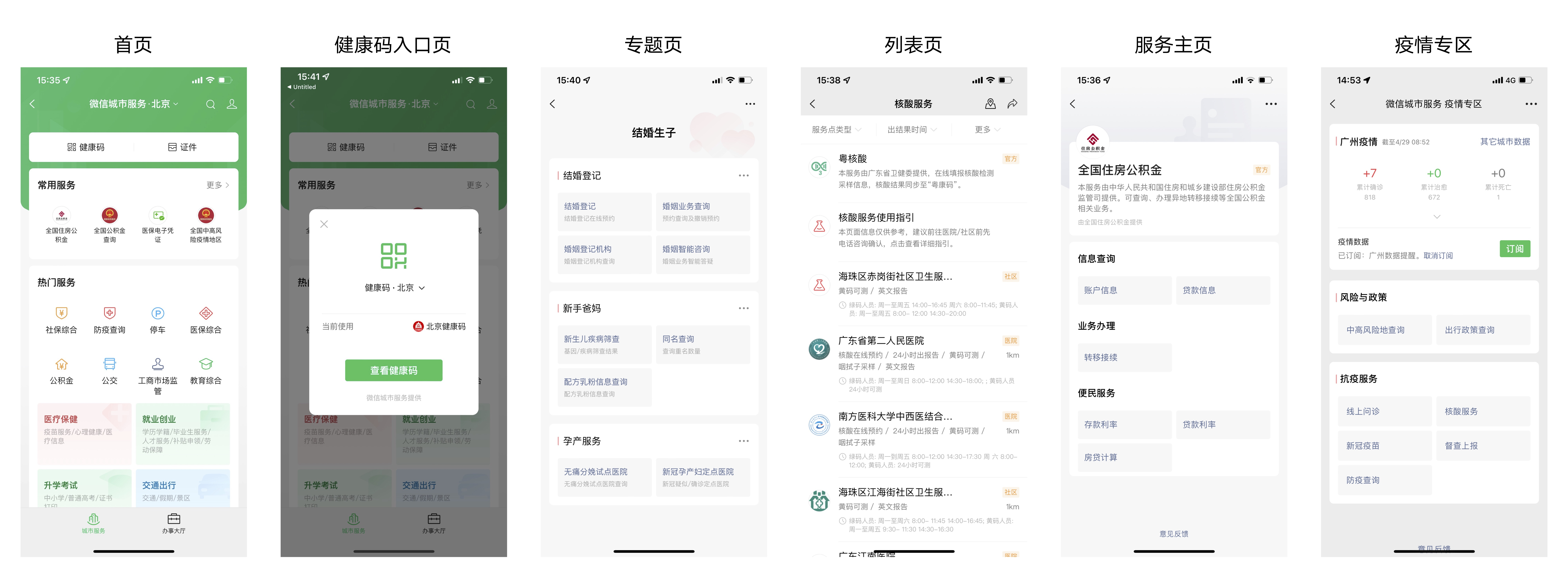
Page Definitions
-
Homepage
Refers to the city service homepage, accessible via: WeChat → Me → Services → City Services.
-
Special Topic Pages
These are aggregated service pages covering popular public welfare topics, accessible via: WeChat → Me → Services → City Services → Special Topics.
Special topic pages are being launched nationwide, including: elderly care, marriage and childbirth, healthcare, transportation, employment and entrepreneurship, housing and settlement, and academic exams. -
Service List Pages
These display a list of all services under a specific category in a given city, accessible via: WeChat → Me → Services → City Services → Popular Services/Office Services subcategories.
Each category has its own service list page, for example: social security, housing provident fund, healthcare, transportation, traffic management, public security document processing, and tax services. -
Service Detail Pages
These provide structured information about services offered by入驻 businesses, including service introductions, links, related accounts, and contact details.
All services that have joined the city service platform have their own service detail pages, for example: National Housing Provident Fund, National Education Services, Social Security Payment in Province X, Registration Platform in City X, and Urban and Rural Residents' Pension Insurance in Province X.
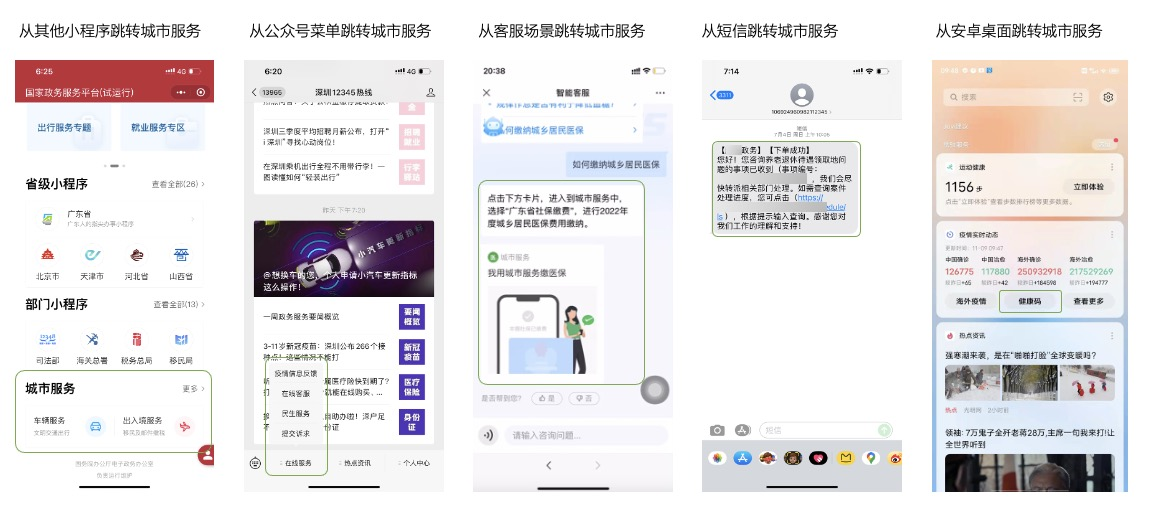
2. Examples of Scenarios Where Jumping Is Supported
Currently, businesses can jump to specific pages of city services in various scenarios, such as: jumping from other Mini Programs, from official account menus, from official account customer service/Mini Program customer service/H5 customer service scenarios, from text messages, and from the Android desktop.
II. Application Requirements
Accounts that meet the following conditions can apply for this capability:
Accounts that have joined the city service platform and have activated service detail pages (official accounts, Mini Programs, and OPEN accounts are all eligible).
III. Application Process
Step 1: Obtain Account Authorization
Send an application email to wx_city@tencent.com. Backstage staff will process the request as soon as possible and reply with the results.
The email title should be in the format [Application for City Service Open Interconnection Capability + Entity Name + APPID], and the body should include the following information:
Entity Name
Calling APPID
Jumping Scenario
Page Type to Jump To
Contact Unit
Contact Person and Phone Number
Contact Person's WeChat ID
Step 2: Call the API to Obtain the Dynamic Page Path
Use the following methods to call the API and obtain the corresponding dynamic page path.
Step 3: Complete Configuration and Test Deployment
IV. Calling Methods
Type 1: API Call
Type 2: MP Configuration
If you have any questions, you can leave a message in the WeChat Open Community or contact the official WeChat City Services email address: wx_city@tencent.com.