# Guide to Integrating the Mini Program Order Confirmation Component
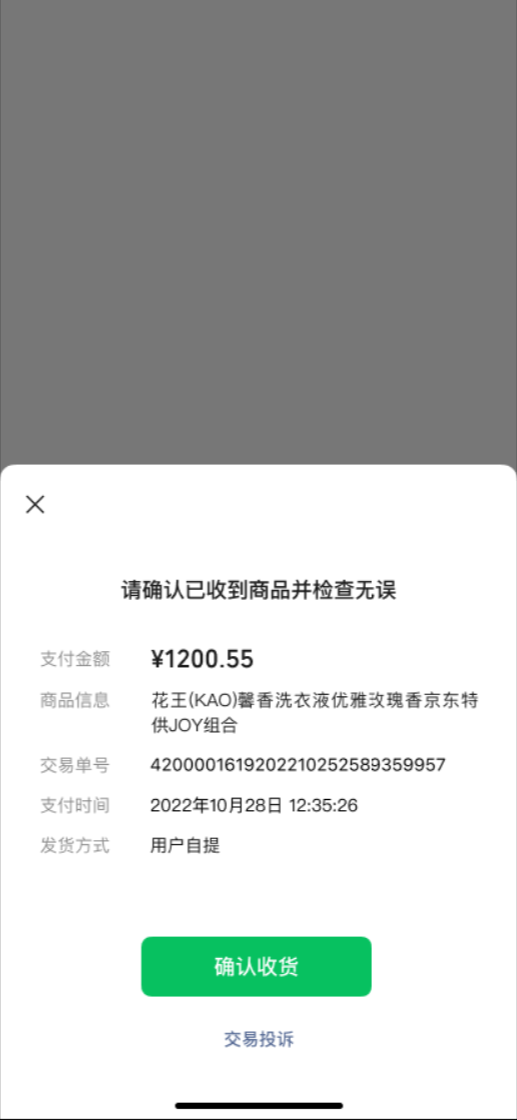
Developers can open the order confirmation component within their Mini Program by calling wx.openBusinessView, allowing users to complete the confirmation process.
API Name: wx.openBusinessView
Compatibility:
- Mini Program version 2.6.0 or later. Users of earlier versions should be prompted to upgrade to the latest WeChat version.
# API Parameters
Object
| Attribute | Type | Required | Description | |||||||||||||||||||||
|---|---|---|---|---|---|---|---|---|---|---|---|---|---|---|---|---|---|---|---|---|---|---|---|---|
| businessType | string | Yes | Fixed value: weappOrderConfirm | |||||||||||||||||||||
| extraData | object | Yes | Used to pass user transaction information to the component. You can use either `transaction_id` or `merchant_id+merchant_trade_no` to uniquely identify the order for confirmation. | |||||||||||||||||||||
| ||||||||||||||||||||||||
# Component Callback
The component uses wx.navigateBackMiniProgram to return to the Mini Program. Developers can handle the callback parameters in the App.onShow event.
After receiving the callback confirming successful receipt, developers should use the query order shipping status backend API to reconfirm whether the receipt has been completed, thereby avoiding security risks.
The callback parameters are located in referrerInfo, where appid is fixed as wx1183b055aeec94d1. extraData is defined as follows:
Object
| Attribute | Type | Required | Description | |||||||||||||||||||||
|---|---|---|---|---|---|---|---|---|---|---|---|---|---|---|---|---|---|---|---|---|---|---|---|---|
| status | string | Yes | "success": User confirmed receipt successfully; "fail": User failed to confirm receipt; "cancel": User cancelled the operation | |||||||||||||||||||||
| errormsg | string | No | Specific error reason when status is "fail" | |||||||||||||||||||||
| req_extradata | object | Yes | Request information when the developer calls the component | |||||||||||||||||||||
| ||||||||||||||||||||||||
# Sample Code
// Launch the order confirmation component
if (wx.openBusinessView) {
  wx.openBusinessView({
    businessType: 'weappOrderConfirm',
    extraData: {
      merchant_id: '1230000109',
      merchant_trade_no: '1234323JKHDFE1243252',
      transaction_id: '420123123123123123123'
    },
    success() {
      // Perform necessary actions
    },
    fail() {
      // Handle failure scenario
    },
    complete() {
      // Complete the process
    }
  });
} else {
  // Guide users to upgrade their WeChat version
}

// Respond to component callbacks
App({
  onShow (options) {
    // Actions to be taken when the app is displayed
  }
})
# Component Style Screenshot: