Merchant can be verified against the bank deposit amount using the settlement statement report provided by TenPay Global
Settlement Rules
Before proceeding with the verification, please familiarize yourself with the settlement rules applicable to each payment method
Terms and Explanations Related to Settlement Rules
Settlement rules typically consist of the following elements:
- Settlement: Refers to the action taken by the collaborating institution after a transaction is completed, where fees are deducted and the funds transition from the completed status to the pre-payment status. Once the funds reach the pre-payment status, they must meet the payment conditions before the actual transfer to Merchant bank can be initiated.
- Settlement Date: Indicates the time when the collaborating institution conducts settlements. The calculation method varies depending on the settlement type:
| Settlement Type | Calculation Method | Example |
|---|---|---|
| Daily Settlement (T) | Settlement date is calculated as T+n. Transactions completed on day T are settled n working days later | 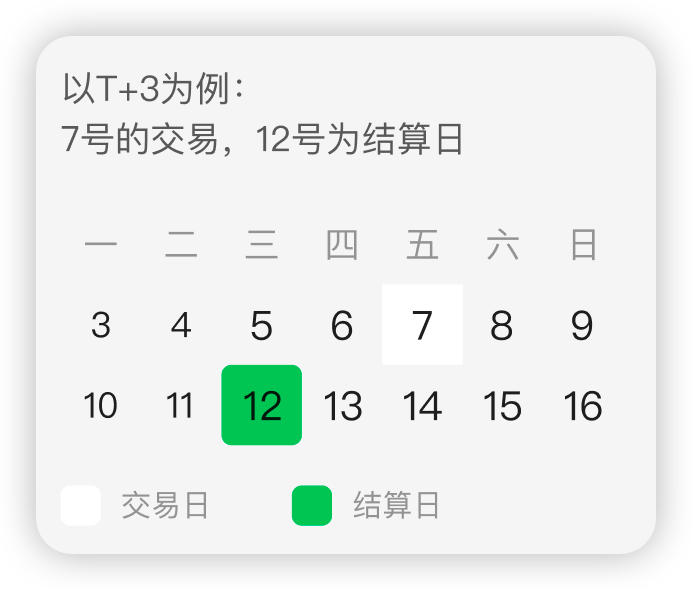 |
| Daily Settlement (D) | Settlement date is calculated as D+n. Transactions completed on day D are settled n natural days later | 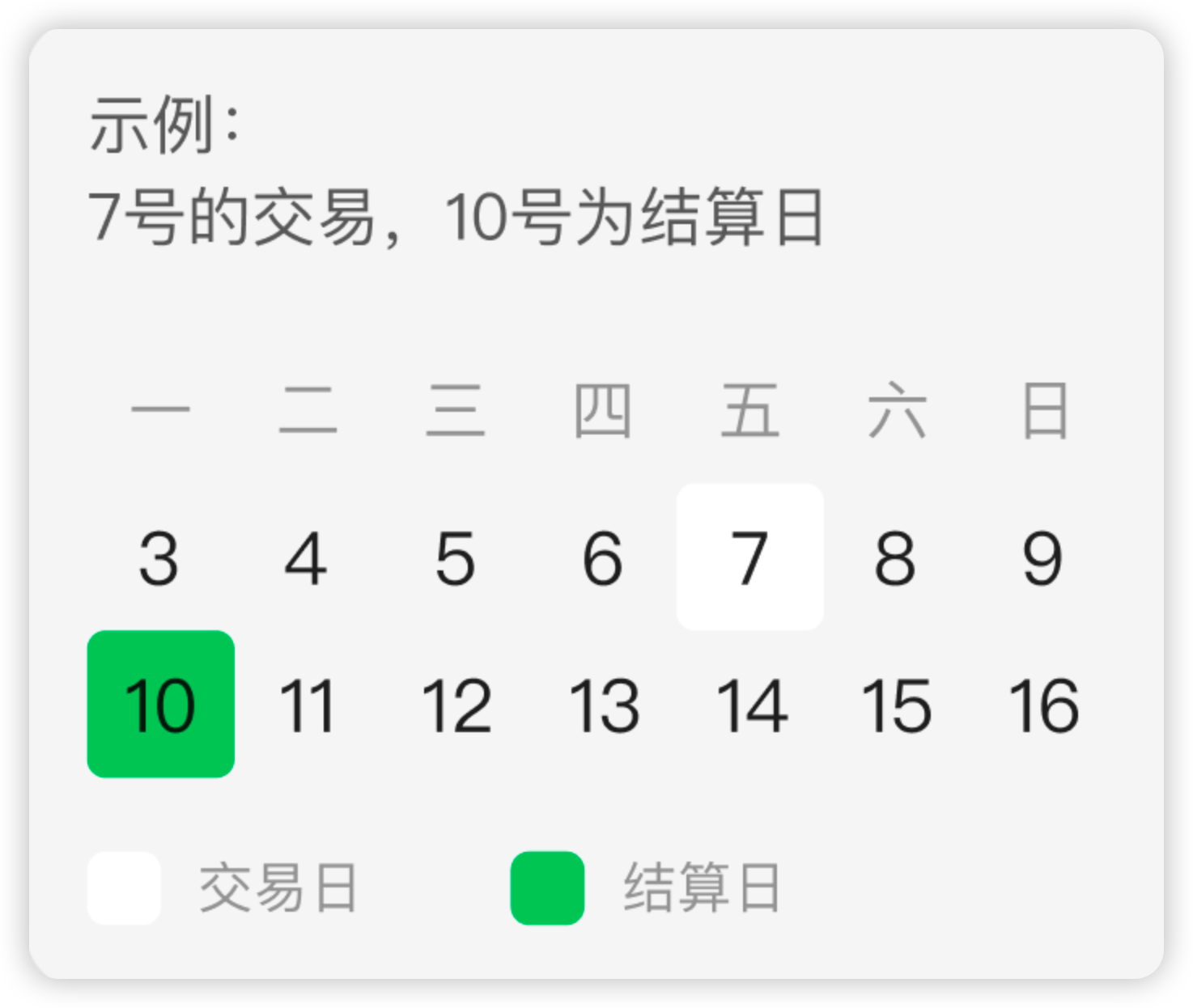 |
| Weekly Settlement (W) | Settlement date is calculated as W+n. Transactions within a week are settled on the n-th natural day of the following week | 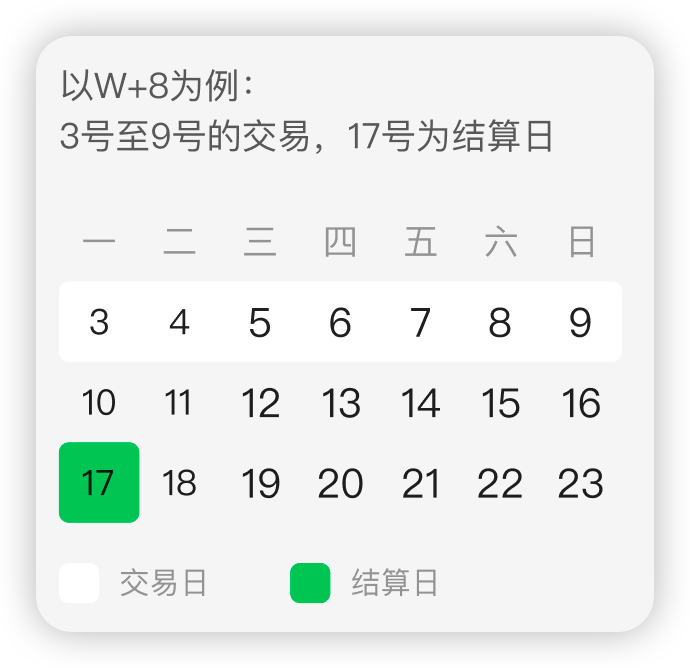 |
- Settlement Currency: The currency used by the collaborating institution for settlements.
- Payment Currency: The currency used by the collaborating institution when transferring physical funds to Merchant bank.
- Payment Conditions: Requirements that must be met before the funds can be transferred to Merchant bank after settlement. These are usually based on cumulative amounts. For example, the cumulative unsettled amount must be ≥ 100 SGD before the payment is triggered.
Note: If you wish to adjust the settlement rules, please contact the TenPay Global Checkout team.
Reviewing Settlement Rules
Merchant can be reviewed in two ways:
-
Check the settlement terms described in the agreement signed between Merchant and TenPay Global or its partners.
-
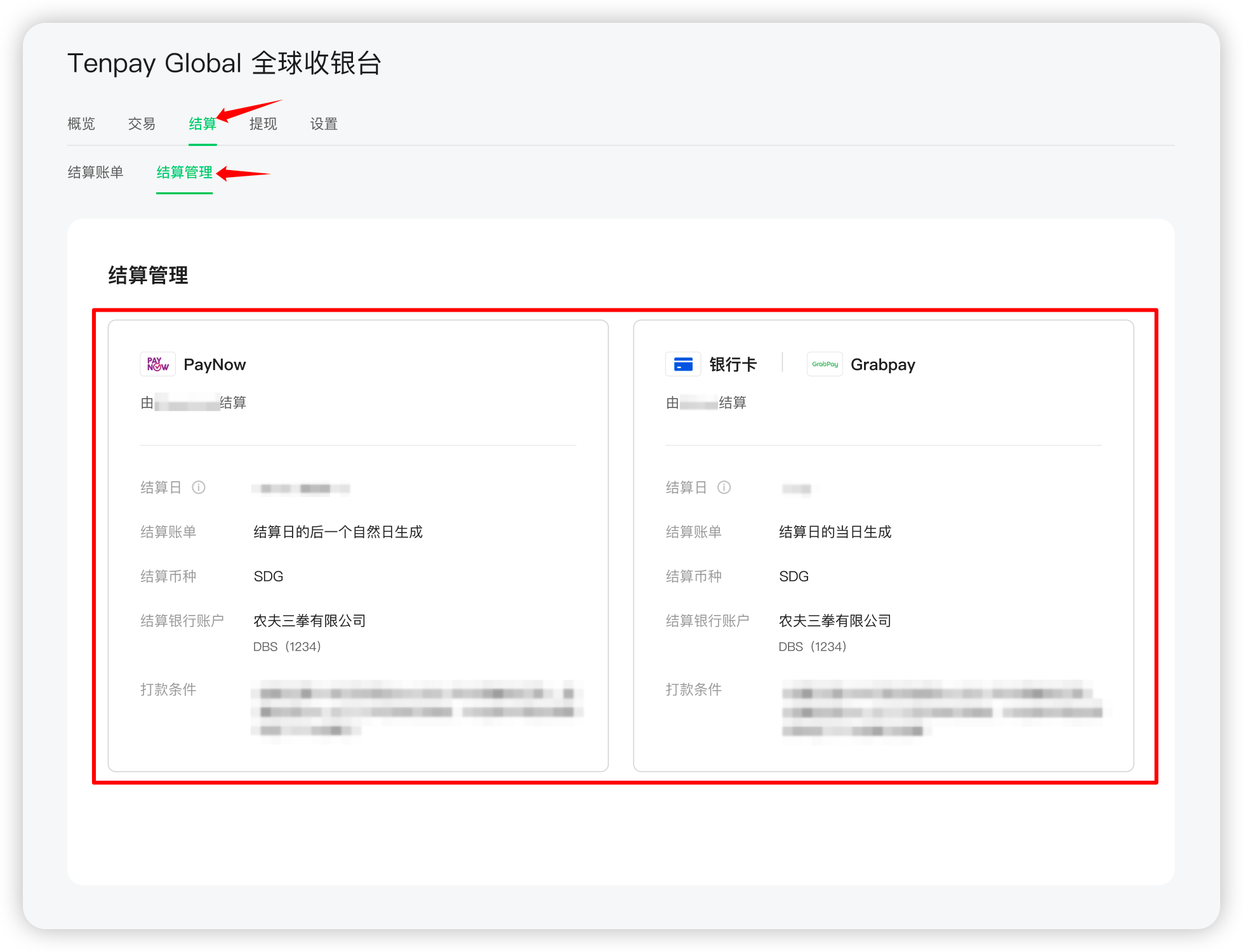
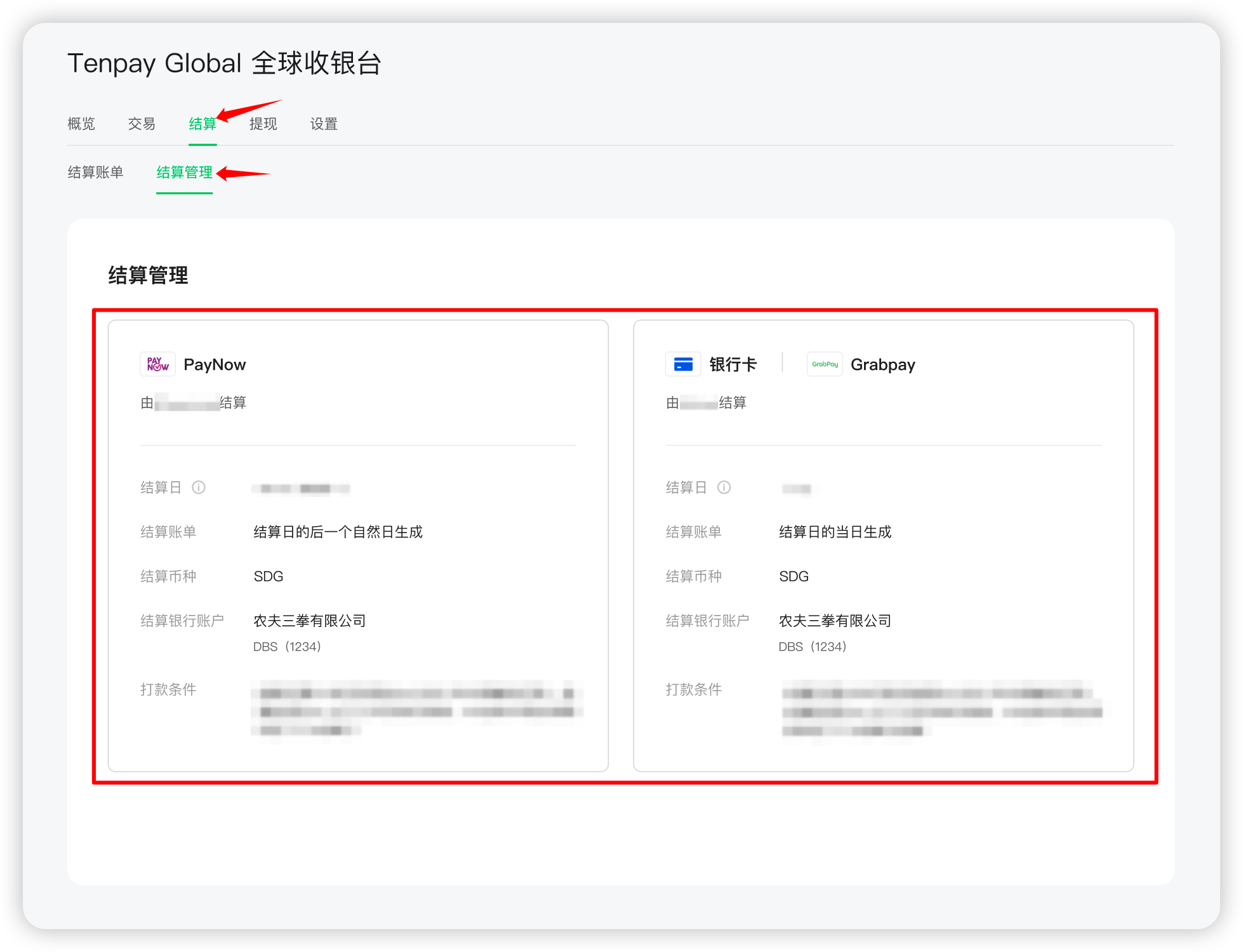
View them through the „Settlement Management“ page. The steps are as follows:
- Log in to the WeChat Public Platform and navigate to „ TenPay Global “.
- Click „Settlement“ to enter the „Settlement Management“ page.
- Review the rules for different payment methods, including „Settlement Date“, „Settlement Currency“, and „Payment Conditions“.
Settlement Bill Report
The Settlement Bill Report includes a summary table and a detailed list of settlements.
View report sample: [Excel] Settlement Bill Report - TenPay Global Checkout
Settlement Summary Table
The Settlement Summary Table displays information such as the total number of successful transactions/total amount, total handling fees, and total settlement amount on the settlement date.
The following table outlines the fields in the Settlement Summary Table and their descriptions:
| Field | Meaning | Description |
|---|---|---|
| acquirer_name | Name of the collaborating institution | The institution that processed the transaction |
| settle_batch_id | Settlement batch identifier | A unique identifier assigned by TenPay Global for this settlement |
| settle_time | Settlement time | The time when funds were settled |
| detail_count | Total number of details | The total number of records involved in this settlement |
| payment_count | Total number of payment orders | The total number of payment orders included in this settlement |
| payment_amount_sum | Total amount of payment orders | The total amount of all payment orders in this settlement |
| refund_count | Total number of refund orders | The total number of refund orders involved in this settlement |
| refund_amount_sum | Total amount of refund orders | The total amount of all refund orders in this settlement |
| dispute_count | Total amount of disputed deductions | The total amount deducted due to disputes in this settlement |
| dispute_amount_sum | Total amount of disputed deductions | The total amount of disputed deductions in this settlement |
| dispute_reverse_count | Total amount of disputed reversals | The total amount reversed due to disputes in this settlement |
| dispute_reverse_amount_sum | Total amount of disputed reversals | The total amount of reversed amounts due to disputes in this settlement |
| trade_currency | Transaction currency | The currency of the transaction amount, based on ISO 4217 standards |
| acquirer_amount_sum | Total amount on the collaborating institution’s side | The net amount after adding positive amounts and subtracting negative amounts |
| acquirer_currency | Currency used by the collaborating institution | The currency accepted by the collaborating institution, based on ISO 4217 standards |
| fee_amount_sum | Total handling fees | The total amount of fees incurred in this settlement |
| fee_currency | Currency of the handling fees | The currency of the handling fees, based on ISO 4217 standards |
| settle_amount_sum | Total settlement amount after fees | The total amount settled to Merchant after deducting fees |
| settle_currency | Settlement currency | The currency used for this settlement, based on ISO 4217 standards |
| freeze_amount | Amount frozen during the period | The amount frozen on the collaborating institution’s side for this batch; “+” indicates a freeze, “-” indicates a release, and “data unavailable” means the institution did not provide this information |
| total_freeze_amount | Total frozen amount | The cumulative frozen amount on the collaborating institution’s side up to this batch; “data unavailable” means the institution did not provide this information |
| freeze_currency | Currency of the frozen amount | The currency of the frozen amount, based on ISO 4217 standards; “data unavailable” means the institution did not provide this information |
| payout_amount | Amount withdrawn during the period | The amount physically withdrawn from the collaborating institution for this batch; “data unavailable” means the institution did not provide this information |
| payout_currency | Currency of the withdrawal amount | The currency of the withdrawn amount, based on ISO 4217 standards; “data unavailable” means the institution did not provide this information |
| adjustment_amount | Amount adjusted manually | The amount manually adjusted due to errors in previous settlements; “data unavailable” means the institution did not provide this information |
| adjustment_currency | Currency of the manual adjustment | The currency of the manually adjusted amount, based on ISO 4217 standards; “data unavailable” means the institution did not provide this information |
| current_rolling_reserve_change | Income/Expenditure of rolling reserve during the period | The amount of rolling reserve collected by the collaborating institution for this batch; “+” indicates a collection, “-” indicates a release, and “data unavailable” means the institution did not provide this information |
| total_rolling_reserve | Total rolling reserve amount | The cumulative rolling reserve amount collected by the collaborating institution up to this batch; “data unavailable” means the institution did not provide this information |
| opening_unsettled_amount | Unsettled amount at the beginning of the period | The total amount that has not been settled before this batch, possibly due to exceeding settlement limits; “data unavailable” means the institution did not provide this information |
| closing_unsettled_amount | Unsettled amount at the end of the period | The total amount that remains unsettled after this batch, possibly due to exceeding settlement limits; “data unavailable” means the institution did not provide this information |
Settlement Detail Table
The Settlement Detail Table displays information such as transaction records on the settlement date, handling fees for each transaction, and the settled amount of each transaction.
The following table outlines the fields in the Settlement Detail Table and their descriptions:
| Field | Meaning | Description |
|---|---|---|
| settle_batch_id | Settlement Batch ID | A unique identifier assigned by TenPay Global for this settlement |
| listed | TenPay Global Transaction Number | A unique identifier assigned by TenPay Global for each transaction. When trade_type = PAYMENT, it corresponds to TenPay Global’s payment order number;when trade_type = REFUND, it corresponds to the refund order number;when trade_type = DISPUTE or DISPUTE_REVERSE, it corresponds to the dispute order number |
| trade_type | Transaction Type | Enumeration values include: PAYMENT (Payment), REFUND (Refund), DISPUTE (Dispute Deduction), DISPUTE_REVERSE (Dispute Resolution Successful), OTHER (Other transaction types that cause changes in the settled amount) |
| out_trade_no | Merchant Order Number | Merchant is a unique identifier assigned to each payment |
| out_refund_no | Merchant Refund Order Number | Merchant is a unique identifier assigned to each refund. It is empty when trade_type = PAYMENT or DISPUTE or DISPUTE_REVERSE |
| trade_state | Transaction Status | When trade_type= PAYMENT, it corresponds to the payment status;when trade_type= REFUND, it corresponds to the refund status;it is empty when trade_type = DISPUTE or DISPUTE_REVERSE |
| trade_amount | Transaction Amount | When trade_type = PAYMENT, it corresponds to the payment amount;when trade_type = REFUND, it corresponds to the refund amount;when trade_type = DISPUTE, it corresponds to the disputed deduction amount;when trade_type = DISPUTE_REVERSE, it corresponds to the resolved dispute amount |
| trade_currency | Transaction Currency | Displayed as a three-letter currency code defined in ISO 4217. It corresponds to the payment currency when trade_type = PAYMENT;it corresponds to the refund currency when trade_type = REFUND;it corresponds to the disputed deduction currency when trade_type = DISPUTE;it corresponds to the resolved dispute currency when trade_type = DISPUTE_REVERSE |
| trade_create_time | Transaction Creation Time | It corresponds to the payment creation time when trade_type = PAYMENT;it corresponds to the refund creation time when trade_type = REFUND;it corresponds to the dispute occurrence time when trade_type = DISPUTE or DISPUTE_REVERSE |
| trade_finish_time | Transaction Completion Time | It corresponds to the payment success time when trade_type = PAYMENT;it corresponds to the refund success time when trade_type = REFUND;it corresponds to the time when the dispute reaches a final state when trade_type = DISPUTE or DISPUTE_REVERSE; it is empty before reaching a final state |
| payment_method_key | Payment Method Name | The payment method associated with the transaction |
| ref_order_no | Reference Order Number | Merchant used for tracking consumption; it is empty when trade_type = REFUND or DISPUTE or DISPUTE_REVERSE |
| acquirer_name | Acquiring Institution Name | The name of the acquiring institution that processed the transaction |
| acquirer_amount | Acquiring Institution Amount | The amount processed by the acquiring institution for this transaction |
| acquirer_currency | Acquiring Institution Currency | The currency in which the acquiring institution processed the transaction |
| fee_amount | Handling Fee Amount | When trade_type = PAYMENT, it corresponds to the payment handling fee;when trade_type = REFUND, it corresponds to the refund handling fee;when trade_type = DISPUTE, it represents the chargeback acceptance fee in SG regions or the dispute adjustment fee in JP regions |
| fee_currency | Handling Fee Currency | It corresponds to the payment handling fee currency when trade_type = PAYMENT;it corresponds to the refund handling fee currency when trade_type = REFUND;it corresponds to the disputed deduction handling fee currency when trade_type = DISPUTE |
| settle_amount | Settled Amount | The settled amount after deducting handling fees from the transaction |
| settle_currency | Settlement Currency | The currency in which the transaction is settled to Merchant |
| acquirer_trade_no | Acquiring Institution Transaction Number | A unique identifier assigned by the acquiring institution for this transaction |
| note | Transaction Note | For transactions with trade_type = OTHER, this field explains the reason for the change |
| store_id | Store Identifier | Merchant store identification number |
| app_id | Application ID | Merchant Mini Program ID |
Obtaining Settlement Statements
Generate and download settlement statement files through the Mini Program Merchant platform:
Note: The earliest time to generate settlement statement files is usually at 15:30 on the 1st natural day after the settlement date.
- Log in to the WeChat Public Platform and navigate to “ TenPay Global ”
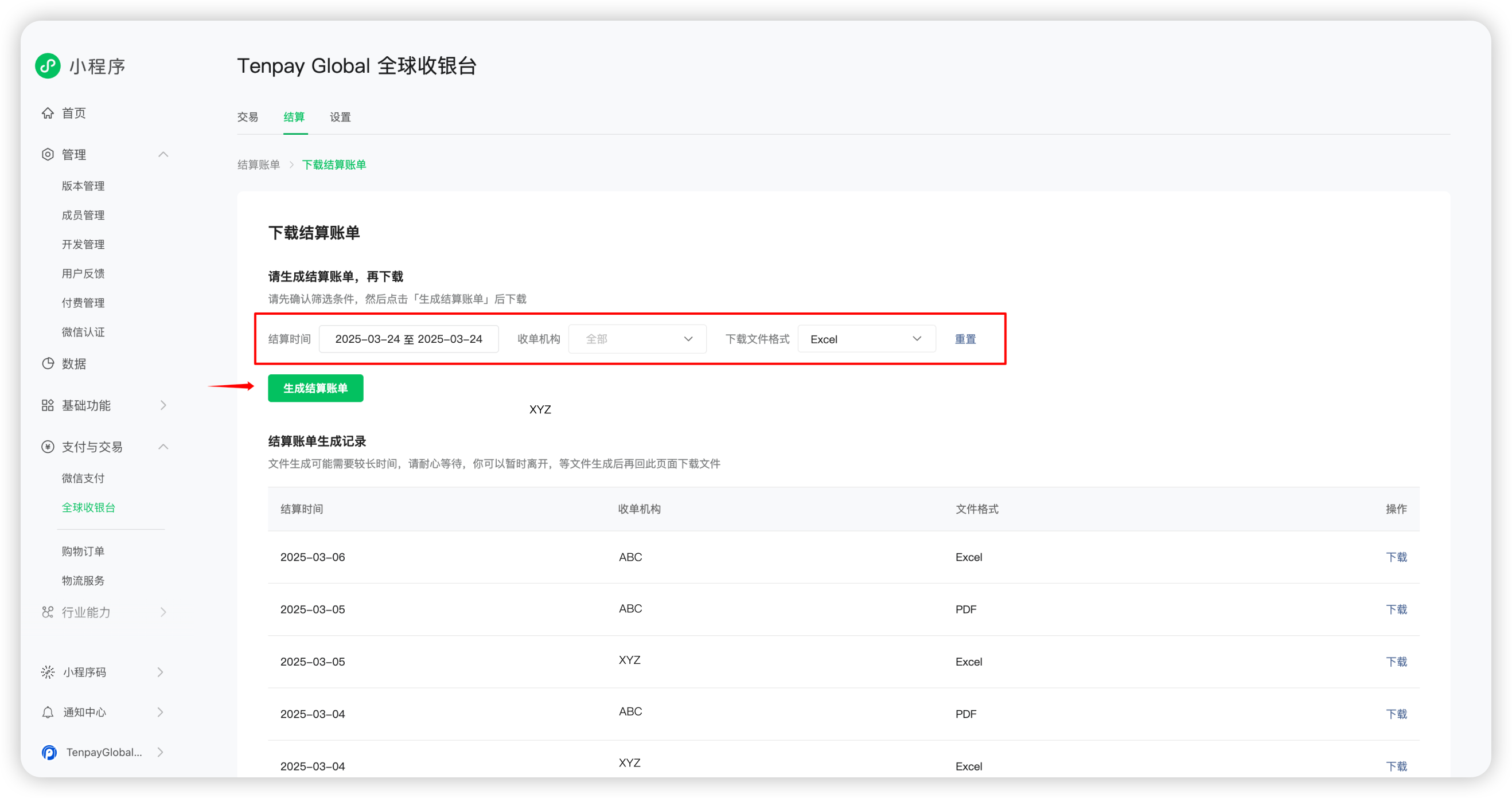
- Click “Settlement” to enter the “Settlement Statements” page, then select “Download Settlement Statement”
 - Filter by “Settlement Date”, “Acquiring Institution”, and “File Format” (Excel or PDF), then click “Generate Settlement Statement”
 - File generation may take some time. Leaving the page during this process will not affect the progress. Once generated, click “Download” to obtain the settlement statement file
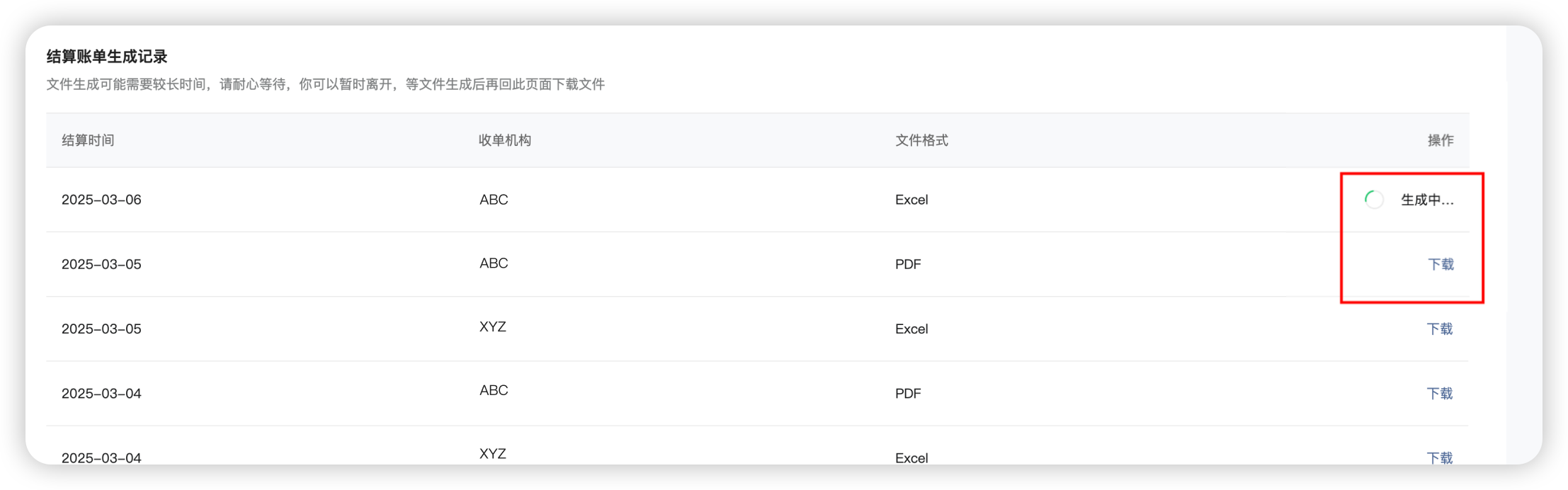
Note: For each acquiring institution and settlement date, only one Excel and one PDF version of the settlement statement file can be generated. Generated files are sorted by settlement date. To redownload previously generated historical settlement statements, review the settlement statement generation record, locate the desired file, and click “Download”.
FAQ
Q: Why is the settlement amount negative on a certain settlement date?
A: In the early stages of enabling the TenPay Global service, it is possible for the settlement amount to be negative. This occurs because the reverse amount during the settlement period exceeds the net amount after deducting positive payments. A negative settlement amount is a normal phenomenon at the beginning of the service. As transactions such as positive payments and reverse refunds accumulate over time, the settlement amount will typically return to a positive value. If the settlement amount is negative, the Merchant designated bank account will not receive a payment, and the negative amount will be deducted from the next settlement.