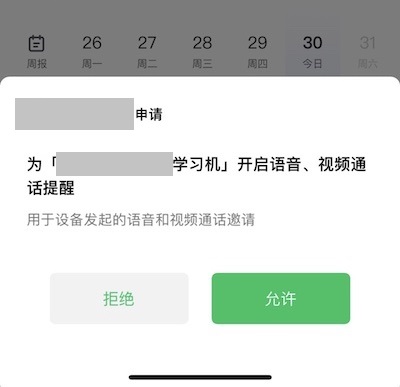
If a device initiates a call to a user, the user must first authorize the device in the WeChat mobile app.
When WeChat calls a device, no authorization is required if using the
callWMPForcallDeviceAPIs. Authorization is still required when using theinitByCallerAPI.
1. Request Authorization
Before user authorization, developers need to obtain the device ticket snTicket via the Get Device Ticket API from the developer backend.
After obtaining the snTicket, invoke wx.requestDeviceVoIP within Mini Program to request user authorization.
Requires Base Library >= 2.27.3. Device Group >= 2.30.4.
wx.requestDeviceVoIP({
 sn: 'xxxxxx', // The SN of the device initiating the call to the user (must match the SN registered for the device)
 snTicket: 'xxxxxx', // The obtained snTicket
 modelId: 'xxxxxx', // The model_id obtained from WeChat Official Accounts Platform via "Device Access"
 deviceName: 'xxx', // The device name, displayed to the user during authorization
 success(res) {
 console.log(`requestDeviceVoIP success:`, res)
},
 fail(err) {
 console.error(`requestDeviceVoIP fail:`, err)
},
})
Note:
- If the user denies authorization or cancels authorization in the settings page, invoking
requestDeviceVoIPagain will not display the authorization dialog. Developers should guide the user to manually enable it in the settings page. - The "Device Name" in the authorization dialog = "deviceName" + "device model corresponding to modelId". For example, if "deviceName" is "iot" and the device model corresponding to modelId is "Campus Phone", the final name will be "iot Campus Phone"
2. Handling Authorization Expiration
After successful authorization, the following actions may cause the authorization to become invalid:
- Clearing authorization: Deleting Mini Program from Recently Used clears the user's authorization record.
- Revoking authorization: After the user agrees to authorization, a "Voice/Video Call Reminders" module appears on the Mini Program settings page. Clicking this allows the user to manage authorized devices and revoke authorization. (Requires WeChat client version >= 8.0.30)
To ensure users can properly use audio and video calling capabilities, developers need to handle authorization expiration. Before initiating a call, it is recommended that developers check the authorization status using the method described in Section 4. If necessary, prompt the user to re-authorize:
- Clearing authorization: Directly call
requestDeviceVoIPto ask the user for re-authorization. - Revoking authorization/User denial: Calling
requestDeviceVoIPagain will not display the authorization popup. Developers should guide the user to manually enable the authorization switch in the settings page.
Developers can determine the user's authorization status in the following ways:
- By the error code when initiating a call fails. When using a plugin to initiate a call, if the device is not authorized, errCode: 9 is returned. (If using a device group, ensure this device exists within the group)
- Querying the authorization status when the user is using Mini Program. See Section 4.
3. Bulk Authorization
If bulk authorization is required, you can create a device group. When a user authorizes a device for audio/video calls, you can authorize the entire device group at once without needing to authorize each device individually.
For example, in a campus phone scenario, a single school may have many handsets. You can add all devices from the same school to a single device group and use wx.requestDeviceVoIP to authorize the entire group.
Note: For device groups, deviceName displays the name specified when the device group was created. Customization is not currently allowed during authorization.
Requires Base Library >= 2.30.4 support.
wx.requestDeviceVoIP({
  isGroup: true,
  groupId: 'Device Group ID',
  success(res) {
    console.log(res)
  },
  fail(res) {
    console.log(res)
  },
})
4. Authorization Status Query
Developers can query the authorization status when the user uses Mini Program through the following methods. According to the unified authorization system design of Mini Program, there is no backend API for querying the authorization status, nor are there event callbacks for user authorization actions.
4.1 Devices (Groups) Authorized by the Current User
Query which devices (groups) the currently logged-in user has agreed to, rejected, or revoked authorization for.
Call wx.getDeviceVoIPList within WeChat Mobile Mini Program to check the authorization status before initiating a call on the mobile side.
Requires Base Library >= 2.30.3. Device Group support requires >= 2.30.4.
// Mini Program Base Library API
wx.getDeviceVoIPList({
 success(res) {
 console.log('[getDeviceVoIPList]', res.list)
 // [{sn: 'xxx', model_id: 'xxx', status: 0}]
 // status: 0/Not Authorized; 1/Authorized
},
})
- Device Groups only have the
groupIdfield;snandmodel_idareundefined.
4.2 Check if the Current Device is Authorized
Based on the user's openId, query whether a specific user has authorized the device (group).
The plugin provides the getIotBindContactList interface, typically used on the device side, which can be used to check the authorization status before initiating a call on the device side (e.g., on the contact page).
const wmpfVoip = requirePlugin('wmpf-voip').default

wmpfVoip
  .getIotBindContactList({
    sn: 'device sn',
    model_id: 'applied modelid',
    openid_list: ['openid_1', 'openid_2'], // Pass the list of openids to verify
  })
  .then(res => {
    console.log(`[getIotBindContactList]:`, res.contact_list)
    // [{sn: 'xxx', model_id: 'xxx', status: 0}]
    // status: 0/Not Authorized; 1/Authorized
  })