
# NPM support
Starting with Weixin Mini Program base library version {% version ('2.2.1')}, and developer tools 1.02.1808300 or above, Mini Programs support installing third-party packages using npm.
This document requires that developers have a certain understanding of npm, so it does not go into the basic features of npm.If you have not been exposed to npm before, please read the official npm documentation to learn.
Tips: Before using npm packages in Weixin Mini Program, build npm
# Use the npm package
# 1. Installing the npm package
Install the npm package by executing the command in the directory where Weixin Mini Program package.json is located:
npm install
This requires that the package.json involved in building npm needs to be within the miniprogramRoot defined by project.config.json.
Tips: The developer tool v1.02.1811150 is starting to be tweaked to build according to the dependencies field in package.json, so declare that packages in devDependencies can also be installed during development without participating in the build.If this is a previous version, the
--productionoption is recommended to reduce the size of the entire Weixin Mini Program-END]] package by installing some business-unrelated npm packages.
Tips: When the miniprogramRoot field does not exist, miniprogramRoot is the directory where project.config.json is located
# 2. Building npm
点击开发者工具中的菜单栏:工具 --> 构建 npm
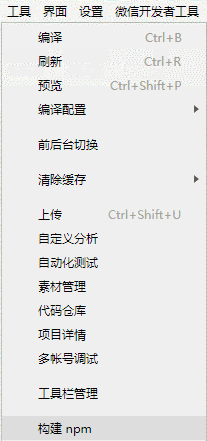 > Why this step?
# 3. The npm package can be used once the build is complete.
Introducing npm package in js:
const myPackage = require('packageName')
const packageOther = require('packageName/other')
Using custom components in the npm package:
{
  "usingComponents": {
    "myPackage": "packageName",
    "package-other": "packageName/other"
  }
}
Tips: When using npm packages here, if only the package name is introduced, the default is to look for the index.js file or index component under the package name.
# Release the npm package
# Constraints on publishing Weixin Mini Program npm packages
The npm package to be released here refers specifically to the npm package customized for Weixin Mini Program (hereinafter referred to as the Mini Programs npm package).Because of the particularity of the Mini Programs custom components, the original npm package mechanism can not meet our needs, so here we need to make some constraints on the Mini Programs npm package:
- The Weixin Mini Program npm package requires that there must be a buildfile generation directory in the root directory (the default is the miniprogram_dist directory). This directory can be specified by adding a miniprogram field in the package.json file, such as
{
  "name": "miniprogram-custom-component",
  "version": "1.0.0",
  "description": "",
  "miniprogram": "dist",
  "devDependencies": {},
  "dependencies": {}
}
- Weixin Mini Program npm Only the build-file generation directory is counted in the Mini Programs' footprint, and only the code from that directory is uploaded when the Mini Programs are uploaded.If the Mini Program npm package has some test, build related code, put it outside the build file generation directory.You can also use the
.npmignorefile to avoid publishing some non-business code files to npm. - Test, build dependencies in the devDependencies field to avoid being packaged together in the Weixin Mini Program package.
# Constraints on publishing other npm packages
If some npm packages that have already been released cannot be modified to the structure of the Weixin Mini Program npm package for some reason, they can be used by fine-tuning, but make sure to follow the following:
- Only supports pure js package, does not support custom components.
- There must be an entry file, that is, make sure that the main field in package.json points to the correct entry, or if there is no main field in package.json, use index.js in the npm package root directory as the entry file.
- Test and build dependencies should be placed in the devDependencies field to avoid being packaged together in the Weixin Mini Program package, as required by the Mini Programs npm package.
- Does not support dependency on c + + addon, does not support dependency on nodejs built-in libraries:
const addon = require('./addon.node'); // 不支持!
const http = require('http'); // 不支持!
Tips: For some pure js implementation of nodejs built-in libraries (such as path module), you can install additional npm packages implemented by other developers to support.
- The following methods are also not allowed when using require dependencies:
// It is not allowed to assign require to another variable before using it. The following code does not resolve the specific dependency
let r;
r = require;
r('testa');

let r2 = require;
r2('testa');

// Do not allow require a variable, the following code depends on the runtime, cannot resolve the specific dependency
let m = 'testa';
require(m);
- Weixin Mini Program Some local variables (such as window objects) and constructors (such as the Function constructor) are not available.
# Release process
The process for releasing npm packages is summarized as follows:
- If you don't already have an npm account, you can register an npm account at npm website .
- Log in to the npm account locally and execute:
npm adduser
or
npm login
- Execute under the root directory of the completed npm pack
npm publish
At this point, the npm package is successfully released to the npm platform.
Tips: Some developers may have modified the npm source during development, so be careful to cut the source back to the npm source when logging in or publishing.
# Introduction to the Principles
To help you better understand the various requirements mentioned in the release npm package, here is a brief introduction to the principle:
- First of all, the node_modules directory does not participate in compiling, uploading, and packaging, so Weixin Mini Program to use npm packages must go through the "build npm" process. In each miniprogramRoot, a miniprogram_npm directory is generated under the node_modules equivalent of the outermost layer of the package.json declared by the developer, which contains the npm package that is built, which is the np package that the Mini Program actually uses.
- There are two types of build packages: Weixin Mini Program npm packages copy all the files in the build directory directly into miniprogram_npm;Other npm packages go through the dependency analysis and packaging process (like webpack) starting with the entry js file.
- The procedure for finding an npm packet is similar to that for an npm implementation, starting from the directory where the npm packet depends on the file until you find an available npm packet or Weixin Mini Program] root directory. Here is a brief description of the directory before and after building packaging, and the structure before building:
|--node_modules
|    |--testComp // 小程序 npm 包
|    |    |--package.json
|    |    |--src
|    |    |--miniprogram_dist
|    |         |-index.js
|    |         |-index.json
|    |         |-index.wxss
|    |         |-index.wxml
|    |--testa // 其他 npm 包
|         |--package.json
|         |--lib
|         |    |--entry.js
|         |--node_modules
|              |--testb
|                   |--package.json
|                   |--main.js
|--pages
|--app.js
|--app.wxss
|--app.json
|--project.config.js
The structure after construction:
|--node_modules
|--miniprogram_npm
|    |--testComp // 小程序 npm 包
|    |    |-index.js
|    |    |-index.json
|    |    |-index.wxss
|    |    |-index.wxml
|    |--testa // 其他 npm 包
|         |--index.js // 打包后的文件
|         |--miniprogram_npm
|              |--testb
|                   |--index.js // 打包后的文件
|                   |--index.js.map
|--pages
|--app.js
|--app.wxss
|--app.json
|--project.config.js
Tips: The code generated by packaging will generate a sourcemap file in the same directory to facilitate reverse debugging.
# Sample js module
The following is the official js module, you can refer to and use:
# Custom component related examples
Please refer to the documentation for developing third-party custom components .
# Tips
Starting with 1.03.2006302 (or 1.03.2006302), we provide two ways to build npm:
# The default way to build npm
By default, package.json is properly configured in miniprogramRoot andnpm installThe result of building npm is to build a miniprogram_npm for each node_modules corresponding to package.json and place it in a subdirectory of the corresponding package.json directory.Reference demo
# Before building npm
├── miniprogram
│   ├── app.js
│   ├── app.json
│   ├── app.wxss
│   ├── index
│   │   ├── 略
│   ├── node_modules // 可被默认方式构建 npm,因为它在 miniprogramRoot 内
│   ├── package.json
│   └── sub_package
│       ├── node_modules // 可被默认方式构建 npm,因为它在 miniprogramRoot 内
│       ├── package.json
│       └── sub_package_page
├── node_modules // 不被默认方式构建 npm,因为它不在 miniprogramRoot 内
├── package.json
└── project.config.json // 其中存在配置 `"miniprogramRoot": "./miniprogram"`
# After building npm
├── miniprogram
│   ├── app.js
│   ├── app.json
│   ├── app.wxss
│   ├── index
│   │   ├── 略
│   ├── miniprogram_npm
│   ├── node_modules // 可被默认方式构建 npm,因为它在 miniprogramRoot 内 --> 同级的 miniprogram_npm 是这份 node_modules 的构建结果
│   ├── package.json
│   └── sub_package
│       ├── miniprogram_npm
│       ├── node_modules // 可被默认方式构建 npm,因为它在 miniprogramRoot 内 --> 同级的 miniprogram_npm 是这份 node_modules 的构建结果
│       ├── package.json
│       └── sub_package_page
├── node_modules // 不被默认方式构建 npm,因为它不在 miniprogramRoot 内 --> 它并没有对应的 miniprogram_npm 生成
├── package.json
└── project.config.json // 其中存在配置 `"miniprogramRoot": "./miniprogram"`
# How to build npm with custom node_modules and miniprogram_npm locations
Unlike the "default way to build npm," this requires the developer to specify the location of node_modules and the location of target miniprogram_npm in project.config.json.Reference demo
# How to use it
- Configure project.config.json's
setting.packNpmManuallytotrue,Build npm by opening custom node_modules and miniprogram_npm locations - Configure the
setting.packNpmRelationListitem for project.config.json, specifying thepackageJsonPathandminiprogramNpmDistDir
WherepackNpmRelationListhas the format
packNpmRelationList: Array<{
  "packageJsonPath": string,
  "miniprogramNpmDistDir": string
}>
- PackageJsonPath represents the package.json corresponding to the node_modules source
- Miniprogramnpmdistdir represents the build result target location of node_modules
# Before building npm
.
├── miniprogram
│   ├── app.js
│   ├── app.json
│   ├── app.wxss
│   ├── index
│   ├── sitemap.json
│   └── sub_package
│       └── sub_package_page
├── project.config.json
├── src_node_modules_1
│   ├── node_modules
│   └── package.json
└── src_node_modules_2
    ├── node_modules
    └── package.json
Where project.config.json exists to configure
"setting": {
  "packNpmManually": true,
  "packNpmRelationList": [
    {
      "packageJsonPath": "./src_node_modules_1/package.json",
      "miniprogramNpmDistDir": "./miniprogram/"
    },
    {
      "packageJsonPath": "./src_node_modules_2/package.json",
      "miniprogramNpmDistDir": "./miniprogram/sub_package"
    }
  ]
}
# After building npm
.
├── miniprogram
│   ├── app.js
│   ├── app.json
│   ├── app.wxss
│   ├── index
│   ├── miniprogram_npm // 由 src_node_modules_1/node_modules 构建得到
│   ├── sitemap.json
│   └── sub_package
│       ├── miniprogram_npm // 由 src_node_modules_2/node_modules 构建得到
│       └── sub_package_page
├── project.config.json
├── src_node_modules_1
│   ├── node_modules
│   └── package.json
└── src_node_modules_2
    ├── node_modules
    └── package.json
# Miniprogram_npm component addressing order
usingComponents in page configuration files (e.g. pages / index / index.json)
{
  "usingComponents": {
    "a": "a"
  }
}
Their addressing order is as follows
[
  // 先寻址相对路径
  "pages/index/a",
  "pages/index/a/index",
  // 再尝试寻址 miniprogram_npm 下的组件
  "pages/index/miniprogram_npm/a",
  "pages/index/miniprogram_npm/a/index",
  // 再尝试其父层级中的 miniprogram_npm 目录
  "pages/miniprogram_npm/a",
  "pages/miniprogram_npm/a/index",
  "miniprogram_npm/a",
  "miniprogram_npm/a/index"
]
tips
The tool addressing order before 1.06. 2307172 would find a / index first, then a / a, and finally a, which is not very cognitive. It is recommended that for cases where the components are a / index and a a - a, or where there is both a and a- index, usingComponents should indicate "a / indic" and "a - an" directly instead of writing "a."