
# Weixin Mini Program Account migration
When it is necessary to discard the original Weixin Mini Program A and use the target Mini Program B to carry out the service, Mini Program account migration can efficiently and cost-effectively migrate Mini Program A users to Mini Program B. After the completion of the account migration, Mini Programs A is equivalent to cancellation and cannot continue to operate or provide relevant functions and services;When a user accesses Mini Programs A by any means, Mini Programs B are automatically opened.
Note that Weixin Mini Program account migration and the change of Mini Program bodies to two different capabilities enable developers to choose between these capabilities according to their actual requirements, as follows:
- Weixin Mini Program Account migration occurs between two accounts, and the Mini Program AppID changes, and the subject may be identical or bound to the same. open platform associated subject under an account . After the migration is complete, the original Mini Program will be logged off by the system and cannot be recovered or used;
- Weixin Mini Program Subject change takes place within the same account, the Mini Program AppID remains unchanged, the operational rights and subject information will change, and the Mini Program will not be logged off.
# Application process
Developers can initiate a Weixin Mini Program account migration application in Settings -> Basic Settings -> Account Information -> Original ID -> Account Migration in the [MP platform.
# Conditions of entry
Weixin Mini Program account for the title status, overseas main account, MiniGame and other temporary access is not supported.
# Migration Restrictions
- A target Weixin Mini Program can be up to 5 Mini Program migration, has completed the migration of the target Mini Program, 6 temporarily do not support the re-launch account migration;
- The original Weixin Mini Program and target Mini Program objects must be the same objects under the same [open platform account or the associated objects .
# Request a Migration Process
Agreed to "Weixin Mini Program account migration protocol" -> Select target Mini Program -> Confirm the current Mini Program administrator -> Confirm a target Mini Program administrator > Account migration freeze period (7 days) -> Account migration complete Note: During the account migration freeze period, developers can cancel the account removal process; If the process is not revoked, the account migration cannot be revoked once it has been completed.
# Performance of Competence
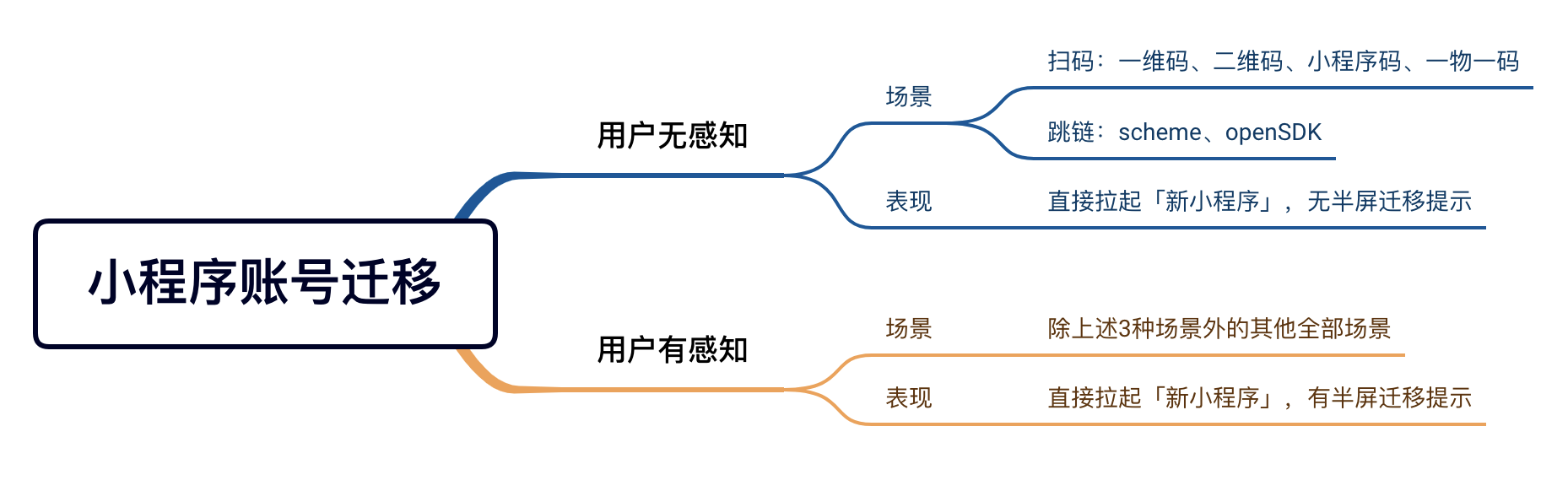
# The user has no perceptible scenario
# Related scenario values
Scanning Related: One dimensional code (1025, 1032), two dimensional code (1011, 1013), Weixin Mini Program code (1047, 1049), one object one code (1124, 1126)
Extrusions are related to: scheme/URL Link(1065、1194)、openSDK(1069)
# C-terminal performance
Weixin Mini Program B
# The user has a perceptual scene
# Related scenario values
All scene values except for the user's unperceived scene values
# C-terminal performance
Weixin Mini Program A has not been added to my Mini Programs Starting with version 8.0.32 of the Guest Terminal, the user opens Weixin Mini Program A, A migration semi-screen prompt will be directly pulled up to Mini Program B and displayed. After the user clicks "I know," subsequent visits to Mini Program A will automatically pull up Mini Program B, no prompts will appear, and Mini Program A's "recent use" record will be deleted.
Weixin Mini Program A has been added to my Mini Programs Starting with client 8.0.32, when a user opens Weixin Mini Program A, it will directly pull up Mini Program B and display a migration half-screen prompt. After the user clicks "I know," Mini Program A in "My Mini Program" will be replaced by Mini Program B; At the same time, the subsequent user access to Mini Program A will automatically pull up Mini Program B, no longer prompt, and Mini Program A's "recently used" record will be deleted.
# Low version client
Client versions below 8.0.32 do not distinguish between user-aware and user-unconscious scenarios. In any scenario, when the user opens Weixin Mini Program A, the H5 page will display the migration prompt, and after the user clicks "Go to open," the user will jump to open Mini Program B. If Weixin Mini Program A is added to "My Mini Program," then open Mini Program B, the page appears Toast prompt "The current Mini Program has been replaced with" My Mini Program. ""
# The debugging process
scenario values are 1248. [[TAG-0START]] Weixin Mini Program [[TAG-0END]] After the Mini Program account migration occurs, the platform will pull up the homepage of Mini Program B by default, and if the developer has the demand to open a specific page, it can be debugged according to the startup parameters.
# Startup parameter inheritance
Weixin Mini Program B can inherit Mini Programs A's AppID, path, query, and scene in two ways.migrateSourceAppId```、```migrateSourcePath```、```migrateSourceQuery```And'migrateSourceScene"
- Call ApageonLaunch to read "
res.query" parameter - Call wx.getLaunchOptionsSync to read the "
query" parameter
All startup parameters except AppID, path, query, and scene (extraData, etc.) are inherited as they are
# Other Notes
- When the user hits Weixin Mini Program migration for the first time, if the network environment is poor, the passenger can not get the migration information or the Mini Program B can not launch normally, then the Mini Program A will be pulled up. If the business has a larger adjustment, it is recommended that developers do a good job in the Mini Program A compatible logic;
- Weixin Mini Program Account migration is only effective for the official version of the Mini Program, not for the experience version and development version;
- Temporarily do not support the original Weixin Mini Program manager, project members and experience members automatically migrated to the target Mini Program, if necessary, developers need to add their own.