# To grant authorization
Some interfaces require user authorization to be called.We divide these interfaces into multiplescopeaccording to the scope of use,The user selects thescopeto authorize, and when aScopeis authorized, all its corresponding interfaces can be used directly.
When such interfaces are called:
- If the user has not accepted or refused this permission, a pop-up asks the user, and the user clicks on consent before calling the interface;
- If the user is authorized, the interface can be called directly;
- If the user has denied authorization, the pop-up will not appear, but will go directly to the interface fail callback. Developers should be compatible with scenarios where users deny authorization.
# Get user authorization settings
Developers can use wx.getSetting to get the user's current authorization status.
# Open the Settings Interface
The user can control the authorization status of the Mini Program in the Weixin Mini Program settings screen ("Top right" - "About" - "Top right" - "Settings").
Developers can call wx.openSetting to open the settings interface and guide users to open authorization.
# Initiate an authorization request in advance
Developers can use wx.authorize to initiate authorization requests to users in advance before calling the authorization API.
# Scope list
| scope | The corresponding interface | describe |
|---|---|---|
| scope.userLocation | wx.getLocation , wx.startLocationUpdate , MapContext.moveToLocation | Precise geographical location |
| scope.userFuzzyLocation | wx.getFuzzyLocation | Ambiguity of geographical location |
| scope.userLocationBackground | wx.startLocationUpdateBackground | Back-end location |
| scope.record | Live-pusher components, wx.startRecord , wx.joinVoIPChat , RecorderManager.START | microphone |
| scope.camera | Camera component, live-pusher components, wx.createVKSession | camera |
| scope.bluetooth | wx.openBluetoothAdapter , wx.createBLEPeripheralServer | Bluetooth |
| scope.writePhotosAlbum | wx.saveImageToPhotosAlbum , wx.saveVideoToPhotosAlbum | Add to Album |
| scope.addPhoneContact | wx.addPhoneContact | Add to Contacts |
| scope.addPhoneCalendar | wx.addPhoneRepeatCalendar , wx.addPhoneCalendar | Add to Calendar |
| scope.werun | wx.getWeRunData | WeChat Exercise steps |
| scope.address | wx.chooseAddress | Communication address (has been deauthorized and can be directly invoked to the corresponding interface) |
| scope.invoiceTitle | wx.chooseInvoiceTitle | An increase in invoice (authorization has been revoked and the corresponding interface can be directly invoked) |
| scope.invoice | wx.chooseInvoice | Get an invoice (the authorization has been revoked and the corresponding interface can be directly invoked) |
| scope.userInfo | wx.getUserInfo | User information (Weixin Mini Program has been collected, please use avatar nickname to fill in , MiniGame can continue to call) |
# Duration of authorization
Once the user explicitly agrees or rejects the authorization, the authorization relationship is recorded in the background until the user actively deletes Weixin Mini Program.
# Best practices
When the authorization interface is really needed, an authorization request is initiated to the user and the reasons for using the feature are clearly stated in the approval request.
# Note
- Authorization is required.
scope.userLocation、scope.userLocationBackground、scope.userFuzzyLocationmust be configured with a geo-location use statement . - The authorization pop-up will display the instructions that Weixin Mini Program filled in the Mini Programs User Privacy Protection Guide . Please fill out carefully.
# Back-end location
Developers first need to declare a background location in the background capability.
Android 8.0.0, iOS 8.0.0 onwards, if developers can support usingwx.authorize ({scope: 'scope.userLocationBackground'})Call the background to use the geolocation authorization window.
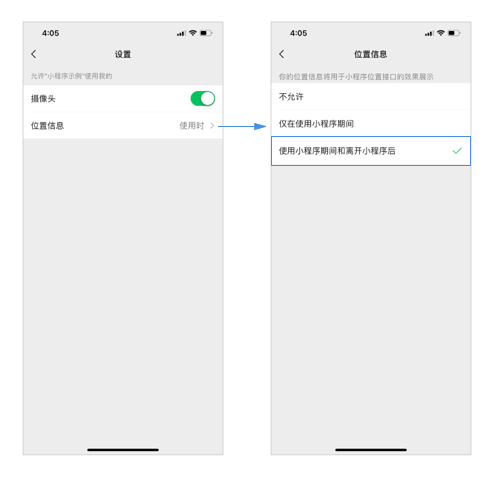
Below the above version, scope.userLocationBackground will not pop up to alert the user.In the settings page, the user needs to actively set the Location Information option to "While using Weixin Mini Program and after leaving the Mini Program."Developers can open the settings page by calling wx.openSetting .