
# Payment feature page
As of 26 June 2025, new application plug-in payment functions are no longer supported, and if you want to implement payments to third parties in Weixin Mini Program, please use "Open half-screen Mini Programs" function .
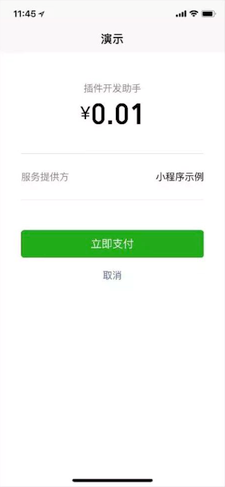
The Payment Function page is used to help the plugin make payments and is equivalent to wx.requestPayment .
Starting with the base library version {% version ('2.22.1')%}, jump payments can be implemented by calling wx.requestPluginPayment directly in the plug-in;Redirection via functional-page-navigator will be deprecated.
Callwx.requestPluginPaymentwhen the following conditions are metOr clicknavigatorwill pull up the payment register directly and skip the payment function page:
Weixin Mini Program Tied to the same open platform account as the plugin
Weixin Mini Program and the plugin are the same principal / associated principal of an open account.
Note that the plug-in uses payment functionality and requires an additional permission request located in the administrative back-END settings of Weixin Mini Program Plugins -> Basic Settings -> Payment Capabilities." In addition, whether or not the application is approved, the main Mini Program is a personal Mini Program that cannot normally use the payment function in the Mini Program when using the Mini Program.
# Call parameters
Parameter explaination:
| Parameter Name | type | Required to fill in | Introductions |
|---|---|---|---|
| fee | Number | yes | The amount that needs to be displayed on the page is in fractions |
| paymentArgs | Object | no | Any data that is passed to a response function in a function page |
| currencyType | String | no | The code for the currency symbol that needs to be displayed in the page, defaults to CNY |
Legal value of currencyType:
| value | Introductions | Minimum version |
|---|---|---|
| CNY | Currency symbol ¥ ¥ | |
| USD | Currency symbol US $ | |
| JPY | Currency symbol J | |
| EUR | Currency symbol € | |
| HKD | Currency symbol HK $ | |
| GBP | Currency symbol £ | |
| AUD | Currency symbol A $ | |
| MOP | Currency symbol MOP $ | |
| KRW | Currency symbol ₩ |
# sample code
# Wx.requestPluginPayment Way
This is recommended from the base library version {% version ('2.22.1')%}.
<!-- plugin/components/pay.wxml -->
<button bindtap="handlePay">支付 0.01 元</button>
// plugin/components/pay.js
Component({
  data: {
    fee: 1,             // 支付金额,单位为分
    paymentArgs: 'A', // 将传递到功能页函数的自定义参数
    currencyType: 'USD' // 货币符号,页面显示货币简写 US$
    version: 'develop', // 上线时,version 应改为 "release",并确保插件所有者小程序已经发布
  },
  methods: {
    handlePay() {
        const { fee, paymentArgs, currencyType, version } = this.data
        wx.requestPluginPayment({
            fee,
            paymentArgs,
            currencyType,
            version,
            success(r) {
                console.log(r)
            },
            fail(e) {
                console.error(e)
            }
        })
    }
  }
})
# Functionl-page-navigator mode (deprecated)
This method will be abandoned. For informational purposes only.
<!-- plugin/components/pay.wxml -->
<!-- 上线时,version 应改为 "release",并确保插件所有者小程序已经发布 -->
<!-- name 参数固定为 "requestPayment" -->
<functional-page-navigator
  version="develop"
  name="requestPayment"
  args="{{ args }}"
  bind:success="paymentSuccess"
  bind:fail="paymentFailed"
>
  <button class="payment-button">支付 0.01 元</button>
</functional-page-navigator>
// plugin/components/pay.js
Component({
  data: {
    args: {
      fee: 1,             // 支付金额,单位为分
      paymentArgs: 'A', // 将传递到功能页函数的自定义参数
      currencyType: 'USD' // 货币符号,页面显示货币简写 US$
    }
  },
  methods: {
    // 支付成功的回调接口
    paymentSuccess: function (e) {
      console.log(e);
      e.detail.extraData.timeStamp // 用 extraData 传递数据,详见下面功能页函数代码
    },
    // 支付失败的回调接口
    paymentFailed: function (e) {
      console.log(e);
    }
  }
})
User callswx.requestPluginPaymentOr clicknavigator, will be the authority judgment, and then directly pull up the payment cashier or jump to the following payment function page:
# Configure functional page functions
The Payment Features page requires the plug-in developer to provide a function in the plug-in owner Weixin Mini Program to respond to a payment call in the plug-in.That is, in the plug-in jump to the payment function page or callwx.requestPluginPaymentAt that time, this function will be called at the right time to help complete the payment.If the function page function is not provided, the function page call returns a failure with thefailevent.
In the root directory of the plugin owner Weixin Mini Programfunctional-pages / request-payment.jsfile namedbeforeRequestPayment.The function should receive two parameters:
| Parameter Name | type | Introductions |
|---|---|---|
| paymentArgs | Object | Namely through functional-page-navigator Custom data passed to the feature page in theargpaymentArgsfield in the parameter of |
| callback | Function | Callback function call that initiates a payment (similar to Weixin Mini Program wx.requestPayment ) |
Parameters for the callback function:
| Parameter Name | type | Introductions |
|---|---|---|
| error | Object | Failure message, if no failure, returnnull |
| requestPaymentArgs | Object | Payment parameter, used to call wx.requestPayment with the following parameters |
Parameters for requestPaymentArgs:
Used to initiate a payment, with the same parameters as wx.requestPayment , but without a callback functionsuccess,fail,complete):
| parameter | type | Required to fill in | Introductions |
|---|---|---|---|
| timeStamp | String | yes | Time stamp The number of seconds from 01 / 01 / 1970 00: 00: 00, that is, the current time |
| nonceStr | String | yes | Random character string of up to 32 characters. |
| package | String | yes | Unify the prepay_id parameter value returned by the single interface in the submission format such as: prepay_id =*** |
| signType | String | yes | Signature algorithm, temporarily support MD5 |
| paySign | String | yes | Signature, specific signature scheme see Weixin Mini Program payment interface document ; |
| extraData | any | no | A custom data segment determined by the developer, which is passed unmodified to the callback parameter for a successful payment, as described in the code example.Base library {% version ('2.9.1')%} is supported |
For more information, see WeChat Payment Interface Documentation
Examples of functional page function code:
// functional-pages/request-payment.js
exports.beforeRequestPayment = function (paymentArgs, callback) {
  // 注意:
  // 功能页函数(这个函数)不应 require 其他非 functional-pages 目录中的文件,
  // 其他非 functional-pages 目录中的文件也不应 require 这个目录中的文件,
  // 这样的 require 调用在未来将不被支持。
  //
  // 同在 functional-pages 中的文件可以 require
  var getOpenIdURL = require('./URL').getOpenIdURL;
  var paymentURL = require('./URL').paymentURL;

  // 自定义的参数,此处应为从插件传递过来的 'A'
  var customArgument = paymentArgs.customArgument;

  // 第一步:调用 wx.login 方法获取 code,然后在服务端调用微信接口使用 code 换取下单用户的 openId
  // 具体文档参考 https://mp.weixin.qq.com/debug/wxadoc/dev/api/api-login.html?t=20161230#wxloginobject
  wx.login({
    success: function (data) {
      wx.request({
        url: getOpenIdURL,
        data: { code: data.code },
        success: function (res) {
          // 拉取用户 openid 成功
          // 第二步:在服务端调用支付统一下单,返回支付参数。这里的开发和普通的 wx.requestPayment 相同
          // 文档可以参考 https://pay.weixin.qq.com/doc/v2/merchant/4011938514
          wx.request({
            url: paymentURL,
            data: { openid: res.data.openid },
            method: 'POST',
            success: function (res) {
              console.log('unified order success, response is:', res);
              var payargs = res.data.payargs;
              // 第三步:调用回调函数 callback 进行支付
              // 在 callback 中需要返回两个参数: err 和 requestPaymentArgs:
              // err 应为 null (或者一些失败信息);
              // requestPaymentArgs 将被用于调用 wx.requestPayment,除了 success/fail/complete 不被支持外,
              // 应与 wx.requestPayment 参数相同。
              var error = null;
              var requestPaymentArgs = {
                timeStamp: payargs.timeStamp,
                nonceStr: payargs.nonceStr,
                package: payargs.package,
                signType: payargs.signType,
                paySign: payargs.paySign,
                extraData: { // 用 extraData 传递自定义数据
                  timeStamp: payargs.timeStamp
                },
              };
              callback(error, requestPaymentArgs);
            }
          });
        },
        fail: function (res) {
          console.log('拉取用户 openid 失败,将无法正常使用开放接口等服务', res);
          // callback 第一个参数为错误信息,返回错误信息
          callback(res);
        }
      });
    },
    fail: function (err) {
      console.log('wx.login 接口调用失败,将无法正常使用开放接口等服务', err)
      // callback 第一个参数为错误信息,返回错误信息
      callback(err);
    }
  });
}
Note: Function page functions should notrequireother non-[ functional-pagesFiles in thedirectory, other non-functional-pages in thedirectory should also notrequirefiles in this directory.Suchrequire`calls that will not be supported in the future.
This directory and file should be placed in the plugin owner's Weixin Mini Program code (not the plugin code), and it is part of the plugin owner Mini Program (not part of the plug-in). If you need to add or change this code, you need to publish the plug-in owner Mini Program to take effect in the official version; You need to re-preview the plug-in owner Mini Program before it can take effect in the development version.