# User information feature page
The user information feature page is used to help the plug-in obtain user information,Includesopenidand nicknames, which are equivalent to wx.login and wX.getUserInfo functions.
Before the base library version {% version ('2.3.1')%}, the user information feature page was the only way to get code and user information in the plug-in;
Since the base library version {% version ('2.3.1') %}, the plugin can call wx.login and [directly after the user has authorized the feature page wx.getUserInfo :
- Authorization is given in the [User + Weixin Mini Program + Plugin] dimension, i.e. the same user using the same plugin in different Mini Programs, or different Mini Program uses in the same Mini Program needs to be given separate authorization.
- Starting with the base library version {% version ('2.6.3')%}, you can use wx.getSetting to check if a user has authorized
In addition, the plug-in can directly call wx.login if any of the following conditions are met:
- The Weixin Mini Program that uses the plug-in has the same AppId as the plug-in
- Weixin Mini Program using the plug-in is bound to the same WeChat open platform account, and both Mini Programs and plug-ins using the plugin are the same or related subjects to the open platform account
If the above conditions are not met, wx.login and wx.getUserInfo will return failure.
# Call parameters
When the user information function page uses functional-page-navigator , the corresponding parameter name should be a fixed valueloginAndGetUserInfo, the remaining parameters are the same as wx.getUserInfo , specifically:
Args parameter explaination:
| Parameter Name | type | Required to fill in | Introductions |
|---|---|---|---|
| withCredentials | Boolean | no | Do you bring your login information? |
| lang | String | no | Specify the language in which user information is returned, zh_CN Simplified Chinese, zh_TW Traditional Chinese, en English. Default is en. |
| timeout | Number | no | Time out in ms |
Note: When withCredents is true, the data returned contains sensitive information such as encrypted Data, iv, etc.
Bindsuccess returns a parameter explaination:
| parameter | type | Introductions |
|---|---|---|
| code | String | With wx.login the login credentials (valid for five minutes).The developer needs to call the api in the background of the developer server, and use the code in exchange for information such as openid and session_key |
| errMsg | String | Call results |
| userInfo | OBJECT | User information object, excluding sensitive information such as openid |
| rawData | String | The raw data character string that does not include sensitive information, used to calculate the signature. |
| signature | String | Use sha1 (rawData + sessionkey)Get a character string to use to verify user information, reference documentation signature 。 |
| encryptedData | String | Including sensitive data, including complete user information encrypted data, see encrypted data decryption algorithm |
| iv | String | The initial vector of the encryption algorithm, see encryption data decryption algorithm |
The userInfo parameter explaination:
| parameter | type | Introductions |
|---|---|---|
| nickName | String | User nickname |
| avatarUrl | String | User avatar. The last value represents the size of a square avatar (there are values 0, 46, 64, 96, 132, and 0 represents a 132\ * 132 square avatar). This item is empty when the user does not have a avatar.If the user changes the avatar, the original avatar URL will become invalid. |
| gender | String | User's gender, when the value is 1 is male, when it is 2 is female, when its value is 0 is unknown |
| city | String | The user's city |
| province | String | The user's province |
| country | String | Country of the user |
| language | String | User's language, simplified Chinese for zh_CN |
# sample code
<!--plugin/components/hello-component.wxml-->
  <functional-page-navigator
    name="loginAndGetUserInfo"
    args="{{ args }}"
    version="develop"
    bind:success="loginSuccess"
    bind:fail="loginFail"
  >
    <button class="login">登录到插件</button>
  </functional-page-navigator>
// plugin/components/hello-component.js
Component({
  properties: {},
  data: {
    args: {
      withCredentials: true,
      lang: 'zh_CN'
    }
  },
  methods: {
    loginSuccess: function (res) {
      console.log(res.detail);
    },
    loginFail: function (res) {
      console.log(res);
    }
  }
});
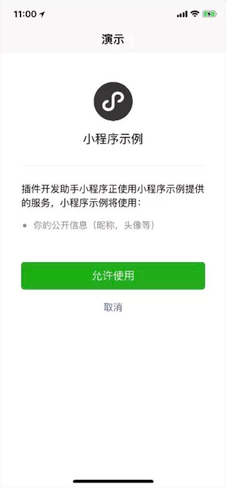
When the user clicks on thenavigator, it will jump to the following user information function page:
View the example in WeChat developer tools:
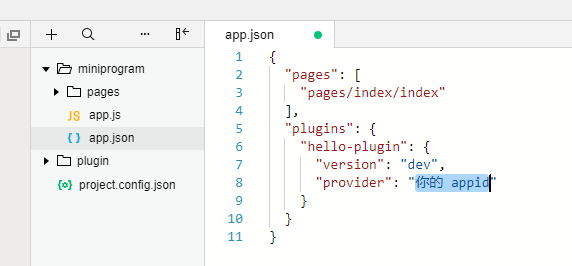
- Since the plug-in requires AppID to work, fill in an appid;
- Due to the limitations of the current code snippet, after opening this example, please__manually fill AppID into
miniprogram / apagejson(see below) to get the sample running.__