
# Hand detection
VisionKit provides hand detection capabilities starting with version 2.28.0 of the base library.Starting with WeChat > = 8.1.0 version, Hand 3D keypoint detection is provided as an extended capability interface for Hand detection.
# Method Definition
There are two ways to use hand detection, one is to input a static picture for detection, the other is through the camera real-time detection.
# 1. Static Image Detection
Input an image via the VKSession.detectHand interface . The algorithm detects the gesture in the image and then outputs the captured gesture critical point information via the VK Session.on interface .
Example code:
const session = wx.createVKSession({
  track: {
    hand: { mode: 2 } // mode: 1 - 使用摄像头;2 - 手动传入图像
  },
})

// In static image detection mode, every time the detectHand interface is adjusted, an updateAnchors event is triggered.
session.on('updateAnchors', anchors => {
    this.data.anchor2DList = []
    this.setData({
        anchor2DList: anchors.map(anchor => ({
            points: anchor.points, // 关键点坐标
            origin: anchor.origin, // 识别框起始点坐标
            size: anchor.size, // 识别框的大小
            gesture: anchor.gesture // 手势分类
        })),
    })
})

// You need to call start once to start
session.start(errno => {
  if (errno) {
    // 如果失败,将返回 errno
  } else {
    // 否则,返回null,表示成功
    session.detectHand({
      frameBuffer, // 图片 ArrayBuffer 数据。待检测图像的像素点数据,每四项表示一个像素点的 RGBA
      width, // 图像宽度
      height, // 图像高度
      scoreThreshold: 0.5, // 评分阈值
      algoMode: 2 //算法模式:0, 检测模式,输出框和点;1,手势模式,输出框和手势分类;2,同时具备0和1,输出框、点、手势分类
    })
  }
})
# 2. Detection via camera in real time
The algorithm detects gestures in the camera in real time, and outputs the detected gesture key points in real time through the VKSession.on interface .
Example code:
const session = wx.createVKSession({
  track: {
    hand: { mode: 1 } // mode: 1 - 使用摄像头;2 - 手动传入图像
  },
})

// The updateAnchors event is triggered continuously (once per frame) when the gesture is detected in the camera's real-time detection mode
session.on('updateAnchors', anchors => {
    this.data.anchor2DList = []
    this.data.anchor2DList = this.data.anchor2DList.concat(anchors.map(anchor => ({
        points: anchor.points,
        origin: anchor.origin,
        size: anchor.size
    })))
})

// The removeAnchors event is triggered when the gesture leaves the camera
session.on('removeAnchors', () => {
  console.log('removeAnchors')
})

// You need to call start once to start
session.start(errno => {
  if (errno) {
    // 如果失败,将返回 errno
  } else {
    // 否则,返回null,表示成功
  }
})
# 3. Turn on 3D keypoint detection
To enable manual 3D keypoint detection, static picture mode only needs to add theopen3dfield to the 2D call, as follows
// Static Picture Mode calls
session.detectHand({
      ...,           // 同2D调用参数
      open3d: true,  // 开启人手3D关键点检测能力,默认为false
    })
The real-time mode adds a 3D switch update function to the 2D call, as follows
// Camera calls in real-time mode
session.on('updateAnchors', anchors => {
  this.session.update3DMode({open3d: true})  // 开启人手3D关键点检测能力,默认为false
  ...,  // 同2D调用参数
})
# Output instructions
# Location Dxplaination
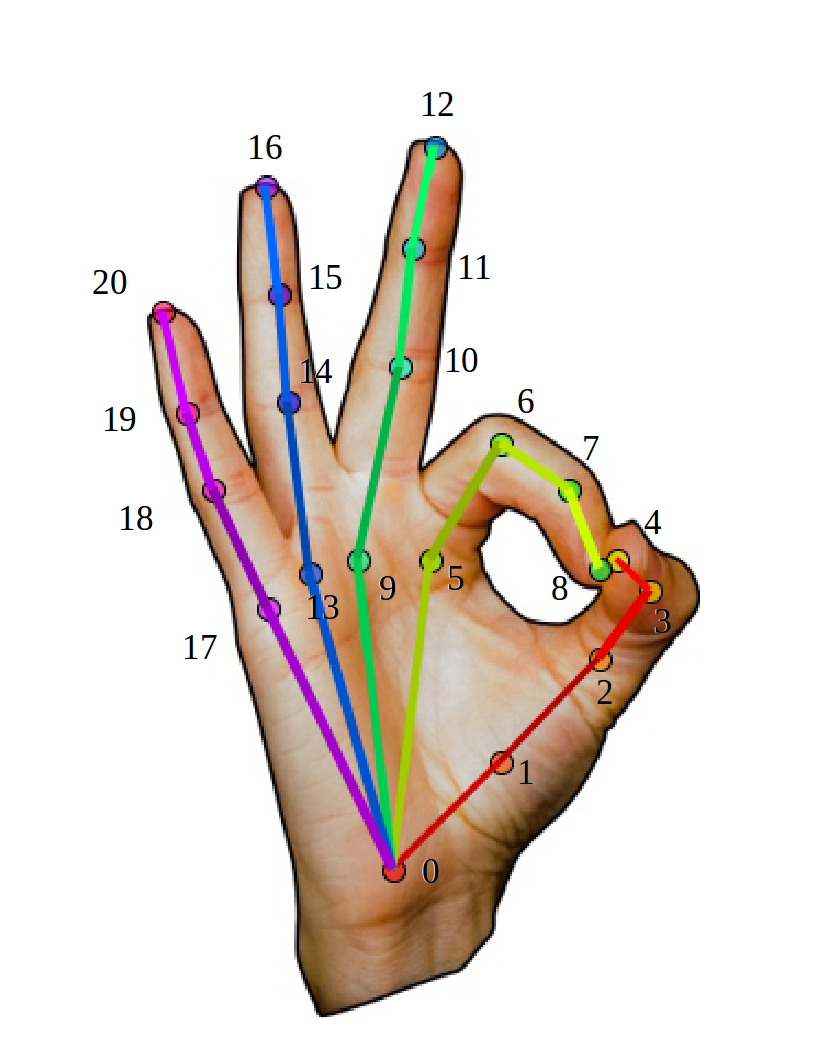
The manual 2D keypoint definition is the same as OpenPose, using a 21-bit bit definition, as shown in the figure below.
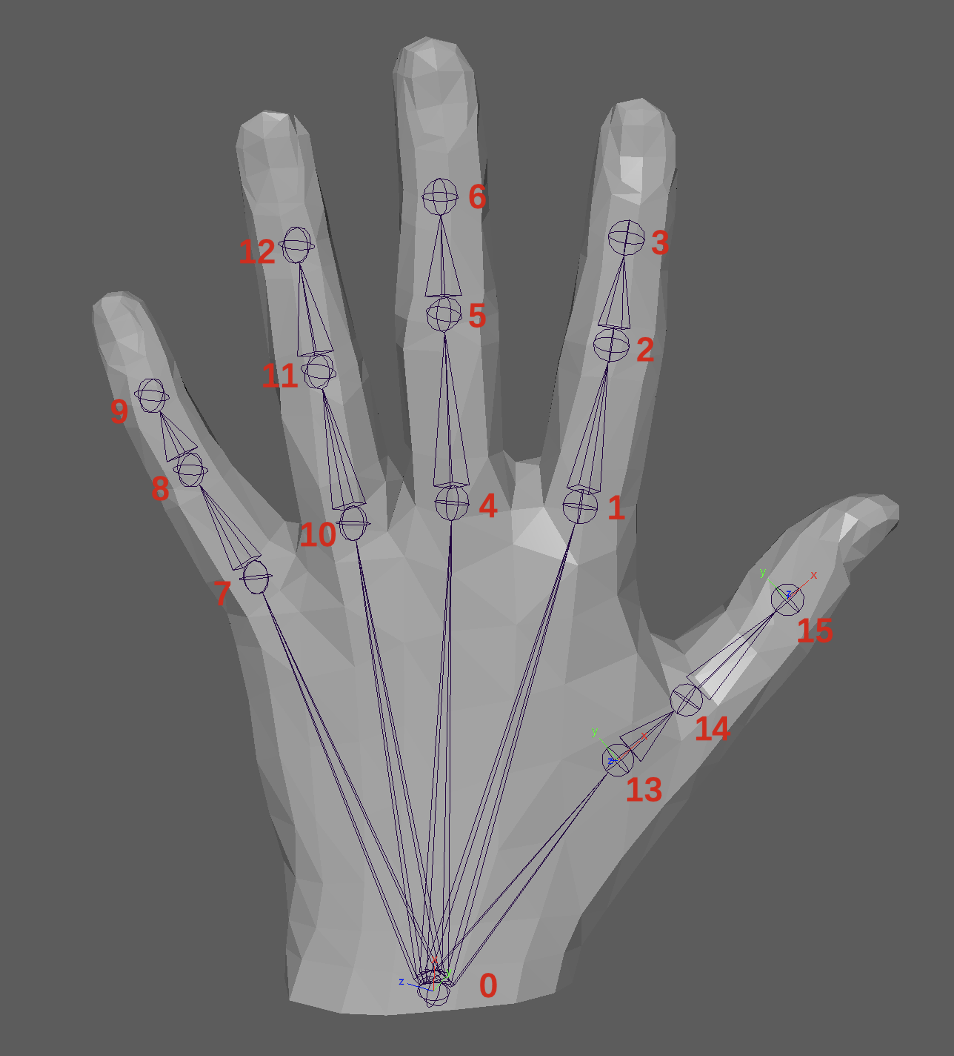
The 3D key points of the human hand are defined using the MANO-16 point joint, as shown in the figure below.
# Hand testing
Hand detection output fields include
struct anchor
{
  points,     // 人手2D关键点在图像中的(x,y)坐标
  origin,     // 人手检测框的左上角(x,y)坐标
  size,       // 人手检测框的宽和高(w,h)
  score,      // 人手检测框的置信度
  confidence, // 人手关键点的置信度
  gesture     // 人手手势类别
}
# Manpower 3D Key Points
After turning on the manpower 3D key point detection capability, the manpower 2D and 3D key point information can be obtained, wherein the manpower 3D key point output field includes
struct anchor
{
  ...,               // 人手检测2D输出信息
  points3d,          // 人手3D关键点的(x,y,z)3D坐标
  camExtArray,       // 相机外参矩阵,定义为[R, T \\ 0^3 , 1], 使用相机内外参矩阵可将3D点位投影回图像
  camIntArray        // 相机内参矩阵,参考glm::perspective(fov, width / height, near, far);
}
# Example of application scenarios
- Smart home.
- AR Interaction.
- Smart vehicles.