
# Single-sample testing
# Method Definition
One-shot detection (OSD) uses only one image of the class to be detected to detect objects of that class in the input image.
The image to be detected category is calledOSD marker.
Unlike general object detection, OSD can theoretically detect any user-specified category.The method allows theOSD markerto have a perspective difference or a certain degree of shape difference from the object in the input image.
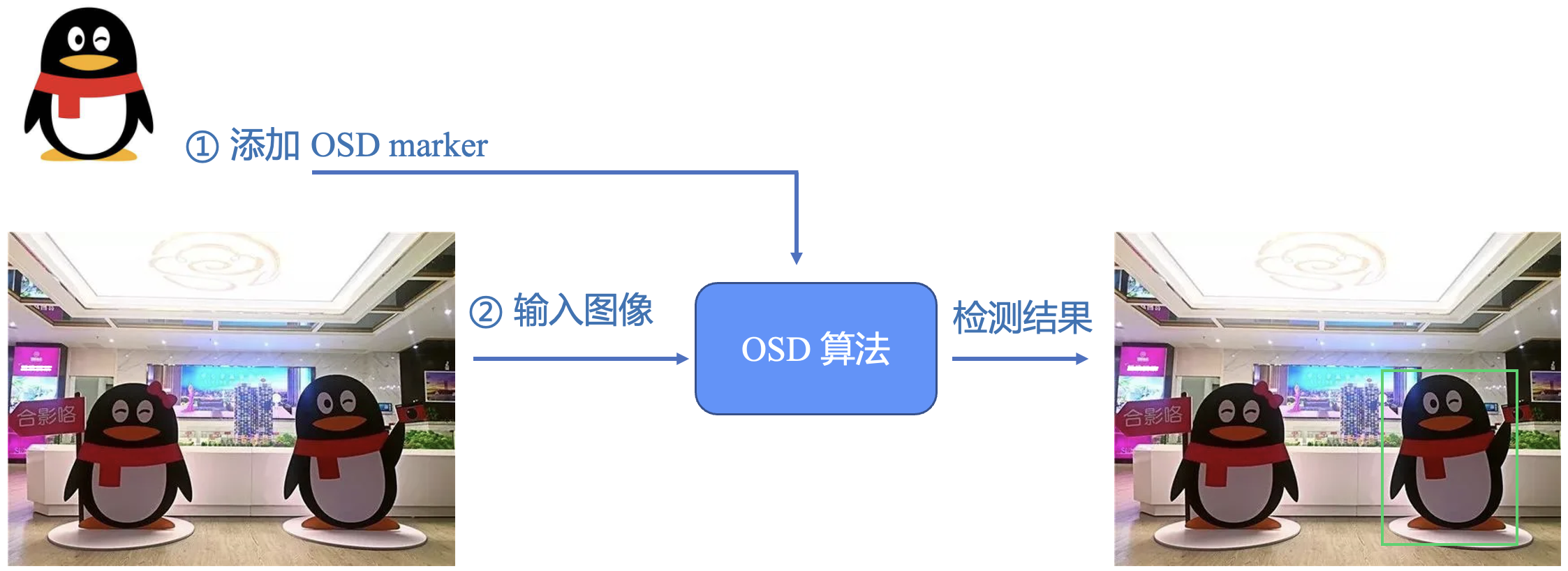
# Example of application scenarios
- Testing of iconic buildings.
- Logo detection.
- Merchandise testing.
- Pet testing.
- Anime image detection.

# Skills introduction
- How to use it
- Add
OSD marker: Invoke VKSession.addOSDMarker () Sets the object to be detected, such as an image of a product, and returns themarkerId.Dxplaination:
(1) You can call this function several times to add multiple pictures for detecting a variety of objects.
(2) AddOSD markerto continuously input images to detect objects.OSD marker。 - Remove
OSD marker: Invoke VKSession.removeOSDMarker () based onmarkerI@@Delete the correspondingOSD markerso that the object is no longer detected. - Get all current
OSD markerinformation: Call VKSession.getAllOSDMarker () Get all currentOSD markerEach item in the list contains themarkerIdand the path of the image.
- Program Examples
Sample code can be viewed on the single sample detection (OSD) capability using the reference page.