Basic Capabilities of Open Data Domain
Developers can choose not to use a framework and directly use the basic capabilities instead. Open Data Domain is a closed, independent JavaScript scope. To run code within the Open Data Domain, you need to add the configuration item openDataContext in game.json to specify the code directory for the Open Data Domain. Adding this configuration item indicates that the Mini Game has enabled the Open Data Domain, which may result in certain limitations.
{
  "deviceOrientation": "portrait",
  "openDataContext": "src/myOpenDataContext"
}
Additionally, you must create an index.js file in that directory as the entry file for the Open Data Domain, where its code will run within the Open Data Domain. game.js is the entry file for the entire game, and its code runs in the Main Domain. Corresponding to the configuration above, the directory structure should be as follows:
├── src
|   └── myOpenDataContext
|       ├── index.js
|       └── ...
├── game.js
├── game.json
└── ...
src/myOpenDataContext is the code directory for the Open Data Domain. Everything outside of src/myOpenDataContext belongs to the code directory for the Main Domain.
Code in the Main Domain and the Open Data Domain cannot require each other. For example, in the following directory structure:
├── src
|   └── myOpenDataContext
|       ├── index.js
|       ├── util.js
|       └── ...
├── lib
|   └── render.js
└── game.js
You cannot use require('src/myOpenDataContext/util') in game.js.
You cannot use require('../../lib/render.js') in src/myOpenDataContext/index.js.
Communication Between the Main Domain and Open Data Domain
The open data domain cannot send messages to the main domain.
The main domain can send messages to the open data domain. Call the wx.getOpenDataContext() method to obtain the open data domain instance, and call the OpenDataContext.postMessage() method on the instance to send messages to the open data domain.
// game.js
let openDataContext = wx.getOpenDataContext()
openDataContext.postMessage({
  text: 'hello',
  year: (new Date()).getFullYear()
})
In the open data domain, use the wx.onMessage() method to listen for messages sent from the main domain.
// src/myOpenDataContext/index.js
wx.onMessage(data => {
  console.log(data)
  /* {
    text: 'hello',
    year: 2018
  } */
})
Display Social Graph Data
OffscreenCanvas Mode (Default Mode)
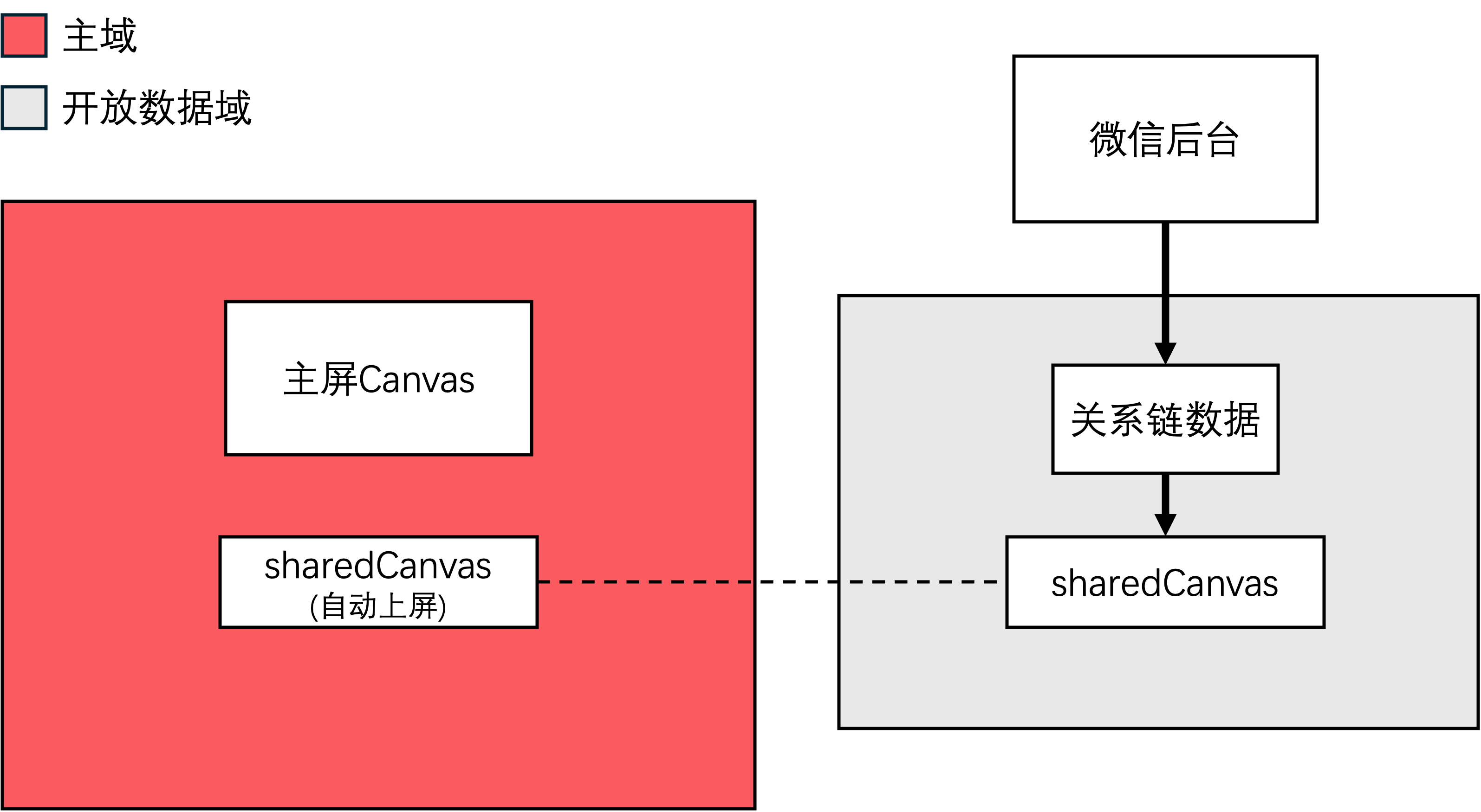
In offscreenCanvas mode, if you want to display user data retrieved via the Relation Chain API, such as rendering a leaderboards in business scenarios, you need to draw the leaderboard onto sharedCanvas within the Open Data Context, and then render sharedCanvas to the main screen Canvas in the main domain.

// src/myOpenDataContext/index.js
const sharedCanvas = wx.getSharedCanvas()
const context = sharedCanvas.getContext('2d')

function drawRankList (data) {
  data.forEach((item, index) => {
    ctx.fillStyle = 'yellow'
    ctx.fillText(item.nickname)
    // ...
  })
}

wx.getFriendCloudStorage({
  keyList: ['key1', 'key2'],
  success: res => {
    let data = res.data
    drawRankList(data)
  }
})
sharedCanvas is an offscreen canvas accessible by both the main domain and the Open Data Context. Calling wx.getSharedCanvas() within the Open Data Context will return sharedCanvas.
// src/myOpenDataContext/index.js
let sharedCanvas = wx.getSharedCanvas()
let context = sharedCanvas.getContext('2d')

const loop = () => {
  requestAnimationFrame(() => {
    context.fillStyle = 'red'
    context.fillRect(0, 0, 100, 100)
    loop()
  })
}
loop()
In the main domain, you can access sharedCanvas via the Open Data Context instance. Using the drawImage() method, you can draw sharedCanvas onto the on-screen canvas.
// game.js
let openDataContext = wx.getOpenDataContext()
let sharedCanvas = openDataContext.canvas

let canvas = wx.createCanvas()
let context = canvas.getContext('2d')

const loop = () => {
  requestAnimationFrame(() => {
    context.drawImage(sharedCanvas, 0, 0)
    loop()
  })
}
loop()
The width and height of sharedCanvas can only be set in the main domain, not in the Open Data Context.
// game.js
sharedCanvas.width = 400
sharedCanvas.height = 200
Essentially, sharedCanvas is also an offscreen Canvas. Resetting the width and height of a Canvas clears its content. Therefore, you need to notify the Open Data Context to redraw sharedCanvas.
// game.js

openDataContext.postMessage({
  command: 'render'
})
// src/myOpenDataContext/index.js
openDataContext.onMessage(data => {
  if (data.command === 'render') {
    // ... redraw sharedCanvas
  }
})
screenCanvas Mode
The screenCanvas mode is supported from Base Library v3.6.6 onwards.
Unlike the default mode, the sharedCanvas in this mode is not an off-screen Canvas but an independent on-screen Canvas. Therefore, there is no longer a need for the main domain to call context.drawImage(sharedCanvas, 0, 0) to render it to the screen, nor is continuous rendering via loops required. In terms of layering, the sharedCanvas in screenCanvas mode overlays the main screen canvas.
Additionally, this mode supports dynamically setting the display width, height, and position of the sharedCanvas within the main domain.
Please note that regardless of the mode, the sharedCanvas is a global singleton. Once one mode is used, it cannot be switched to the other mode.
Example code for screenCanvas mode:
// game.js
const openDataContext = wx.getOpenDataContext({
  sharedCanvasMode: 'screenCanvas' //  screenCanvas=on-screen mode
})
const sharedCanvas = openDataContext.canvas
sharedCanvas.width = 300 // Set resolution width
sharedCanvas.height = 200 // Set resolution height
sharedCanvas.style.width = "150px" // Set display width
sharedCanvas.style.height = "100px" // Set display height
sharedCanvas.style.left = "50px" // Set left margin on screen
sharedCanvas.style.top = "100px" // Set top margin on screen

// In screenCanvas mode, the display width, height, and position of sharedCanvas can be dynamically adjusted.
// For example, by setting width and height to 1px, and moving left and top outside the main screen area, sharedCanvas can be hidden.
setTimeout(() => {
  sharedCanvas.style.width = "1px" // Set display width
  sharedCanvas.style.height = "1px" // Set display height
  sharedCanvas.style.left = "-10px" // Set left margin on screen
  sharedCanvas.style.top = "-10px" // Set top margin on screen
}, 5000)
// src/myOpenDataContext/index.js
const sharedCanvas = wx.getSharedCanvas()
const ctx = sharedCanvas.getContext('2d')

const loop = () => {
  requestAnimationFrame(() => {
    ctx.fillStyle = 'yellow'
    ctx.fillRect(50, 50, 100, 100);
    loop()
  })
}
loop()
Limitations
When a Mini Game utilizes the open data domain, the Mini Game environment applies specific restrictions to both the main domain and the open data domain. These restrictions vary depending on the mode, as detailed below.
Main Domain
| offscreenCanvas Mode | screenCanvas Mode |
|---|---|
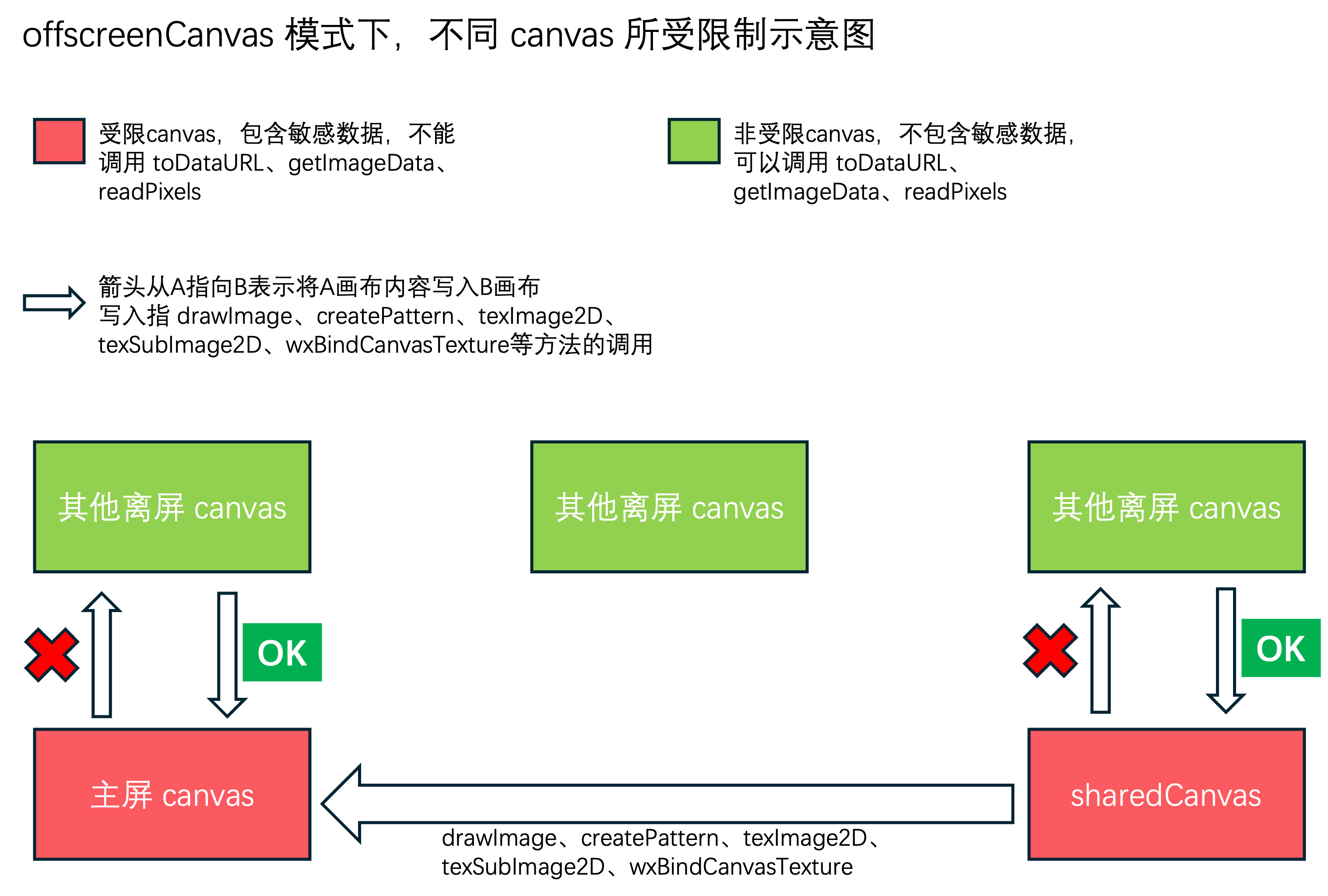
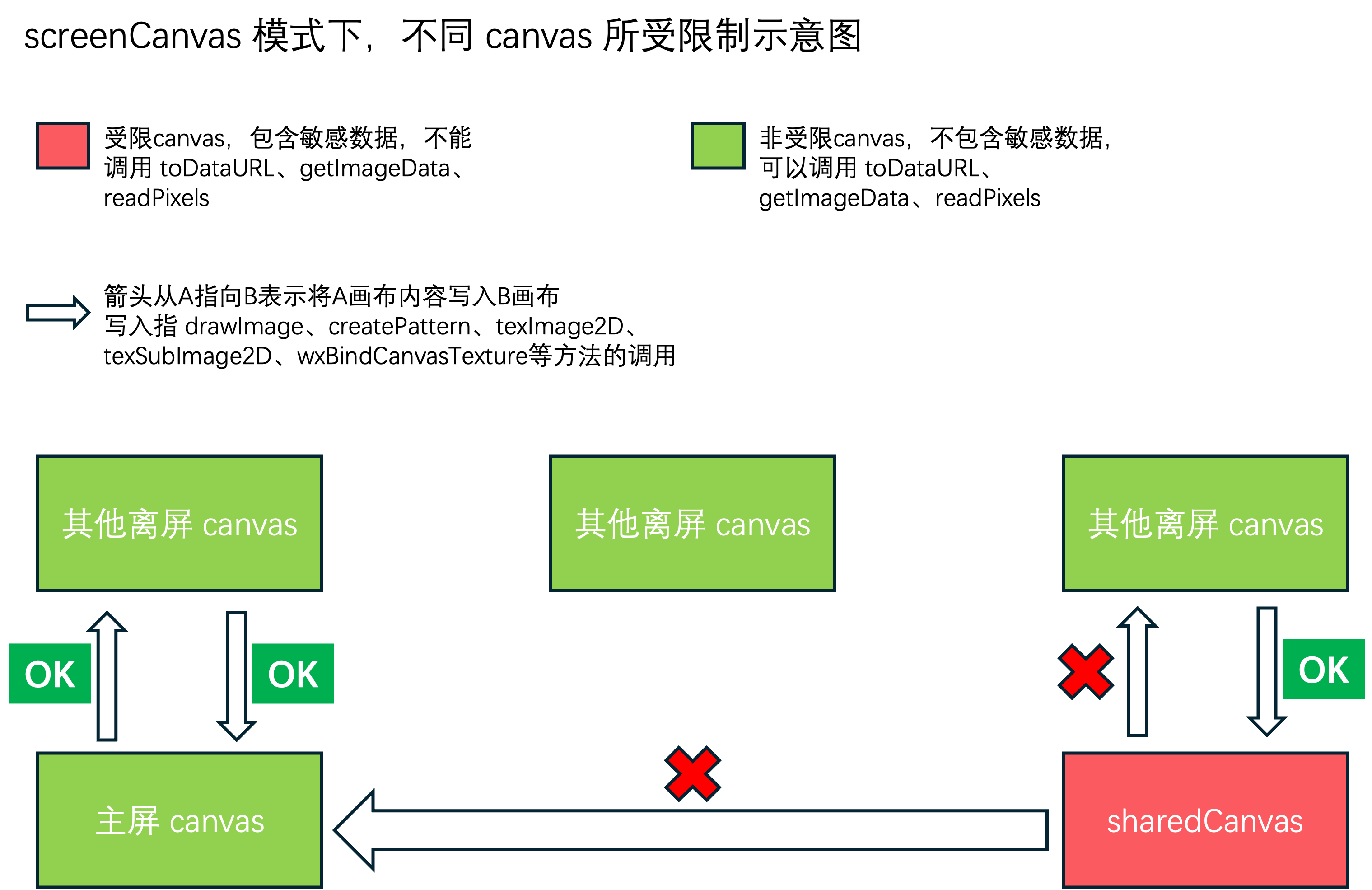
| In the main domain, sharedCanvas can only be drawn to the main screen canvas and cannot be drawn to other offscreen canvases | In the main domain, sharedCanvas cannot be drawn to any canvas, including the main screen canvas |
| The main screen canvas cannot be drawn to any other offscreen canvas in any form, including via drawImage, createPattern, texImage2D, texSubImage2D, etc. | It is allowed to draw the main screen canvas to other offscreen canvases |
| The main screen canvas cannot call any operations that read canvas pixels, such as toDataUrl, getImageData, or readPixels | It is allowed for the main screen canvas to call toDataUrl, getImageData, or readPixels |
| When the main screen canvas calls toTempFilePath or toTempFilePathSync, it returns a "pseudo path". The "pseudo path" can only be used with APIs such as wx.saveImageToPhotosAlbum and wx.shareAppMessage, and cannot be read via the file system | When the main screen canvas calls toTempFilePath or toTempFilePathSync, it returns a real path, allowing it to be read via the file system |
| In the main domain, when sharedCanvas calls toTempFilePath or toTempFilePathSync, it returns a "pseudo path". The "pseudo path" can only be used with APIs such as wx.saveImageToPhotosAlbum and wx.shareAppMessage, and cannot be read via the file system | In the main domain, when sharedCanvas calls toTempFilePath or toTempFilePathSync, it returns a "pseudo path". The "pseudo path" can only be used with APIs such as wx.saveImageToPhotosAlbum and wx.shareAppMessage, and cannot be read via the file system |
| In the main domain, sharedCanvas cannot call any operations that read canvas pixels, such as toDataURL, getImageData, or readPixels | In the main domain, sharedCanvas cannot call any operations that read canvas pixels, such as toDataURL, getImageData, or readPixels |
| In the main domain, sharedCanvas cannot call getContext | In the main domain, sharedCanvas cannot call getContext |
| The width and height of sharedCanvas can only be set in the main domain | The width, height, and position of sharedCanvas can only be set in the main domain |
Open Data Domain
The Open Data Domain can only invoke a limited set of APIs, as follows:
Frame Rate
Timer
System Info
Touch Events
- wx.onTouchStart()
- wx.onTouchMove()
- wx.onTouchEnd()
- wx.onTouchCancel()
- wx.offTouchStart()
- wx.offTouchMove()
- wx.offTouchEnd()
- wx.offTouchCancel()
Canvas
All canvas objects in the Open Data Domain only support 2d rendering mode. Additionally, toDataURL and toTempFilePath(Sync) are not available.
Image
Images in the Open Data Domain can only use local images or images from the WeChat CDN. Images hosted on the developer's own server are not supported. For images that are neither local nor from the WeChat CDN, you can first download the image file using wx.downloadFile() from the main domain, and then pass the file path to the Open Data Domain for use via OpenDataContext.postMessage().
Open Data
- wx.getFriendCloudStorage()
- wx.getGroupCloudStorage()
- wx.getUserCloudStorage()
- wx.setUserCloudStorage()
- wx.removeUserCloudStorage()
Tips: For more APIs, refer to API - Open Interfaces - Open Data.
Listening to Main Domain Messages