When hot reload is enabled, modifications to code files take effect in the simulator without requiring a refresh, thereby improving code editing efficiency and experience. It is recommended to use the latest Base Library version for this feature, with a minimum version of 2.12.0 or higher.
Enable Hot Reload
You can toggle the Hot Reload entry via the toolbar above the simulator, or enable/disable it in the project's local settings.
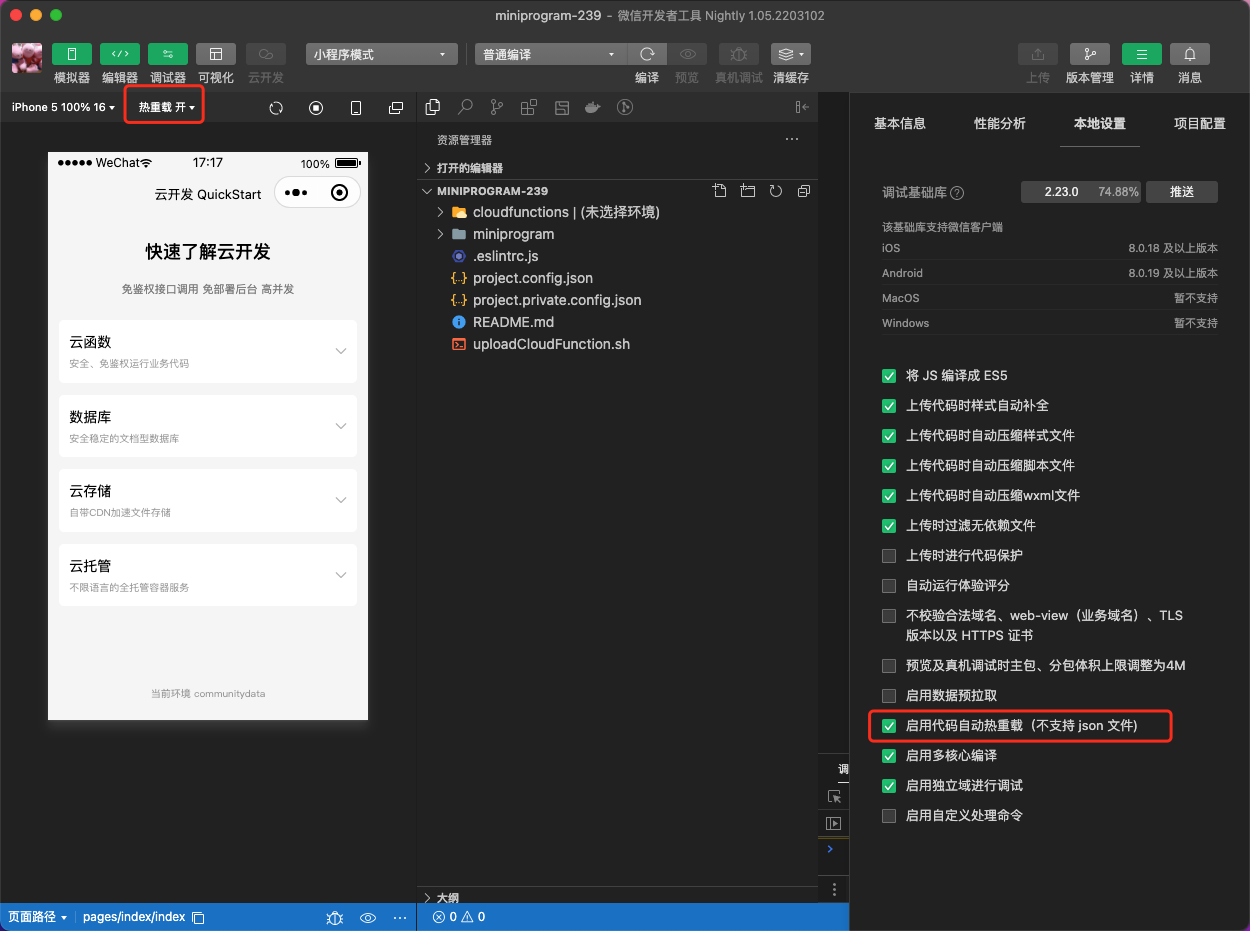
In Hot Reload development mode, editing and saving wxml/wxss/js files automatically triggers the Hot Reload feature, allowing you to see the updated effects in real-time in the simulator. This improves the efficiency of single-page development.

Hot Reload Execution Logic
After enabling hot reload, the simulator will update to varying degrees based on different scenarios:
- Modifications to WXML/WXSS are injected into the simulator via hot reload, taking effect without refreshing the simulator.
- Modifications to page JS or JS dependencies of the page trigger a hot reload.
- Modifications to JS files that are not used as dependencies trigger a full compilation.
- Modifications to files that cannot be directly hot-reloaded, such as JSON or app.js, trigger a full compilation.
Note: If the result does not meet expectations, you can click the Compile button to recompile.
Related Tutorials
You can access the following video: https://developers.weixin.qq.com/community/business/doc/0004e22a218d98b43fdc690cd5c80d