VisionKit provides depth estimation capabilities.
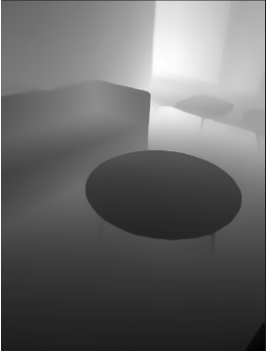
Depth estimation refers to obtaining the distance information from each point in the scene of an image to the camera. The map composed of such distance information is known as a depth map.
Method Definitions
We provide two modes for depth estimation here:
Vision Mode: (Android WeChat >= 8.0.37, iOS WeChat >= 8.0.38) Uses the camera for depth estimation.
AR Mode: (Android WeChat >= 8.0.38 with Base Library >= 2.33.0, iOS WeChat >= 8.0.39 with Base Library >= 3.0.0) Uses the camera and IMU for depth estimation. It outputs a non-linear depth map controlled by near and far parameters, intended for virtual-real occlusion. Currently supports specific models; the list of supported models is identical to the 6Dof - Horizontal Plane AR - V2 Plane AR Interface Support List.
| Interface Type | Accuracy | Model Coverage |
|---|---|---|
| Vision Mode | Medium | High |
| AR Mode | High | Medium |
Vision Mode Interface
The depth estimation vision mode interface offers two usage methods: one involves inputting a static image for depth estimation, while the other enables real-time depth estimation via the camera.
- Static Image Estimation
By using the VKSession.detectDepth interface to input an image and the VKSession.on interface to listen for depth map information, the pixel values in the image represent the current depth. Darker colors indicate a shorter distance to the camera, while whiter colors indicate a greater distance.

Example code:
const session = wx.createVKSession({
  track: {
    depth: {
      mode: 2 // mode: 1 - Use camera; 2 - Manually input image
    },
  },
  gl: this.gl,
})
// In static image estimation mode, each call to the detectDepth interface triggers one updateAnchors event
session.on('updateAnchors', anchors => {
  anchors.forEach(anchor => {
    console.log('anchor.depthArray', anchor.depthArray) // Depth map ArrayBuffer data
    console.log('anchor.size', anchor.size) // Depth map size, result is an array [width, height]
  })
})

// Need to call start once to initialize
session.start(errno => {
  if (errno) {
    // If failed, errno will be returned
  } else {
    // Otherwise, null is returned, indicating success
    session.detectDepth({
      frameBuffer, // ArrayBuffer data of the image to be detected. RGBA data of the depth image to be detected.
      width, // Image width
      height, // Image height
    })
  }
})
- Real-time Estimation via Camera
The algorithm outputs the depth map of the current frame in real time. The pixel value of each frame represents the current depth. Darker colors indicate a shorter distance to the camera, while whiter colors indicate a greater distance.
Example code:
const session = wx.createVKSession({
  track: {
    depth: {
      mode: 1 // mode: 1 - Use camera; 2 - Manually input image
    },
  },
})

// Need to call start once to initialize
session.start(errno => {
  if (errno) {
    // If failed, errno will be returned
  } else {
    // Get information of each frame
    const frame = session.getVKFrame(canvas.width, canvas.height)
    // Get depth map information for each frame
    const depthBufferRes = frame.getDepthBuffer();
    const depthBuffer = new Float32Array(depthBufferRes.DepthAddress)
    // Create rendering logic, transfer array values to a texture, and render it to the screen
    render()
  }
})
AR Mode Interface
For details, see V2+ Virtual-Real Occlusion in Horizontal Plane AR
Real-Time Estimation Output Description
1. Effect Preview
2. Key Points for Depth Estimation
The output fields for real-time depth key points include:
struct anchor
{
  DepthAddress, // The address of the depth map ArrayBuffer. Usage example: new Float32Array(depthBufferRes.DepthAddress);
  width,    // The width of the returned depth map
  height,      // The height of the returned depth map
}
Application Scenario Examples
- Special effects scenarios.
- AR games and applications (the following is an example of AR real-virtual occlusion).
Program Examples
Visual Mode:
- Reference for using real-time depth estimation capability
- Reference for using static image depth estimation capability
AR Mode:
Demo Experience
Visual Mode:
- Real-time depth estimation capability. Experience it in API-VisionKit Vision Capabilities-Real-time Depth Map Detection within the Mini Program sample.
- Photo depth estimation capability. Experience it in API-VisionKit Vision Capabilities-Photo Depth Map Detection within the Mini Program sample.
AR Mode:
- Experience it in API-VisionKit Vision Capabilities-Horizontal Plane AR-v2-Realistic Occlusion within the Mini Program sample.