VisionKit has provided face landmark detection since base library version 2.25.0 (Android WeChat >= 8.0.25, iOS WeChat >= 8.0.24), serving as a capability interface parallel to marker capabilities and OSD capabilities.
Face 3D landmark detection has been available since WeChat version >= 8.1.0, serving as an extended capability interface to face 2D landmark detection.
Method Definition
There are two usage methods for facial landmark detection: one is to detect a static image, and the other is to perform real-time detection via the camera.
1. Static Image Detection
By inputting an image via the VKSession.detectFace API, the algorithm detects the face in the image and then outputs the face position coordinates, 106 keypoint coordinates, and the rotation angle of the face in the 3D coordinate system via the VKSession.on API.
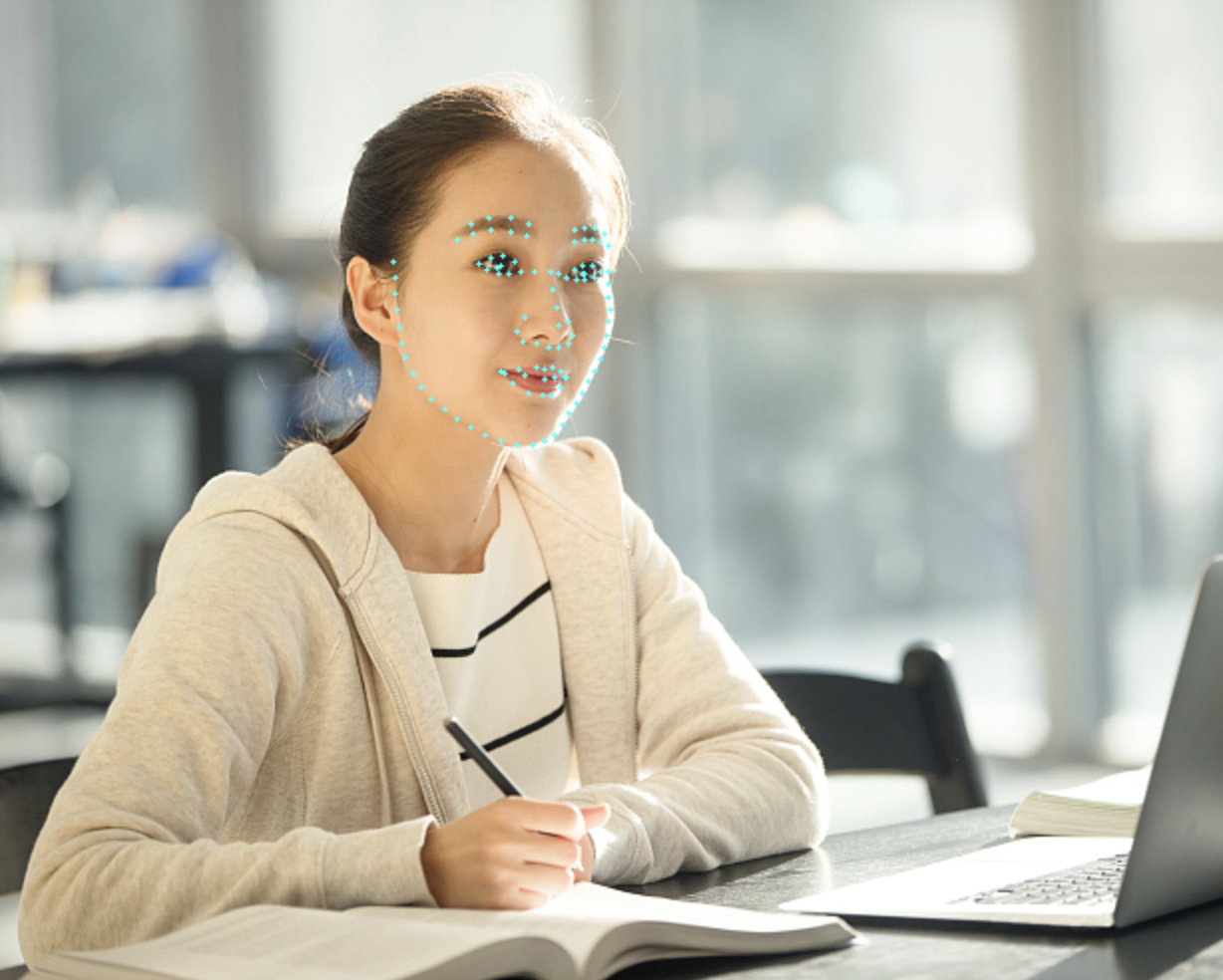
Example code:
const session = wx.createVKSession({
  track: {
    face: { mode: 2 } // mode: 1 - use camera; 2 - manually input image
  },
})
// In static image detection mode, each call to the detectFace API triggers an updateAnchors event
session.on('updateAnchors', anchors => {
  anchors.forEach(anchor => {
    console.log('anchor.points', anchor.points)
    console.log('anchor.origin', anchor.origin)
    console.log('anchor.size', anchor.size)
    console.log('anchor.angle', anchor.angle)
  })
})

// A single call to start is required to initiate the session
session.start(errno => {
  if (errno) {
    // If failed, errno will be returned
  } else {
    // Otherwise, null is returned, indicating success
    session.detectFace({
      frameBuffer, // Image ArrayBuffer data. Face image pixel data, where every four items represent the RGBA of a pixel
      width, // Image width
      height, // Image height
      scoreThreshold: 0.5, // Score threshold
      sourceType: 1,
      modelMode: 1,
    })
  }
})
2. Real-time Detection via Camera
The algorithm detects faces in real-time from the camera feed. It outputs the face position coordinates, 106 keypoint coordinates, and the face's rotation angles in the 3D coordinate system in real-time via the VKSession.on interface.
Example code:
const session = wx.createVKSession({
  track: {
    face: { mode: 1 } // mode: 1 - Use camera; 2 - Manually pass image
  },
})

// In real-time camera detection mode, the updateAnchors event is triggered continuously when a face is detected (once per frame)
session.on('updateAnchors', anchors => {
  anchors.forEach(anchor => {
    console.log('anchor.points', anchor.points)
    console.log('anchor.origin', anchor.origin)
    console.log('anchor.size', anchor.size)
    console.log('anchor.angle', anchor.angle)
  })
})

// The removeAnchors event is triggered when the face leaves the camera view
session.on('removeAnchors', () => {
  console.log('removeAnchors')
})

// You must call start once to initiate
session.start(errno => {
  if (errno) {
    // If failed, errno is returned
  } else {
    // Otherwise, null is returned, indicating success
  }
})
3. Enable 3D Key Point Detection
To enable the 3D face key point detection capability, in static image mode, simply add the open3d field to the 2D call parameters, as shown below:
// Static image mode call
session.detectFace({
      ...,           // Same parameters as the 2D call
      open3d: true,  // Enable 3D face key point detection capability, defaults to false
    })
In real-time camera mode, add a 3D mode update function to the 2D call, as shown below:
// Real-time camera mode call
session.on('updateAnchors', anchors => {
  this.session.update3DMode({open3d: true})  // Enable 3D face key point detection capability, defaults to false
  ...,  // Same parameters as the 2D call
})
Output Description
1. Point Definitions
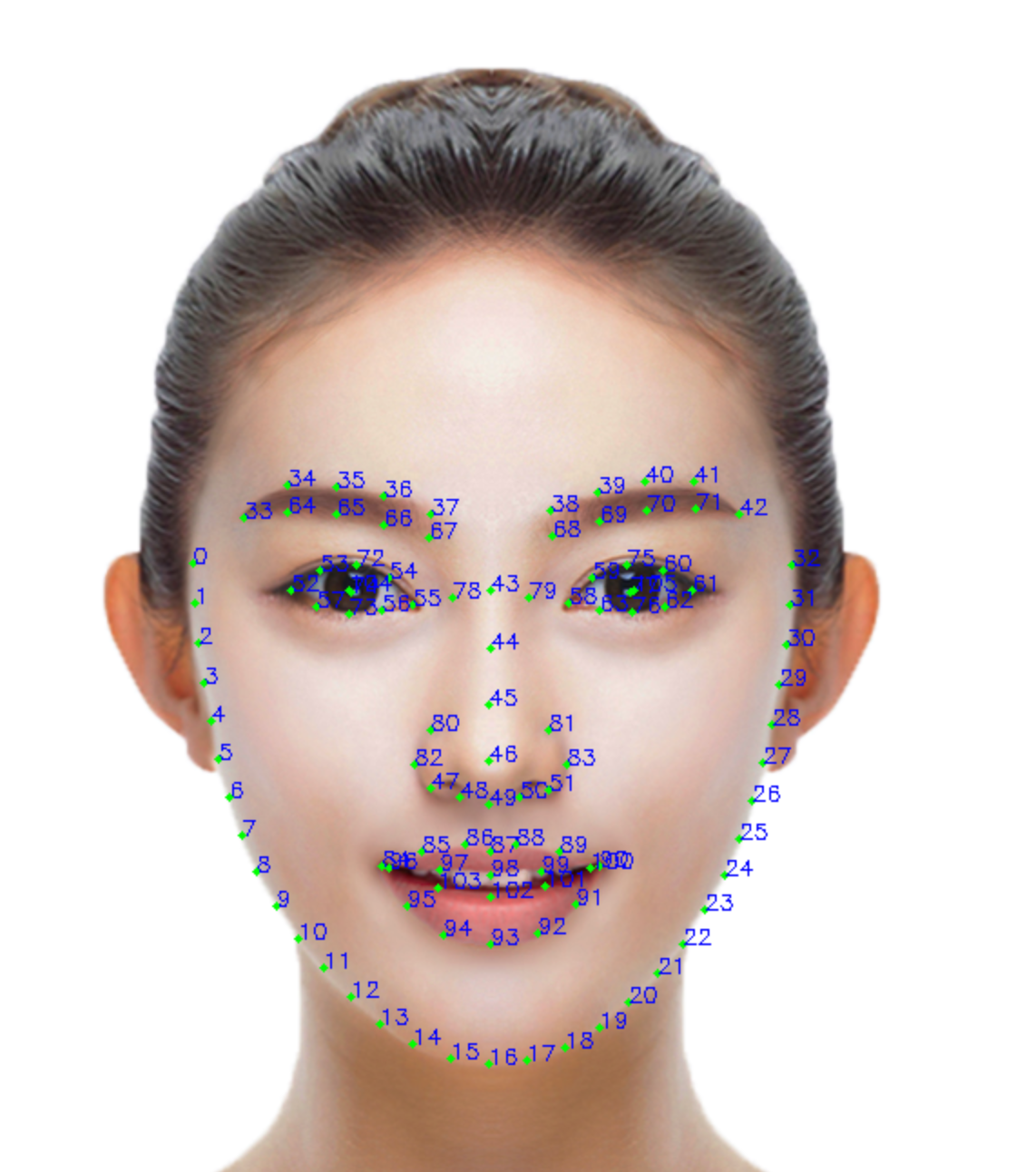
Both 2D and 3D face key points consist of 106 points. The definition method is illustrated in the figure below. When the face pose changes, the contour points of the 2D face key points always follow the visible face edge, while the 3D face key points maintain the three-dimensional structure.
2. Face 2D Key Points
The output fields for Face 2D Key Points include:
struct anchor
{
  points,    // (x,y) coordinates of the 106 points in the image
  origin,    // (x,y) coordinates of the top-left corner of the face box
  size,      // width and height of the face box (w,h)
  angle,     // face angle information (pitch, yaw, roll)
  confidence // confidence score of the face key points
}
3. Face 3D Key Points
Once the Face 3D key point detection capability is enabled, you can retrieve both 2D and 3D face key point information. The output fields for Face 3D key points include:
struct anchor
{
  ...,               // Face 2D key point output information
  points3d,          // (x,y,z) 3D coordinates for 106 face points
  camExtArray,       // Camera extrinsic matrix, defined as [R, T \\ 0^3 , 1]. Use camera intrinsic and extrinsic matrices to project 3D points back to the image
  ccamIntArray       // Camera intrinsic matrix, refer to glm::perspective(fov, width / height, near, far);
}
Application Scenarios
- Face detection.
- Face effects.
- Face pose estimation.
- Face AR games.
Code Examples
- Reference for using real-time camera face detection capability
- Reference for using static image face detection capability
Special Notes
If the Mini Program face recognition function involves collecting or storing user biometric features (such as face photos or videos, ID cards and hand-held ID cards, ID card photos and headshots, etc.), this type of service must use the WeChat Native Face Recognition API.