This API should be called on the server side and cannot be called directly on the client side (Mini Program, web page, APP, etc.). For details, please refer to API Call Guide.
API English Name: batchcreateretail
This API allows for the pre-filling of store information.
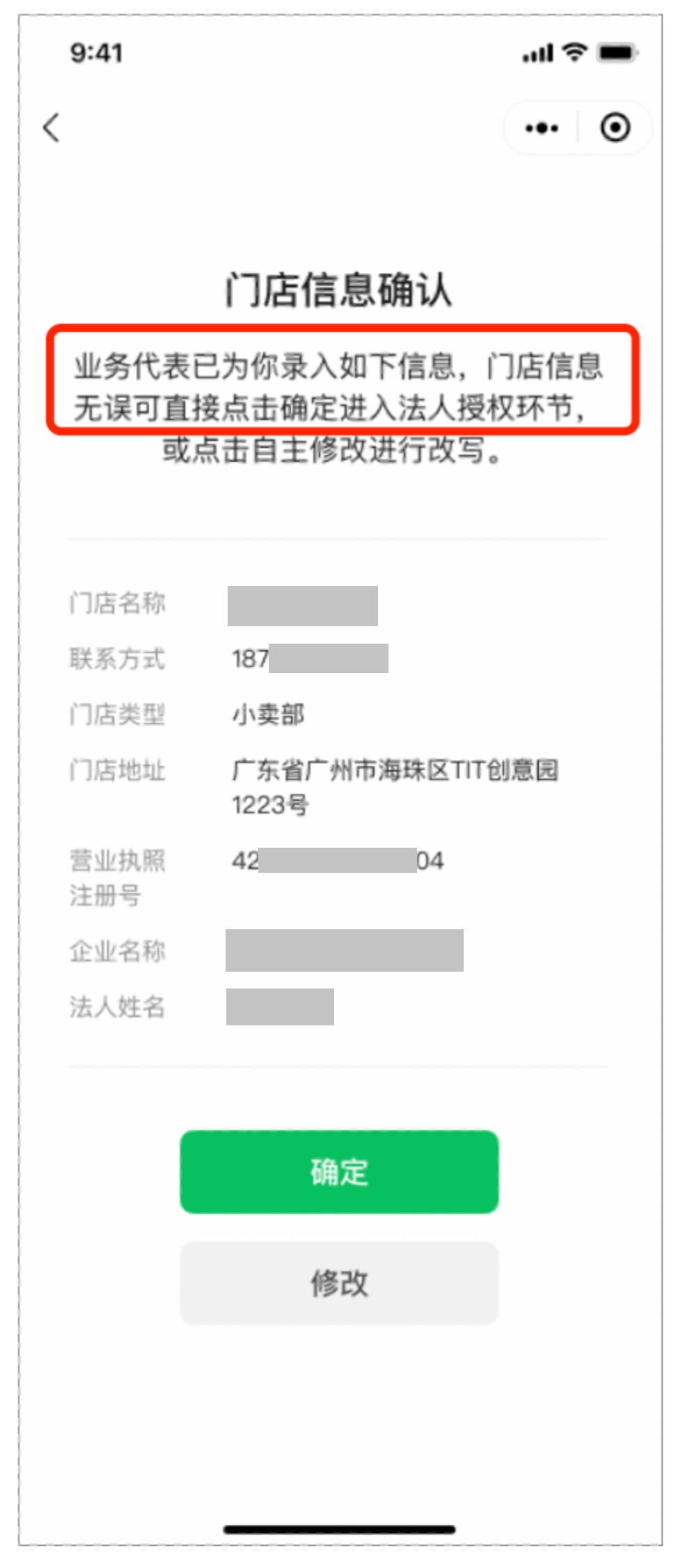
Scenario Description: For users who have pre-filled store information, when logging into Mini Program to initiate the store authentication and authorization process, the pre-filled store information is displayed by default. Users can complete the authentication and authorization with a single confirmation, reducing operational costs and improving the success rate of authentication and authorization.
1. Call Method
HTTPS Call
POST https://api.weixin.qq.com/wxa/business/batchcreateretail?access_token=ACCESS_TOKEN
Cloud Call
- This API does not support cloud call.
Third-party Call
-
This API supports third-party platforms on behalf of Merchant call.
-
The permission set ID of this API is: 158
-
After the service provider obtains one of the permission set authorizations, it can use authorizer_access_token to call on behalf of Merchant, for details please refer to Third-party Call documentation.
2. Request Parameters
Query Parameters Query String Parameters
| Parameter | Type | Required | Example | Description |
|---|---|---|---|---|
| access_token | string | Yes | ACCESS_TOKEN | API call credential, you can use access_token, authorizer_access_token |
Request Body Request Payload
| Parameter | Type | Required | Description |
|---|---|---|---|
| retail_info_list | objarray | Yes | Store information list. A maximum of 100 stores can be imported per call. |
Body.retail_info_list(Array) Object Payload
Store information list. A maximum of 100 stores can be imported per call.
| Parameter | Type | Required | Description |
|---|---|---|---|
| mobile_phone | string | Yes | Phone Number |
| retail_name | string | Yes | Store Name. Length limit: 1-100 characters, where one Chinese character counts as 2 characters. |
| retail_type | string | No | Level 1 Store Type. Options: "Grocery", "Convenience Store", "Supermarket", "Restaurant", "Maternity & Baby", "Tobacco & Alcohol", "Other" |
| sub_retail_type | string | No | Level 2 Store Type. Required if Level 1 type is "Other". |
| address_province | string | Yes | Store Address, Province |
| address_city | string | Yes | Store Address, City |
| address_region | string | Yes | Store Address, District |
| address_street | string | Yes | Store Address, Detailed Street Address |
| registration_number | string | No | Business License Registration Number |
| biz_name | string | No | Enterprise Name |
| corporation_name | string | No | Legal Representative Name |
| latitude | number | No | Latitude |
| longitude | number | No | Longitude |
| business_type | array | No | Level 1 Main Product. Options: "Food & Beverage", "Catering", "Fresh Produce (including Flowers)", "Tobacco & Alcohol", "Footwear & Underwear", "Personal Care & Beauty", "3C Digital", "Home Appliances", "Auto Repair/Parts", "Medical/Devices", "Home Decoration/Hardware/Building Materials", "Home Textiles", "Stationery & Toys", "Maternity & Baby", "Pets", "Other" |
| other_business_type | string | No | Level 2 Main Product. Required if Level 1 Main Product includes "Other". |
3. Response Parameters
Response Body Response Payload
| Parameter | Type | Description |
|---|---|---|
| errcode | number | Error Code |
| errmsg | string | Error Message |
| num_success | number | num_success |
| num_failure | number | num_failure |
| failure_record_list | objarray | failure_record_list |
Res.failure_record_list(Array) Object Payload
failure_record_list
| Parameter | Type | Description | Enum |
|---|---|---|---|
| mobile_phone | string | Phone Number | - |
| registration_number | string | Business License Registration Number | - |
| failure_code | number | failure_code | Enum Values |
4. Enum Information
Res.failure_record_list(Array).failure_code Enum
failure_code
| Enum Value | Description |
|---|---|
| 2 | Invalid phone number |
| 3 | Invalid store type |
| 4 | Address parsing failed |
| 5 | Phone number already associated with store information |
| 6 | Invalid store name (Length limit is 1-100 characters, where one Chinese character counts as 2 characters) |
| 7 | Invalid main product |
5. Notes
If the call to this interface returns the failure code 4: Address Parsing Failed, you can pass the address data that failed to import into the Address Parsing Interface (Address Parsing Interface Documentation) to obtain the standardized province, city, and district, and then re-import it. Attachment: Valid Address Combinations for Store Assistant
Common QA
- After pre-filling store information, what is the correct way to retrieve the information to complete authentication, and why might errors occur?
Answer: ① Brand pre-fills store information: Suppose Phone A has store information pre-filled by a brand. Any WeChat ID can log into Phone A + verification code to retrieve the store information. Once the store information is retrieved, the same WeChat ID that originally logged into Phone A to retrieve the information must be used to continue completing the authentication; otherwise, using a different WeChat ID will result in an error.
② Store pre-fills store information itself: Suppose WeChat ID A logs into Phone B + verification code to pre-fill some store information, then exits the plugin. Later, if another WeChat ID logs into Phone B + verification code to retrieve the previously pre-filled information and continue authentication, an error will occur. You must use the original WeChat ID A to log into Phone B + verification code to retrieve the information.
Note: Regardless of the pre-filling method, once the store authentication process is completed and authentication is successful, any WeChat ID can use the same phone number + verification code to retrieve the authenticated store information and make modifications to the store information.
6. Code Example
Request Example
{
    "retail_info_list": [
        {
            "mobile_phone": "12345678910",
            "retail_name": "Zhang San BBQ",
            "retail_type": "Restaurant",
            "address_province": "Guangdong Province",
            "address_city": "Guangzhou City",
            "address_region": "Haizhu District",
            "address_street": "No. 397 Xingang Middle Road, TIT Creative Park",
            "longitude": 113.32531,
            "latitude": 23.0996132
        },
        {
            "mobile_phone": "a123456789",
            "retail_type": "Convenience Store",
            "address_province": "Guangdong Province",
            "address_city": "Guangzhou City",
            "address_region": "Haizhu District",
            "address_street": "No. 397 Xingang Middle Road, TIT Creative Park",
            "registration_number": "xxxxx",
            "biz_name": "xxxxx",
            "corporation_name": "xxxxx"
        }
    ]
}
Response Example
{
    "errcode": 0,
    "errmsg": "ok",
    "num_success": 1,
    "num_failure": 1,
    "failure_record_list": [
        {
            "mobile_phone": "a123456789",
            "registration_number": "",
            "failure_code": 6
        }
    ]
}
7. Error Codes
The following is the error code list of this API, other error codes can refer to Common Error Codes; When encountering errors in calling the API, you can use the official API Diagnostic Tool to assist in locating and analyzing problems.
| Error Code | Error Description |
|---|---|
| -1 | System is busy, please try again later |
| 0 | Success |
| 40001 | invalid credential, access_token is invalid or not latest. Invalid token. |
| 41001 | access_token missing |
| 47001 | data format error |
| 48001 | api unauthorized Mini Program does not have permission for this API. Please contact the point of contact to enable it. |
| 61004 | access clientip is not registered, not in ip-white-list |
| 61007 | api is unauthorized to component |
| 9404000 | Too many uploads |
| 9404001 | Missing store information parameters |
8. Applicable Scope
The callable account types for this API are not yet clear, or are determined by the calling parameters in business. Please refer to the actual calling situation.