miniprogram-ci is a compilation module extracted from WeChat DevTools for Mini Program /Mini Game project code.
Developers can use miniprogram-ci independently to upload or preview Mini Program code without opening the Mini Program DevTools.
miniprogram-ci supports third-party platform upload and preview starting from version 1.0.28, with the same invocation method as standard development mode. View details
Key and IP Whitelist Configuration
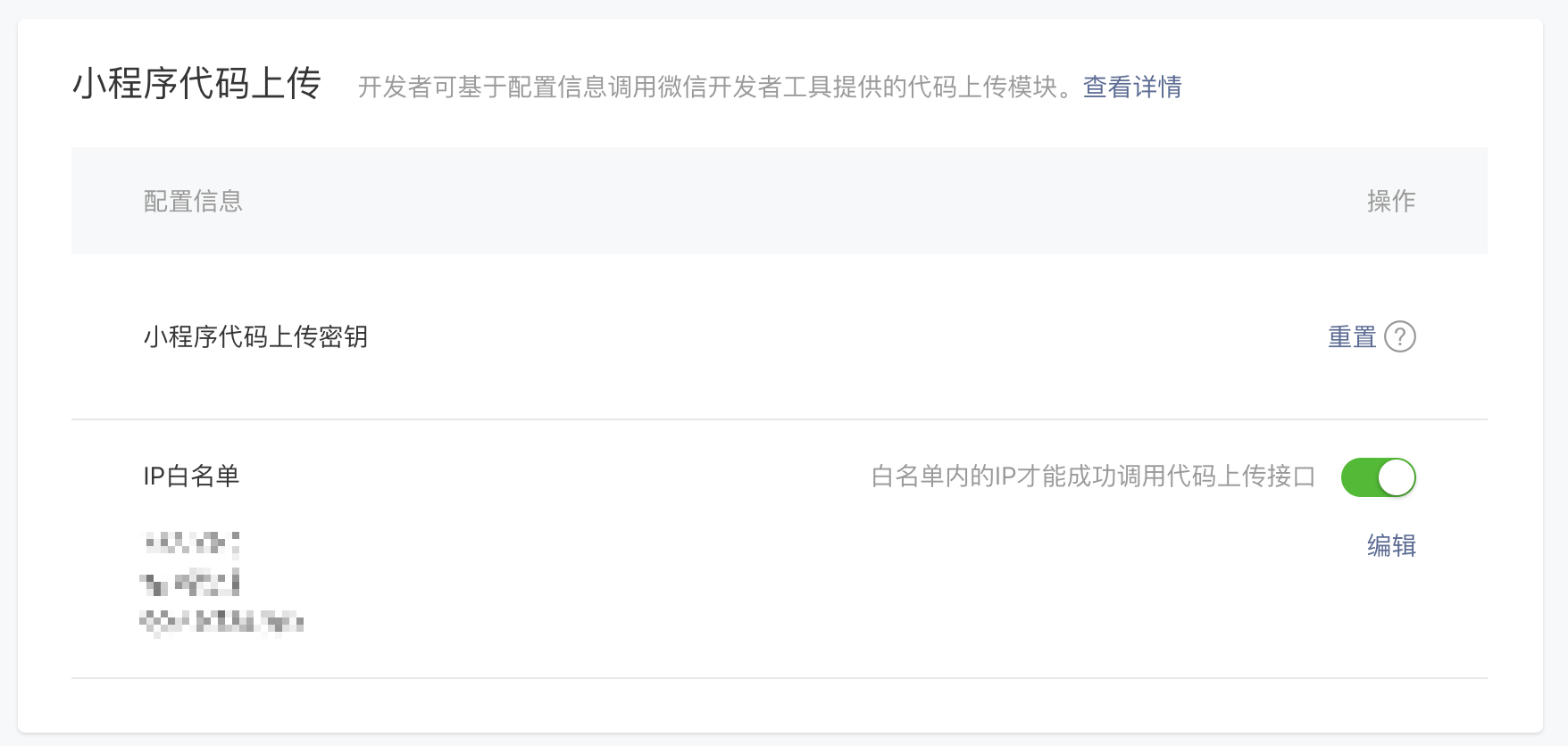
Before using miniprogram-ci, visit "WeChat Official Accounts Platform - Management - Development Management - Development Settings - Mini Program Code Upload" to generate a "Code Upload Key" and configure the IP whitelist.
Developers can choose to enable the IP whitelist. Once enabled, only IPs in the whitelist can call the relevant APIs. We recommend that all developers enable this option by default to reduce risks.
The Code Upload Key holds permissions for previewing and uploading code. The key is not stored in plaintext on the WeChat Official Accounts Platform. Once lost, it must be reset. Developers are advised to keep the key properly secured.
Features
miniprogram-ci currently provides the following capabilities:
- Upload code, corresponding to the upload feature in the Mini Program Developer Tools
- Preview code, corresponding to the preview feature in the Mini Program Developer Tools
- Build npm, corresponding to: Menu - Tools - Build npm in the Mini Program Developer Tools
- Upload Cloud Development cloud function code, corresponding to the upload cloud function feature in the Mini Program Developer Tools
- Upload Cloud Hosting code, corresponding to the upload Cloud Hosting feature in the Mini Program Developer Tools
- Upload Cloud Storage / Static Hosting files, corresponding to Cloud Development - Cloud Storage and Static Hosting file management in the Mini Program Developer Tools
- Proxy, configure the network request proxy mode for miniprogram-ci
- Retrieve the sourceMap of the most recent uploaded version
- Support invocation via node scripts and command line
Script Invocation
npm install miniprogram-ci --save
Project Object
The Project Object is the primary input parameter for this module. You can implement it yourself based on the definition below.
Definition of the Project Object:
interface IProject {
 appid: string
 type: string
 projectPath: string
 privateKey: string
 attr(): Promise<IProjectAttr>
 stat(prefix: string, filePath: string): IStat | undefined
 getFile(prefix: string, filePath: string): Promise<Buffer>
 getFileList(prefix: string, extName: string): string[]
 updateFiles: () => void
}
| Key | Type | Description |
|---|---|---|
| appid | Property | Mini Program /appid of the Mini Game project |
| type | Property | The type of the project. Valid values are miniProgram/miniProgramPlugin/miniGame/miniGamePlugin |
| projectPath | Property | The path of the project, i.e., the directory containing project.config.json |
| privateKey | Property | Private key, used for authentication when fetching project attributes and uploading. Download it after logging in to the WeChat Official Platform |
| attr | Async Method | Project attributes. If privateKey is specified, the actual project attributes will be used |
| stat | Sync Method | The stat of the file path (filePath) under the prefix (prefix) in a specific directory. Returns undefined if it does not exist |
| getFile | Async Method | The Buffer of the file path (filePath) under the prefix (prefix) in a specific directory |
| getFileList | Sync Method | The list of files under the file path (filePath) under the prefix (prefix) in a specific directory |
| updateFile | Sync Method | Update project files |
You can also create this object by specifying the project path
const ci = require('miniprogram-ci')
// Note: When calling new ci.Project, ensure that the project code is complete to avoid errors due to missing files during the compilation process.
const project = new ci.Project({
 appid: 'wxsomeappid',
 type: 'miniProgram',
 projectPath: 'the/project/path',
 privateKeyPath: 'the/privatekey/path',
 ignores: ['node_modules/**/*'],
})
| Key | Type | Required | Description |
|---|---|---|---|
| appid | string | Yes | Valid Mini Program /Mini Game appid |
| projectPath | string | Yes | Project path |
| privateKeyPath | string | Yes | Path to the private key |
| type | string | No | Explicitly specifies the current project type. The default is miniProgram. Valid values: miniProgram/miniProgramPlugin/miniGame/miniGamePlugin |
| ignores | string[] | No | Specifies rules for exclusion |
Upload
const ci = require('miniprogram-ci')
;(async () => {
  const project = new ci.Project({
    appid: 'wxsomeappid',
    type: 'miniProgram',
    projectPath: 'the/project/path',
    privateKeyPath: 'the/path/to/privatekey',
    ignores: ['node_modules/**/*'],
  })
  const uploadResult = await ci.upload({
    project,
    version: '1.1.1',
    desc: 'hello',
    setting: {
      es6: true,
    },
    onProgressUpdate: console.log,
  })
  console.log(uploadResult)
})()
Parameters
| Key | Type | Required | Description |
|---|---|---|---|
| project | IProject | Yes | #Project object |
| version | string | Yes | Custom version number |
| desc | string | No | Custom description |
| setting | object | No | #Compilation settings |
| onProgressUpdate | function | No | Progress update listener function |
| robot | number | No | Specify which CI robot to use, valid values: 1 to 30 |
| threads | number | No | Specify the number of threads to launch during local compilation |
Return
| Key | Type | Required | Description |
|---|---|---|---|
| subPackageInfo | Array<{name:string, size:number}> | No | Mini Program package information. name represents the entire Mini Program package when it is __FULL__, represents the Mini Program main package when it is __APP__, and represents a subpackage in other cases. |
| pluginInfo | Array<{pluginProviderAppid:string, version: string, size:number}> | No | Mini Program plugin information |
| devPluginId | string | No | The plugin ID for the uploaded version in plugin development mode |
Preview
const ci = require('miniprogram-ci')
;(async () => {
 const project = new ci.Project({
 appid: 'wxsomeappid',
 type: 'miniProgram',
 projectPath: 'the/project/path',
 privateKeyPath: 'the/path/to/privatekey',
 ignores: ['node_modules/**/*'],
})
 const previewResult = await ci.preview({
 project,
 desc: 'hello', // This description will appear in the development version list of " Mini Program Assistant"
 setting: {
 es6: true,
},
 qrcodeFormat: 'image',
 qrcodeOutputDest: '/path/to/qrcode/file/destination.jpg',
 onProgressUpdate: console.log,
 // pagePath: 'pages/index/index', // Preview page
 // searchQuery: 'a=1&b=2', // Preview parameters [Note!] The `&` character here should be written as the escape character `\&` in the command line
})
 console.log(previewResult)
})()
Parameters
| Key | Type | Required | Description |
|---|---|---|---|
| project | IProject | Yes | #Project object |
| desc | string | No | Custom remark, displayed in the " Mini Program Assistant" development version list |
| setting | object | No | #Compilation settings |
| onProgressUpdate | function | No | Progress update listener function |
| robot | number | No | Specifies which CI robot to use, optional values: 1 ~ 30 |
| qrcodeFormat | string | No | Format of the returned QR code file, "image" or "base64", default value "terminal" for debugging |
| qrcodeOutputDest | string | Yes | Save path for the QR code file |
| pagePath: | string | No | Preview page path |
| searchQuery: | string | No | Startup parameters for the preview page |
| scene | number | No | Default value 1011, see Scene Value List for specific meanings |
Return Value
| Key | Type | Required | Description |
|---|---|---|---|
| subPackageInfo | Array<{name:string, size:number}> | No | Mini Program package information. If name is __FULL__, it indicates the entire Mini Program package; if name is __APP__, it indicates the Mini Program main package; otherwise, it indicates a subpackage |
| pluginInfo | Array<{pluginProviderAppid:string, version: string, size:number}> | No | Mini Program plugin information |
Build npm
Corresponds to the Build npm feature in Developer Tools.
const ci = require('miniprogram-ci')
;(async () => {
  const project = new ci.Project({
    appid: 'wxsomeappid',
    type: 'miniProgram',
    projectPath: 'the/project/path',
    privateKeyPath: 'the/path/to/privatekey',
    ignores: ['node_modules/**/*'],
  })
  // Build npm when necessary
  const warning = await ci.packNpm(project, {
    ignores: ['pack_npm_ignore_list'],
    reporter: (infos) => { console.log(infos) }
  })
  console.warn(warning)
  // Can format the warning
  /*
    warning.map((it, index) => {
            return `${index + 1}. ${it.msg}
    \t> code: ${it.code}
    \t@ ${it.jsPath}:${it.startLine}-${it.endLine}`
          }).join('---------------\n')
  */
  // After building npm, you can use ci.preview or ci.upload
})()
| Parameter | Type | Required | Description |
|---|---|---|---|
| project | IProject | Yes | Project object |
| options.ignores | string[] | No | Rules to exclude when building npm |
| options.reporter | function | No | Build callback information |
Fetch the sourceMap of the Most Recent Uploaded Version
const ci = require('miniprogram-ci')
;(async () => {
  const project = new ci.Project({
    appid: 'wxsomeappid',
    type: 'miniProgram',
    projectPath: 'the/project/path',
    privateKeyPath: 'the/path/to/privatekey',
    ignores: ['node_modules/**/*'],
  })
  await ci.getDevSourceMap({
    project,
    robot: 1,
    sourceMapSavePath: './sm.zip'
  })
})()
Parameters
| Key | Type | Required | Description |
|---|---|---|---|
| project | IProject | Yes | #Project object |
| robot | number | Yes | Specifies which CI robot to use. Optional values: 1 ~ 30 |
| sourceMapSavePath | string | Yes | The path to save |
Build npm with a custom node_modules location
Sometimes, the node_modules associated with the modules to be built may not be located within the Mini Program project. Therefore, a new interface has been provided to support this requirement.
For example, consider the following project structure:
├── lib # The lib directory contains the node_modules to be built
│ ├── node_modules
│ │ └── is-object
│ └── package.json
└── miniprogram-project # This is the Mini Program project path
 ├── miniprogram # We want the final miniprogram_npm to be built under the miniprogram/ directory
 │ ├── app.js
 │ ├── app.json
 │ ├── app.wxss
 │ ├── pages
 │ │ ├── index
 │ │ └── logs
 │ └── sitemap.json
 └── project.config.json
You can then invoke it as follows:
let packResult = await ci.packNpmManually({
 packageJsonPath: './lib/package.json',
 miniprogramNpmDistDir: './miniprogram-project/miniprogram/',
})

console.log('pack done, packResult:', packResult)
// Output: pack done, packResult: {miniProgramPackNum: 0, otherNpmPackNum: 1, warnList: []}
The resulting final project structure is:
.
├── lib
│ ├── node_modules
│ │ └── is-object
│ └── package.json
└── miniprogram-project
 ├── miniprogram
 │ ├── app.js
 │ ├── app.json
 │ ├── app.wxss
 │ ├── miniprogram_npm # <--- This is the miniprogram_npm built from lib/node_modules
 │ ├── pages
 │ └── sitemap.json
 └── project.config.json
| Parameter | Type | Required | Description |
|---|---|---|---|
| options.packageJsonPath | string | Yes | The path to the package.json corresponding to the node_modules to be built |
| options.miniprogramNpmDistDir | string | Yes | The target location for the built miniprogram_npm |
| options.ignores | string[] | No | Specify the rules to exclude |
Upload Cloud Development Cloud Function
Corresponds to the Cloud Function upload feature in the Cloud Development section of WeChat DevTools.
const ci = require('miniprogram-ci')
;(async () => {
  const project = new ci.Project({
    appid: 'wxsomeappid',
    type: 'miniProgram',
    projectPath: 'the/project/path',
    privateKeyPath: 'the/path/to/privatekey',
    ignores: ['node_modules/**/*'],
  })

  const result = await ci.cloud.uploadFunction({
    project,
    env: 'Cloud Environment ID',
    name: 'Cloud Function Name',
    path: 'Cloud Function Code Directory',
    remoteNpmInstall: true, // Whether to install dependencies in the cloud
  })
  console.warn(result)
})()
| Parameter | Type | Required | Description |
|---|---|---|---|
| project | IProject | Yes | Project object |
| env | string | Yes | Cloud Environment ID |
| name | string | Yes | Cloud Function Name |
| path | string | Yes | Cloud Function Code Directory |
| remoteNpmInstall | boolean | No | Whether to install dependencies in the cloud, default is false |
Additional note on remoteNpmInstall: When set to true, dependencies are installed in the cloud, and the local node_modules is not uploaded. When set to false, a full upload is performed, including node_modules.
Upload Cloud Development Static Website/Cloud Storage
Corresponds to the upload capabilities for Static Website Hosting and Cloud Storage in the Cloud Development features of the Developer Tools.
You need to install the alpha version: npm install --save miniprogram-ci@alpha
const ci = require('miniprogram-ci')
;(async () => {
  const project = new ci.Project({
    appid: 'wxsomeappid',
    type: 'miniProgram',
    projectPath: 'the/project/path',
    privateKeyPath: 'the/path/to/privatekey',
    ignores: ['node_modules/**/*'],
  })
  // Static website
  const resultStatic = await ci.cloud.uploadStaticStorage({
    project,
    env: 'Cloud Environment ID',
    path: 'Local file directory',
    remotePath: 'Remote file directory to upload to',
  })
  // Cloud storage
  const resultStorage = await ci.cloud.uploadStorage({
    project,
    env: 'Cloud Environment ID',
    path: 'Local file directory',
    remotePath: 'Remote file directory to upload to',
  })
  console.warn(resultStatic, resultStorage)
})()
| Parameter | Type | Required | Description |
|---|---|---|---|
| project | IProject | Yes | Project object |
| env | string | Yes | Cloud Environment ID |
| path | string | Yes | Local file directory |
| remotePath | boolean | No | Remote file directory to upload to |
Creating a New Cloud Base Cloud Hosting Version
This corresponds to the new version creation capability of Cloud Hosting under Cloud Base in WeChat DevTools.
You need to install the alpha version: npm install --save miniprogram-ci@alpha
const ci = require('miniprogram-ci')
;(async () => {
  const project = new ci.Project({
    appid: 'wxsomeappid',
    type: 'miniProgram',
    projectPath: 'the/project/path',
    privateKeyPath: 'the/path/to/privatekey',
    ignores: ['node_modules/**/*'],
  })
  const result = await ci.cloud.uploadContainer({
    project,
    env: 'Cloud Environment ID',
    version: {
      uploadType: 'package', // Upload method
      flowRatio: 0, // Traffic ratio
      cpu: 0.25, // CPU cores
      mem: 0.5, // Memory size
      minNum: 0, // Minimum number of replicas
      maxNum: 1, // Maximum number of replicas
      policyType: 'cpu', // Scaling condition
      policyThreshold: 60, // Scaling threshold
      containerPort: 80, // Container listening port
      serverName: 'server', // Service name
      versionRemark: 'ci', // Version remarks
      envParams: '{}', // Environment variables
      buildDir: '', // Build directory
      dockerfilePath: '' // Dockerfile path
    },
    containerRoot: 'the/path/to/container' // Directory of the version files to be uploaded
  })
  console.warn(result)
})()
| Parameter | Type | Required | Description |
|---|---|---|---|
| project | IProject | Yes | Project object |
| env | string | Yes | Cloud Environment ID |
| containerRoot | string | Yes | Local container file directory |
| version.uploadType | string | Yes | Upload type (package/repository/image) |
| version.flowRatio | number | Yes | Default traffic ratio after creating the new version |
| version.cpu | number | Yes | Number of CPU cores (Refer to Container Specifications) |
| version.mem | number | Yes | Memory size (Refer to Container Specifications) |
| version.minNum | number | Yes | Minimum number of replicas |
| version.maxNum | number | Yes | Maximum number of replicas |
| version.policyType | string | Yes | Scaling condition. Currently only supports: cpu |
| version.policyThreshold | number | Yes | Scaling threshold |
| version.containerPort | number | Yes | Container listening port |
| version.serverName | string | Yes | Service name |
| version.versionRemark | string | No | Version remarks |
| version.dockerfilePath | string | No | Dockerfile path |
| version.buildDir | string | No | Build directory |
| version.envParams | string | No | Environment variables |
Proxy
miniprogram-ci uses the get-proxy module to automatically retrieve the proxy address.
If you do not use the ci.proxy() method or the --proxy parameter to specify a proxy, miniprogram-ci will retrieve the HTTPS proxy address in the following order:
- Retrieve
HTTPS_PROXYfrom environment variables - Retrieve
https_proxyfrom environment variables - Retrieve
HTTP_PROXYfrom environment variables - Retrieve
http_proxyfrom environment variables - Retrieve
https-proxyfrom npm configuration - Retrieve
http-proxyfrom npm configuration - Retrieve
proxyfrom npm configuration - Add
servicewechat.comto theno_proxyenvironment variable; miniprogram-ci will not send network requests through the proxy
const ci = require('miniprogram-ci')
ci.proxy('YOUR_PROXY_URL')
Command-line Invocation
npm install -g miniprogram-ci
#help
miniprogram-ci --help

#preview
miniprogram-ci \
  preview \
  --pp ./demo-proj/ \
  --pkp ./private.YOUR_APPID.key \
  --appid YOUR_APPID \
  --uv PACKAGE_VERSION \
  -r 1 \
  --enable-es6 true \
  --proxy YOUR_PROXY \
  --qrcode-format image \
  --qrcode-output-dest '/tmp/x.jpg' \

#upload

miniprogram-ci \
  upload \
  --pp ./demo-proj/ \
  --pkp ./private.YOUR_APPID.key \
  --appid YOUR_APPID \
  --uv PACKAGE_VERSION \
  -r 1 \
  --enable-es6 true \

#pack-npm
miniprogram-ci \
  pack-npm \
  --pp ./YOUR_PROJECT/ \
  --pkp ./private.YOUR_APPID.key \
  --appid YOUR_APPID \


#pack-npm-manually
miniprogram-ci \
pack-npm-manually \
--pack-npm-manually-package-json-path PACKAGE_JSON_PATH \
--pack-npm-manually-miniprogram-npm-dist-dir DISTPATH

#cloudbase upload cloudfunction
miniprogram-ci cloud functions upload \
  --pp ./YOUR_PROJECT/ \
  --appid YOUR_APPID \
  --pkp ./private.YOUR_APPID.key \
  --env YOUR_CLOUD_ENV_ID \
  --name YOUR_CLOUD_FUNCTION_NAME \
  --path ./YOUR_CLOUD_FUNCTION_FOLDER_PATH/ \
  --remote-npm-install true

#proxy
export HTTPS_PROXY = YOUR_PROXY_URL # You can declare a temporary proxy in the shell script

miniprogram-ci \
  upload \
  --pp ./demo-proj/ \
  --pkp ./private.YOUR_APPID.key \
  --appid YOUR_APPID \
  --uv PACKAGE_VERSION \
  -r 1 \
  --enable-es6 true \
  --proxy YOUR_PROXY_URL # You can also use this parameter to declare the proxy

#get dev source map
  miniprogram-ci \
  get-dev-source-map \
  --pp ./demo-proj/ \
  --pkp ./private.YOUR_APPID.key \
  --appid YOUR_APPID \
  -r 1 \ # Specify which robot's most recently uploaded version's sourceMap to retrieve
  --source-map-save-path ./sourcemap.zip # Save path, .zip extension recommended; the final output is a zip package
Compilation Settings
| Key | Type | Description |
|---|---|---|
| es6 | boolean | Corresponds to the "es6 to es5" option in Mini Program Developer Tools |
| es7 | boolean | Corresponds to the "Enhanced Compilation" option in Mini Program Developer Tools |
| minifyJS | boolean | Minifies JS code |
| minifyWXML | boolean | Minifies WXML code |
| minifyWXSS | boolean | Minifies WXSS code |
| minify | boolean | Minifies all code; corresponds to the "Code Minification" option in Mini Program Developer Tools |
| codeProtect | boolean | Corresponds to the "Code Protection" option in Mini Program Developer Tools |
| autoPrefixWXSS | boolean | Corresponds to the "Automatic Style Prefixing" option in Mini Program Developer Tools |
Regarding the Code Compilation Options of Mini Program Developer Tools
Third-Party Platform Development
Starting from version 1.0.28, miniprogram-ci supports upload and preview for third-party platform development. The invocation method is identical to standard development mode.
When using third-party platform development mode, please note the following:
- Ensure that a correct
ext.jsonfile exists in the project. - The private key file must be the private key file associated with the development Mini Program's
appidbound to the third-party platform. - The IP whitelist must be the IP whitelist associated with the development Mini Program's
appidbound to the third-party platform. - The
appidparameter passed during invocation must be theappidof the development Mini Program bound to the third-party platform. For more information on third-party platform development mode, please refer to here.