When the free duration is insufficient, the Cloud Testing service supports two purchase options:
Purchase Methods Comparison
The two purchase methods are compared as follows:
| Comparison Item | Dedicated Cloud Purchase | Additional Duration Purchase |
|---|---|---|
| Test Duration | Unlimited, similar to a subscription model | Purchased package duration + weekly free granted duration |
| Usage Scope | Can configure Dedicated Cloud testing for multiple projects | The project must be specified when purchasing duration. If there are multiple projects, they need to be purchased separately |
| Machine Sharing | Dedicated Cloud machines are exclusively dedicated to the configured project and are not shared with other projects | All projects share the Public Cloud; if other projects occupy machines, you need to wait in queue |
| Quick Test Mode | Supported | Supported, requires selecting machines from the Quick Test Cloud |
| Available Machine Models | Can only test with the purchased Dedicated Cloud machine models; machine model can be changed once per month | Can select from 300+ machine models on the Public Cloud for testing |
| Remote Manual Operation on Real Devices | Supported | Not Supported |
| Detailed Documentation | Purchase Dedicated Cloud | Purchase Additional Duration |
Recommendation:
If the project primarily uses Cloud Testing for automated regression testing, is not sensitive to compatibility testing, and has a high usage volume or requires multiple projects to share resources, purchasing cloud resources is recommended.
If the project requires compatibility testing on specific device models or aims to improve testing speed, purchasing additional time slots is recommended.
FAQ:
1. I want to use the Dedicated Cloud for regression testing and also hope to use additional duration for compatibility testing. Is this supported?
YunCe supports purchasing two plans simultaneously. Users can freely switch between usage modes.
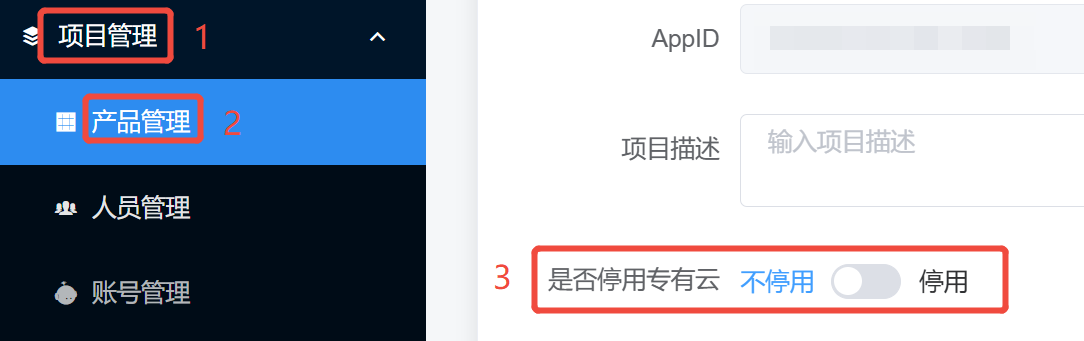
Specifically, go to "Project Management" => "Product Management" and configure the Disable Dedicated Cloud option:
- Do not disable: Continue using the Dedicated Cloud mode with unlimited duration, suitable for regression testing scenarios.
- Disable: Stop using the Dedicated Cloud and revert to the duration-based mode, suitable for compatibility testing scenarios.
Note: This option is only available for projects that have purchased the Dedicated Cloud.
Need Help
If you have any questions about purchasing Cloud Testing, feel free to join the official Cloud Testing WeCom group and contact the group owner for feedback.