As the number of foreign users visiting China continues to grow, certain Mini Programs present limitations regarding mobile numbers, identification documents, and language support, preventing foreigners from using them effectively—or at all. To enhance the user experience for international visitors, developers are encouraged to implement internationalization-friendly adaptation for Mini Programs.
【Optimization Items】
- Account System Adaptation (Required): Ensure that login and ticket-purchase processes are compatible with international phone numbers that do not start with +86. Relax the validation rules for domestic 11-digit phone number formats or add an email login option.
- Information Entry Adaptation (Required): Allow the entry of real-name and ticket-purchase information using overseas identification documents such as passports, and relax character input restrictions for names.
- Multilingual Adaptation (Priority): Mini Program already supports translation into 18 different languages. Developers should verify whether the translated pages and text are properly adapted. To ensure accurate translation of proprietary terms (such as brand names and product names) within Mini Program, it is recommended to maintain a dedicated translation glossary in the Mini Program platform.
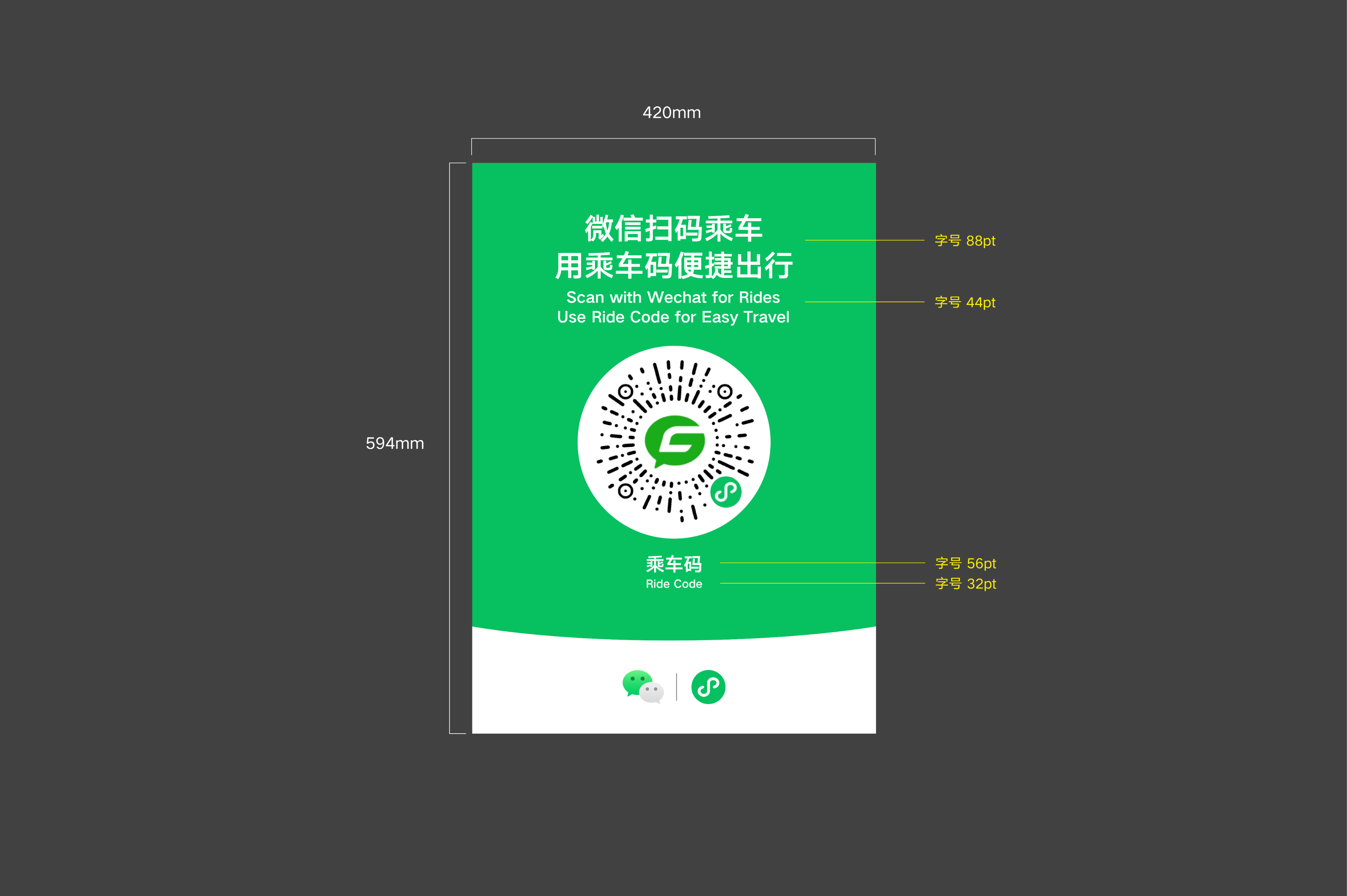
- Bilingual Marketing Materials: Update offline marketing materials in accordance with the Mini Program Material Design Guidelines to improve the scanning experience for foreign users.
It is recommended to use the Internationalization Adaptation Skill to quickly identify code optimization areas
- Usage guide: Mini Program Internationalization Adaptation Skill
- SkillHub: Mini Program Internationalization Adaptation Skill — SkillHub
- ClawHub: Mini Program Internationalization Adaptation Skill — ClawHub
If you have additional product optimization requirements, other feedback, or technical issues, feel free to contact us at miniprogram_global@tencent.com at any time.
1. Account System Adaptation (Required)
The registration, login, and ticket purchase pages must be compatible with international phone numbers not starting with +86, with relaxed validation rules for 11-digit phone numbers, or must support email login, or integrate a Mini Program phone number quick verification component.
1.1. Compatibility with International Phone Numbers Other Than +86
Phone numbers are crucial fulfillment details in scenarios involving travel to China, such as booking scenic spot tickets, placing restaurant orders, and checking into hotels. It is recommended that developers use the platform’s phone number quick verification component or establish their own SMS verification channel to collect users’ phone numbers, thereby adapting to the usage habits of international visitors.
1.1.1. Integration Solutions for International Phone Number Authorization
| Integration Method | Description |
|---|---|
| Integrate the “Quick Phone Number Verification” Component (Recommended) | The WeChat platform has made the Quick Phone Number Verification component service available to Mini Program that are not individual entities and have completed authentication. This is designed to assist developers in requesting phone numbers from users. For detailed guidance, refer to: Quick Phone Number Verification Component | WeChat Open Documentation |
| Developers Build Their Own SMS Verification Channel | Developers can also develop their own processes for phone number entry and verification code delivery on the Mini Program frontend to collect information. If sending SMS verification codes for international phone numbers is involved, it is recommended to pay close attention to the delivery rate for cross-border messages.
|
Whether the phone number is obtained directly from WeChat or manually entered by the user, the underlying system must support international number formats.
1.1.2. Compatibility Logic for International Phone Numbers
| Compatibility Method | Description |
|---|---|
| Compatibility with International Country Codes | Relax the restrictions on phone number country codes, allowing users to enter numbers that do not start with +86 at the frontend.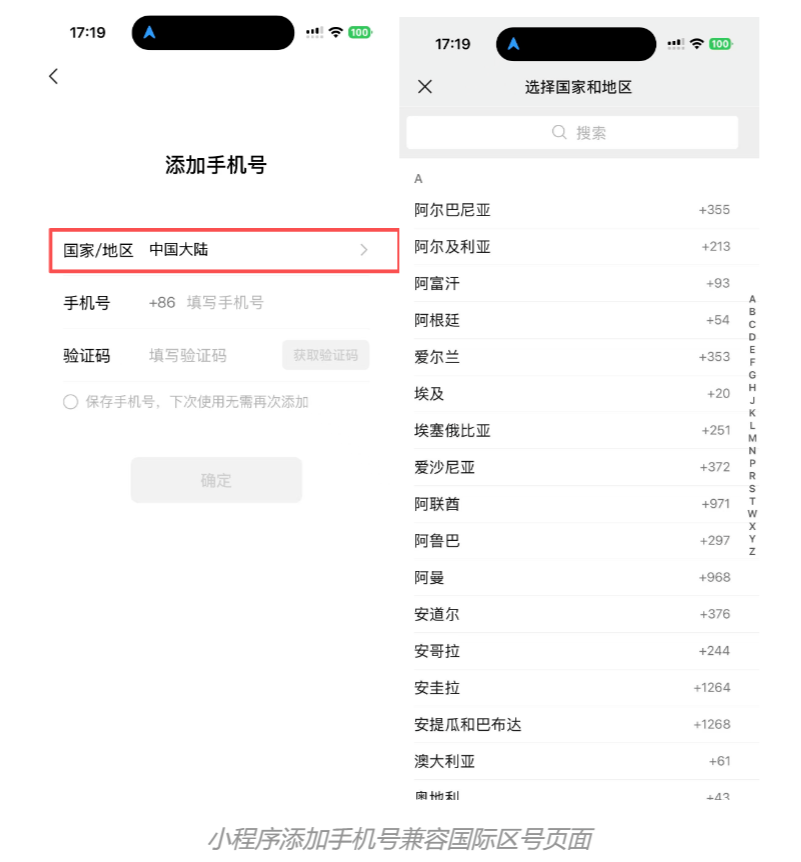 |
| Compatibility with International Number Lengths | Relax the validation rule that requires phone numbers to be exactly 11 digits, preventing overseas phone numbers from being flagged as invalid due to length issues.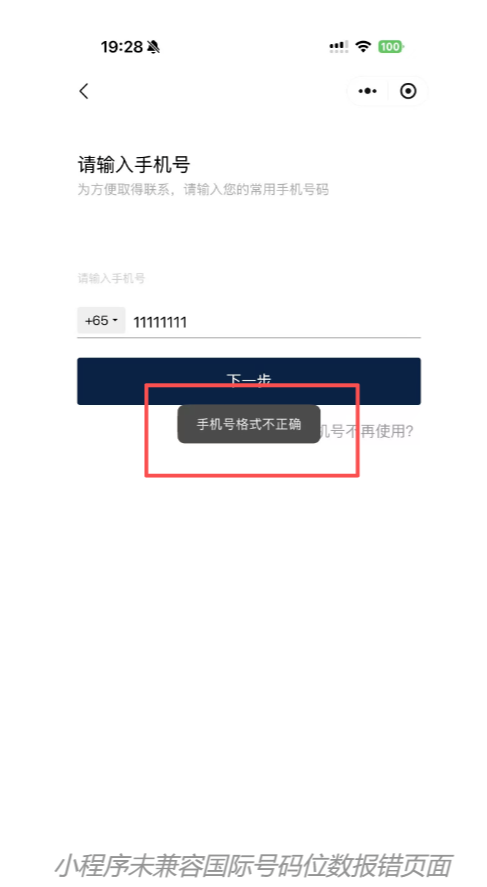 |
1.2 Compatible Email Login Verification
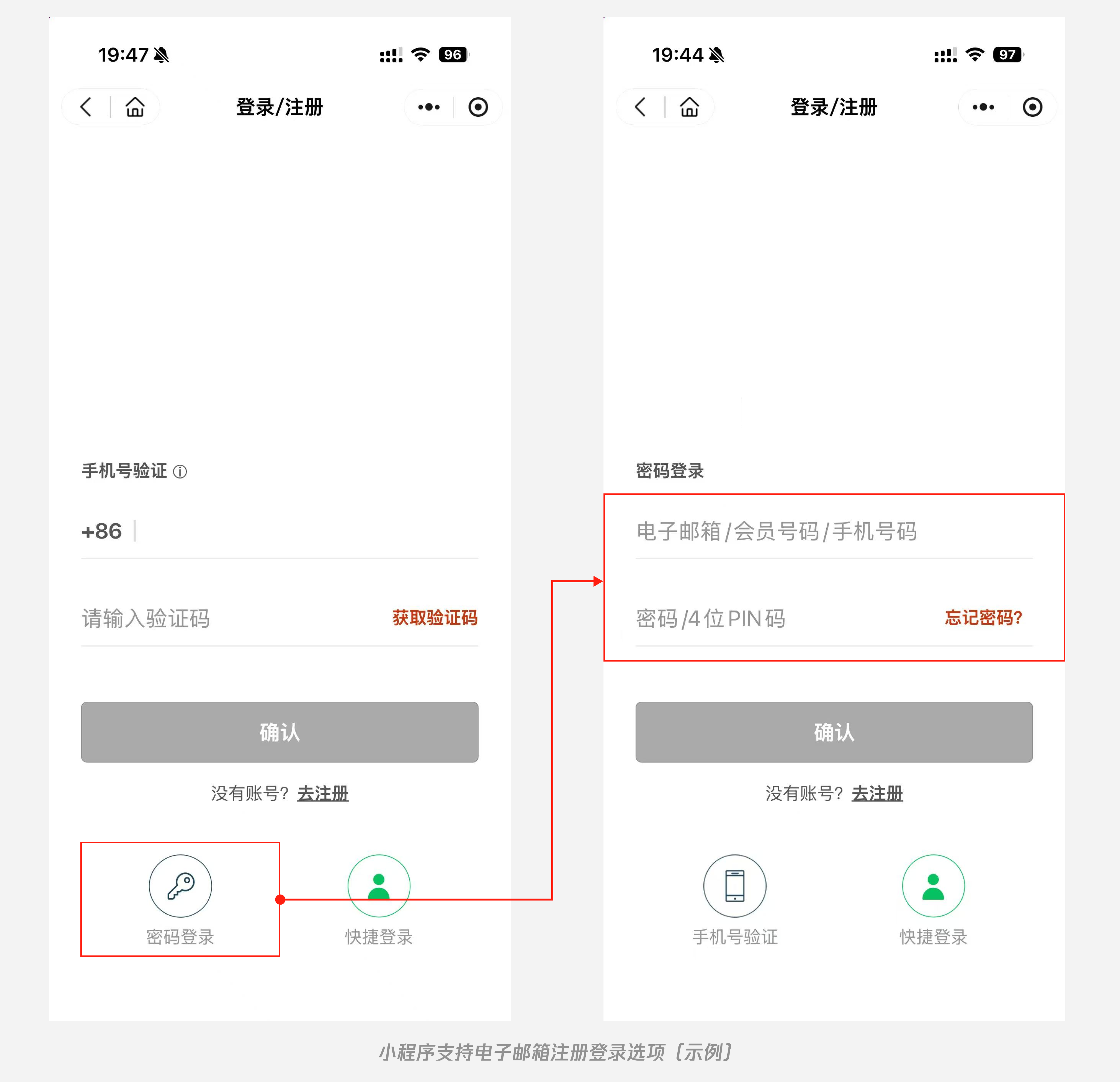
Given that international SMS messages may be blocked or delayed in cross-border roaming scenarios, and considering that overseas users have a tendency to use email frequently, it is recommended to add supplementary verification/information collection options such as "email + verification code" or "email + password" in addition to mobile number login. This ensures that users can still complete identity verification and access services via email when SMS delivery is not possible.
II. Information Entry Adaptation (Required)
Real-name verification and ticket purchase information support foreign documents such as passports, with relaxed validation rules for name entry;
In scenarios such as real-name verification, logistics information filling, and ticket booking, overly strict form field restrictions (for example, only allowing Chinese characters or only supporting ID cards) can prevent international users from entering valid information. Developers can carry out adaptation optimizations in the following directions.
| Optimization Direction | Description |
|---|---|
| Document Type Adaptation | In business scenarios requiring real-name verification, add options such as “Passport” and “Permanent Resident Identity Card for Foreigners” in addition to “Resident ID Card”, and implement corresponding document number validation rules.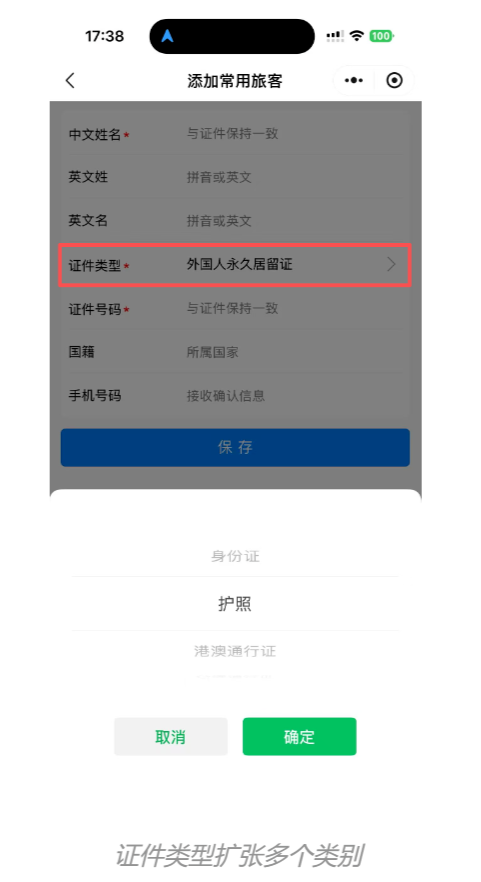 |
| Relaxed Name Entry Rules |
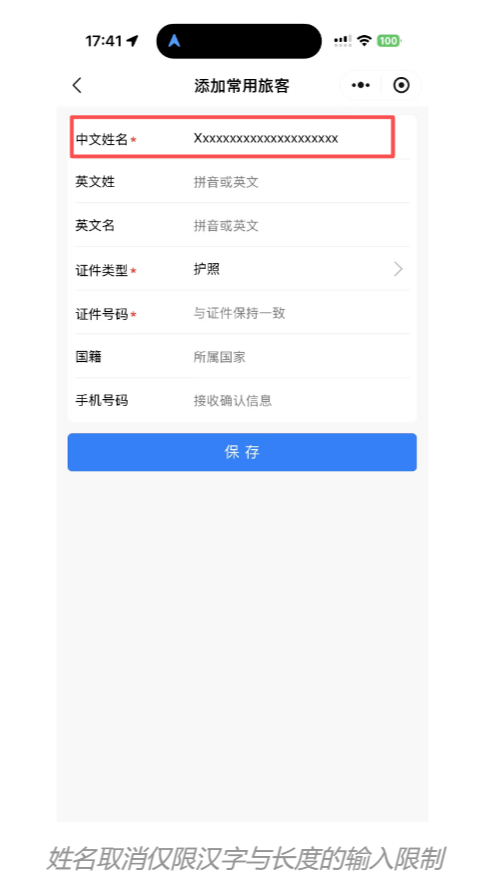 |
III. Multilingual Adaptation (Key Focus)
Mini Program currently supports translation into 18 different languages. Developers should pay close attention to the adaptation of pages and text content to prevent overflow or incomplete display of translated results. To ensure accurate translation of proper nouns such as brand names and product terms within Mini Program, developers are advised to maintain a dedicated translation glossary in the Mini Program backend. Additionally, developers can also customize the multilingual interface on their own.
3.1 Platform Translation Capability Adaptation
The platform already provides users with the Mini Program translation feature, supporting 18 languages. Developers can optimize the user experience of this translation function on Mini Program through the following methods:
| Multilingual Adaptation Methods | Description of Adaptation Methods |
|---|---|
| Page Adaptation (High Priority) | Considering differences such as text length and word segmentation across languages, developers need to pay attention to and address the issue of translated content overflowing due to excessive length during Mini Program page design. |
| Text Standardization (High Priority) | The Mini Program translation feature is only applicable to text translation and cannot recognize text in images. During Mini Program page design, developers should avoid using images to replace text, ensuring that the textual expression remains clear and intuitive as much as possible. |
| Glossary Maintenance | To ensure accurate translation of proprietary terms (such as brand names and product terms) used by developers in Mini Program, the platform allows developers to maintain their own translation glossaries for Mini Program on the WeChat Official Account Platform (including Mini Program names, brand terms, product terms, professional vocabulary, etc.). 1. Log in to the WeChat Official Account Platform, navigate to “Basic Functions - Translation”, download the translation glossary file template, fill in the content, and upload it. 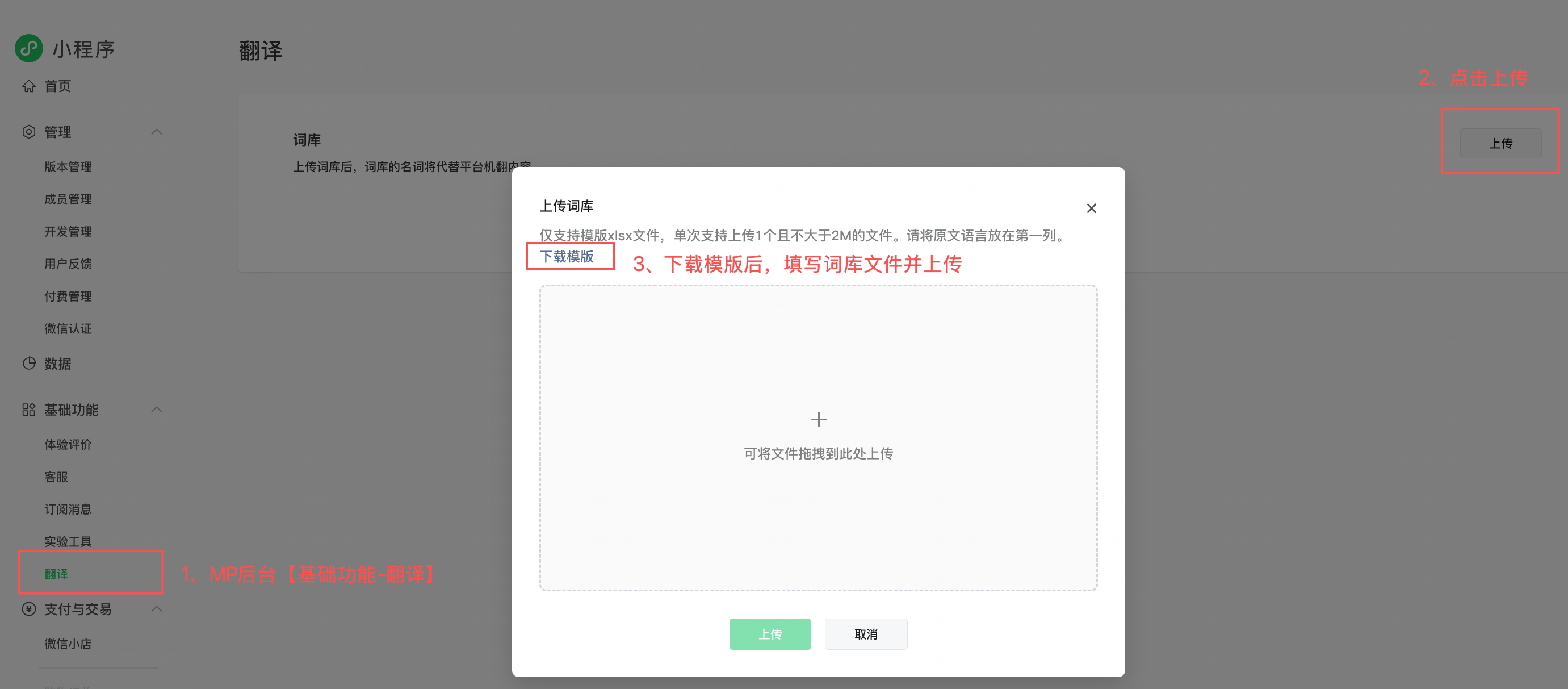 2. After verifying that the content of the translation glossary is correct, click “Confirm Activation”. The glossary in the currently approved version will then take effect officially. 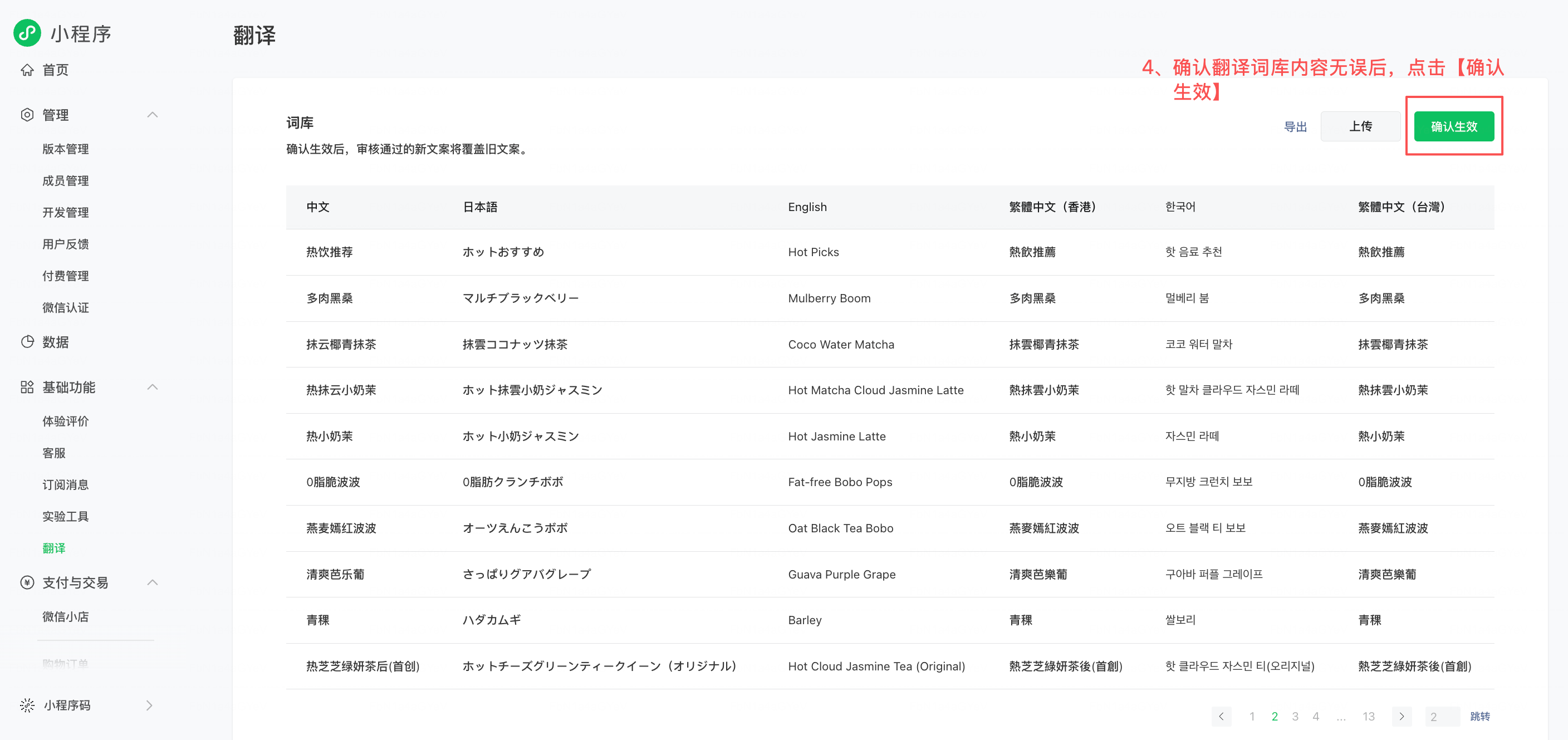 Please note: • The template for the translation glossary file is as follows:  • The first column of the Excel file for the translation glossary represents the primary language of Mini Program. If the primary language is Chinese, Chinese text will be placed in Column A; if it is English, English text will be placed in Column A, and so on. • If Merchant only maintains translations for certain language versions, leaving the translation fields empty for other languages is sufficient. |
| Dynamic Translation Adaptation | Developers can use wx.onUserTriggerTranslation to listen for events triggered by users when activating the translation function for Mini Program, and dynamically adjust the core content of the page (such as brand terms and product terms) to the target translation language. Once the platform detects that such content is already in the target language, it will not translate it again. Example: 1. Detect that the user has enabled the translation function with Arabic as the target language. 2. The developer changes the product names on the page to their Arabic equivalents, leaving other content unchanged. 3. The platform recognizes that the product names are already in Arabic and does not translate them again, only translating the remaining content. |
Instructions for the Mini Program Translation Function
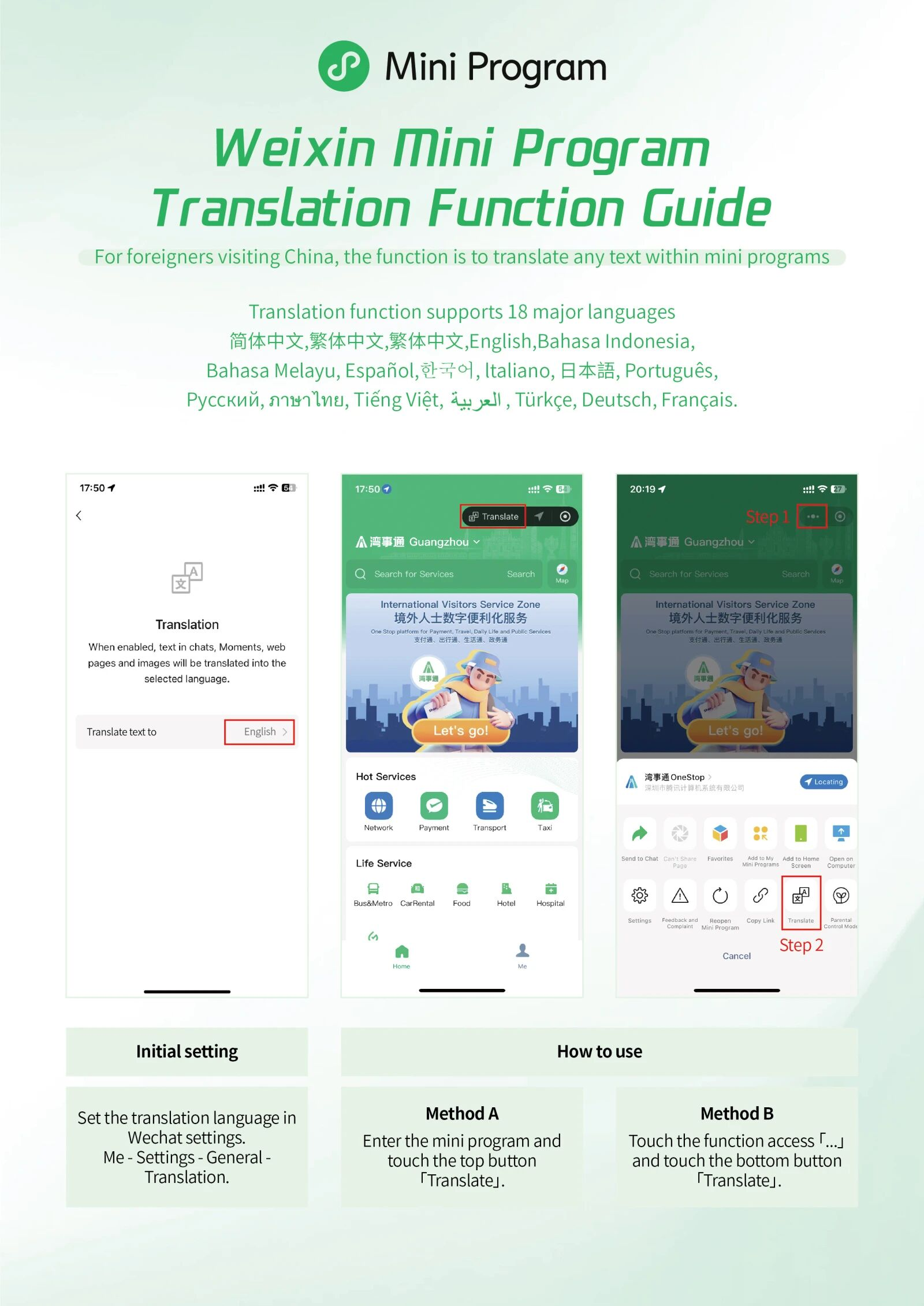
- Setting the Translation Language: The default target language is the language used in the WeChat client. If a different language is required, users can go to “Me” - “Settings” - “General” - “Translation” to select the desired language from the list.
- Enabling Mini Program Translation: There are two ways to do this: (1) Enter Mini Program, and if a “Translate” bubble appears in the top-right corner, click the “Translate” button; (2) Click the “…” button in the top-right corner of Mini Program, and then click the “Translate” button in the pop-up.
- Mini Program Translation Supports 18 Languages: Simplified Chinese, Traditional Chinese (Taiwan), Traditional Chinese (Hong Kong), English, Indonesian, Malay, Spanish, Korean, Italian, Japanese, Portuguese, Russian, Thai, Vietnamese, Arabic, Turkish, German, French.
3.2 Developers’ Responsibility for Adapting Multilingual Interfaces
Developers can detect the user’s client language/target translation language through the following two interfaces and adapt the interface to multiple languages accordingly:
- Developers can use the wx.getAppBaseInfo interface to obtain the user’s client language version based on the returned language field, adapt the interface to match the user’s language within Mini Program, and integrate a built-in multilingual switching feature.
- Developers can listen for events triggered by users to use the translation function in Mini Program via wx.onUserTriggerTranslation, and dynamically adapt the core content of the page for multiple languages.
- If the marketing mechanisms in Mini Program are overly complex (such as pop-up ads, referral programs, or point-based tasks), they may be extremely difficult for foreign visitors to understand and could be perceived as distracting content. Additionally, they might cause layout issues after automatic page translation. Developers are advised to implement differentiated Mini Program interfaces based on the detected system language.
| Recommendation | Explanation |
|---|---|
| Intelligent Routing (Core Logic) | • Developers can retrieve the user’s client language version (language field) using the wx.getAppBaseInfo interface. • When a non-Chinese language environment is detected, Mini Program automatically loads the internationalized interface. |
| Simplifying UI Design | • Focus on core functions: For the international version of the interface, complex marketing pop-ups, membership task systems, and unnecessary social referral options should be removed, leaving only the core service pathways such as ordering food, purchasing tickets, payment processing, customer support, and maps that are essential to Mini Program. • Use more universal visuals: Increase the use of generic icons and illustrations to reduce reliance on plain text descriptions, thereby lowering the barrier to cross-cultural understanding. |
IV. Bilingual Marketing Materials
The platform provides Mini Program Material Design Guidelines in Chinese and English to help Merchants update their offline marketing materials, making the scanning experience more user-friendly for foreigners.;