Mini Program adopts a model similar to Shadow DOM to implement component encapsulation. Each component has its own Shadow tree, isolating the component's styles and structure from the external environment. This isolation mechanism makes components more modular.
Shadow Tree
In this model, there are two types of tree concepts: Shadow Tree and Composed Tree.
The Shadow Tree refers to the internal WXML node tree structure of each component. For example, comp.wxml looks like this:
<!-- This is the WXML structure of the custom component comp -->
<view class="inner"></view>
<slot></slot>
The <view class="inner"> and <slot> inside it constitute its Shadow Tree.
For the page page.wxml that references it, the structure looks like this:
<!-- This is the WXML structure that uses comp -->
<comp>
  <view class="outer"></view>
</comp>
Preview the effect in DevTools
This page itself also has its own Shadow Tree, consisting of <comp> and <view class="outer">.
Composed Tree
The component framework combines all Shadow trees on the page to form a Composed tree.
Taking the two Shadow trees above as an example, the component framework first places each component's Shadow tree at the position of its corresponding component node. At this point, the root of each Shadow tree is referred to as the shadow-root node, and the component node itself is referred to as the host node.
<comp> <!-- host node of the comp component -->
  #shadow-root <!-- Shadow tree root of the comp component, i.e., shadow-root -->
    <view class="inner"></view>
    <slot></slot>
  <view class="outer"></view>
</comp>
Then, the component framework places the content associated with the slot at the position of the slot node.
<comp>
  #shadow-root
    <view class="inner"></view>
    #slot <!-- slot node of the comp component -->
      <view class="outer"></view> <!-- slot content provided by the page component to the comp component -->
</comp>
Finally, the component framework removes all shadow-root and slot nodes to form the final Composed tree.
<comp>
  <view class="inner"></view>
  <view class="outer"></view>
</comp>
Preview the effect in DevTools
Viewing the Tree Structure in Developer Tools
In the WXML panel of WeChat Developer Tools, you can choose to view either the Shadow tree or the Composed tree. The Shadow tree closely resembles the WXML structure in the code, while the Composed tree is closer to the actual rendering result.
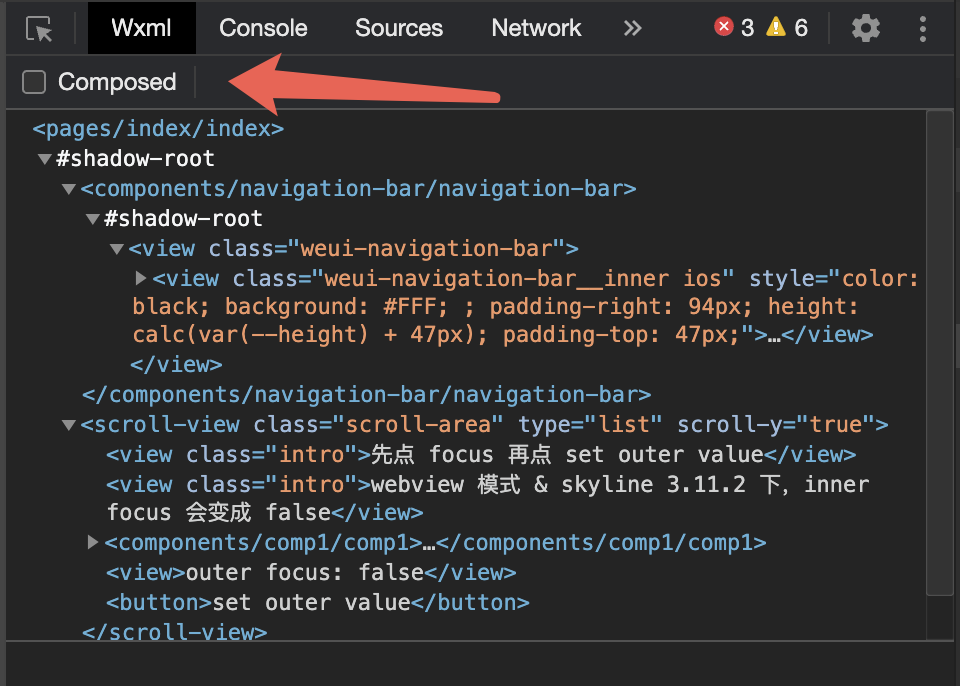
Isolation of the Shadow Tree
With the encapsulation capability provided by the Shadow Tree, the styles and logic between components are more clearly isolated, thereby preventing external interference. The Shadow Tree provides the following isolation features.
Style Isolation
WXSS styles for different components (as well as the global app.wxss) are isolated from each other. They cannot override or affect one another, and global class definitions cannot be used directly.
You can flexibly control style isolation by using methods such as Component Style Isolation or External Style Classes.
Event Isolation
Events triggered via triggerEvent are restricted to capture and bubble within the Shadow tree; external components cannot directly listen to these events.
You can modify the event bubbling and capturing behavior by setting the composed parameter, thereby allowing events to traverse the Shadow tree.
SelectQuery Isolation
When using the Get Node Information on the Page related APIs, you can only retrieve nodes within the current Shadow tree. Access to the Shadow trees of other components or external elements is not permitted.