Some interfaces require user authorization and consent before they can be invoked. We categorize these interfaces into multiple scope groups based on their usage. When a user grants authorization for a specific scope, all interfaces under that scope can be invoked directly.
When invoking such interfaces:
- If the user has neither accepted nor rejected this permission, a dialog box will appear to ask for the user's consent; the interface can only be invoked after the user clicks "Agree";
- If the user has already granted authorization, the interface can be invoked directly;
- If the user has already rejected authorization, no dialog box will appear; instead, the process will proceed directly to the
failcallback of the interface. Developers must handle the scenario where users reject authorization.
Get User Authorization Settings
Developers can use wx.getSetting to retrieve the user's current authorization status.
Opening the Settings Interface
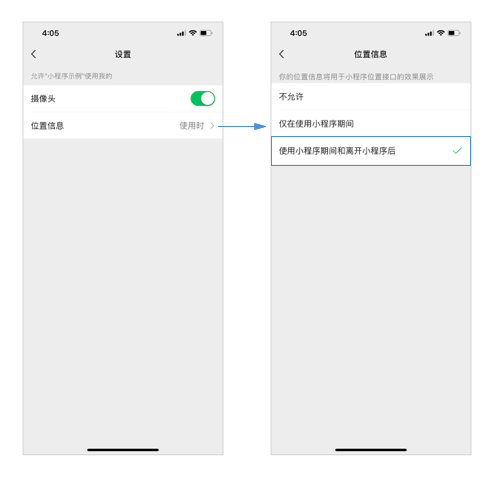
Users can control the authorization status for this Mini Program in the Mini Program settings interface (tap "Top Right" > "About" > "Top Right" > "Settings").
Developers can call wx.openSetting to open the settings interface and guide users to enable authorization.
Proactive Authorization Request
Developers can use wx.authorize to proactively request user authorization before invoking APIs that require authorization.
Scope List
| scope | Corresponding API | Description |
|---|---|---|
| scope.userLocation | wx.getLocation, wx.startLocationUpdate, MapContext.moveToLocation | Precise location |
| scope.userFuzzyLocation | wx.getFuzzyLocation | Fuzzy location |
| scope.userLocationBackground | wx.startLocationUpdateBackground | Background location |
| scope.record | live-pusher component, wx.startRecord, wx.joinVoIPChat, RecorderManager.start | Microphone |
| scope.camera | camera component, live-pusher component, wx.createVKSession | Camera |
| scope.bluetooth | wx.openBluetoothAdapter, wx.createBLEPeripheralServer | Bluetooth |
| scope.writePhotosAlbum | wx.saveImageToPhotosAlbum, wx.saveVideoToPhotosAlbum | Add to album |
| scope.addPhoneContact | wx.addPhoneContact | Add to contacts |
| scope.addPhoneCalendar | wx.addPhoneRepeatCalendar, wx.addPhoneCalendar | Add to calendar |
| scope.werun | wx.getWeRunData | WeChat Sport steps | | scope.address | wx.chooseAddress | Communication address (authorization has been revoked; you can call the corresponding API directly) | | scope.invoiceTitle | wx.chooseInvoiceTitle | Invoice title (authorization has been revoked; you can call the corresponding API directly) | | scope.invoice | wx.chooseInvoice | Retrieve invoice (authorization has been revoked; you can call the corresponding API directly) | | scope.userInfo | wx.getUserInfo | User information (Mini Program has been reclaimed. Please use Avatar and Nickname Input. Mini Games can continue to call this API) |
Authorization Validity
Once a user explicitly agrees to or refuses authorization, the authorization relationship is recorded in the backend until the user actively deletes Mini Program.
Best Practices
Request user authorization only when the authorization API is truly needed. Clearly explain the reasons for using the feature in the authorization request.
Notes
- You must configure the usage description for location when authorizing
scope.userLocation,scope.userLocationBackground, orscope.userFuzzyLocation. - The authorization dialog displays the description entered by Mini Program in the Mini Program User Privacy Protection Guidelines. Please fill it in carefully.
Background Location
Developers must first declare background location in the background capabilities configured in the backend.
Starting from Android 8.0.0 and iOS 8.0.0, developers can invoke the background location authorization dialog by calling wx.authorize({scope: 'scope.userLocationBackground'}).
For versions below the above thresholds, scope.userLocationBackground will not prompt users with a permission dialog. Users must manually navigate to the Settings page and set the "Location" option to "While Using Mini Program " and "After Leaving Mini Program ". Developers can open the Settings page by calling wx.openSetting.