Getting Started
Mini Program AI General Interface is a general-purpose AI model inference solution provided officially, supporting Int8 model quantization inference. It can significantly improve model inference performance while reducing model storage and computational overhead.
This guide demonstrates how to optimize the Floating Point Classification Demo using this technology.
1. Preparation
- Please download the Model Quantization Tool and install the dependencies.
git clone https://github.com/wechat-miniprogram/xnet-miniprogram.git && cd xnet-miniprogram/nncs && pip install -r requirements.txt
- Please download the ImageNet dataset, or ImageNet-mini.
- Please download the pretrained model Mobilenetv2. Directory structure:
ImageNet
|---train
|     |---n01440764
|     |---n01443537
|     |---...
|     |---n15075141
|---val
|     |---n01440764
|     |---n01443537
|     |---...
|     |---n15075141
nncs
|---nncs
|---demo
|     |---imagenet_classification
|---requirements.txt
|---README.md
mobilenet-v2-71dot82.onnx
2. Quantization Training Example
- Reference code: demo/imagenet_classification/train_imagenet_onnx.py
- Modify data source and ONNX path:
    ...
    args.train_data = "/data/yangkang/datasets/ImageNet"
    args.val_data = "/data/yangkang/datasets/ImageNet"
    ...
    model = "mobilenet-v2-71dot82.onnx"
- Run quantization training
cd demo/imagenet_classification && python train_imagenet_onnx.py
- Log sample: demo/imagenet_classification/nncs_onnx_lr1e-5.logfile. Floating-point model accuracy is 71.82, and accuracy after QAT fine-tuning is 71.52.
- Quantized model export: mobilenetv2_qat.onnx
python deploy.py
- Supported quantization schemes: Quantization-Aware Training (QAT) and Post-Training Quantization (PTQ)
3. Mini Program Demo
The demo for quantized classification is adapted from the Floating-point Classification Demo. Note the key difference:
this.session = wx.createInferenceSession({
 model: modelPath,
 precisionLevel: 0,
 allowNPU: false,
 allowQuantize: true, // Must be set to true to enable quantized inference
});
4. Running Effect
Scan the QR code below, click "API - General AI Inference Capability - mobileNetInt8" to view the running effect.

Run the demo, and you will see that while the camera is capturing, the classification results are written in real-time to the bottom of the page.
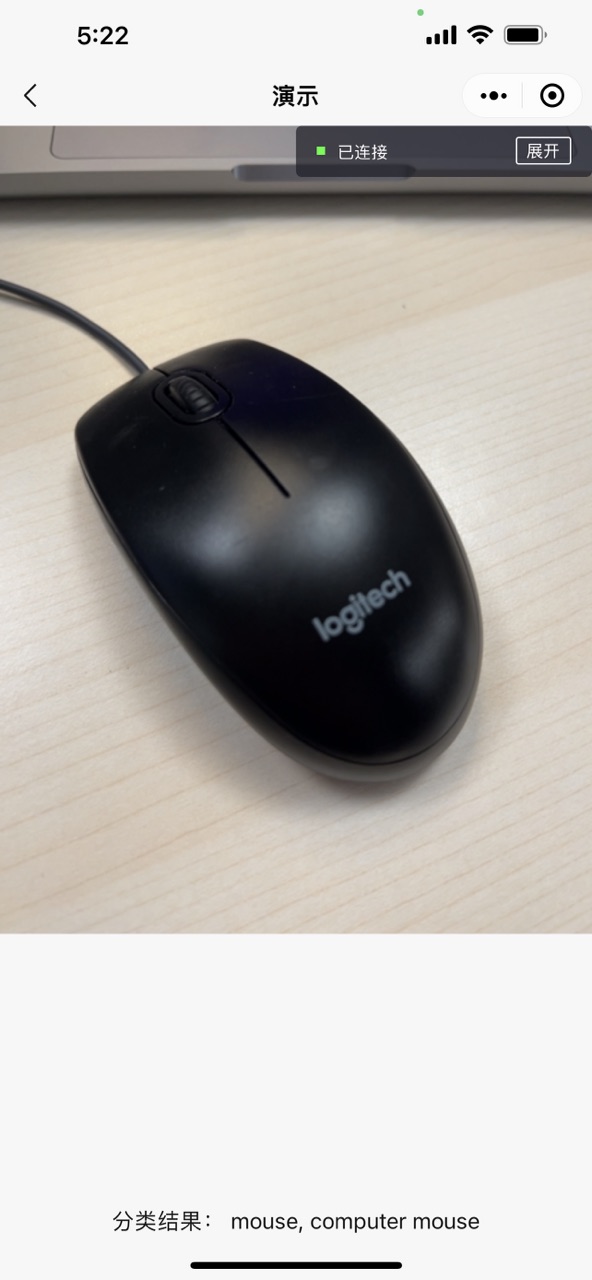
For the complete demo, please refer to the Official GitHub Mini Program Example.
5. Enable Timing Test
  data: {
    predClass: "None",
    classifier: null,
    enableSpeedTest: true,  // Set to true
    avgTime: 110.0,
    minTime: 110.0
  },
On iPhone 13 Pro Max, the floating-point classification demo takes approximately 10ms, while the quantized classification demo takes approximately 5ms.