You can use the backend API to retrieve the Mini Program Code for any page of a Mini Program. Scanning this Mini Program Code directly opens the corresponding page in the Mini Program. All generated Mini Program Codes are permanently valid and can be used with confidence.
We recommend generating and using Mini Program Codes, as they offer better recognition and support advanced features such as displaying the "Official Account Follow Component".
The generated Mini Program Code is shown below:

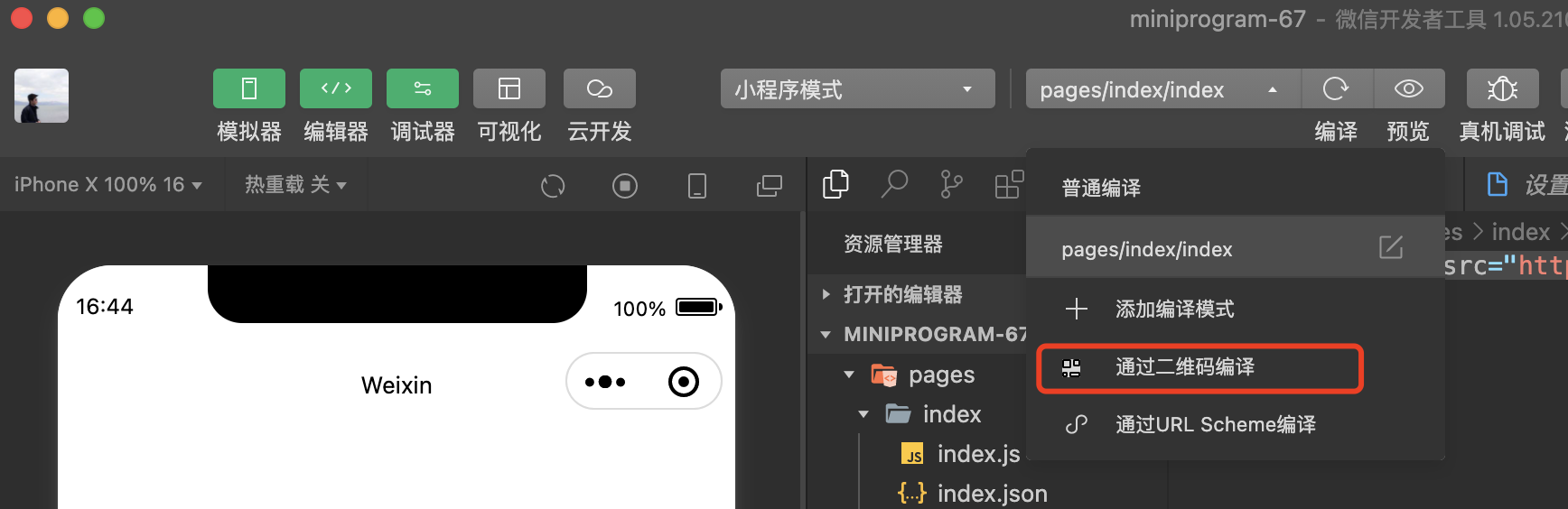
You can debug the obtained Mini Program Code using Developer Tools version 1.02.1803130 or later via the Toolbar - Custom Compile Conditions - Compile by QR Code feature.
To meet different needs and scenarios, two APIs are provided. Developers can choose the one that best suits their requirements.
- API A: Suitable for business scenarios with a relatively small number of required codes
- Generates a Mini Program Code. It accepts long
pathparameters, but the generation volume is limited. For quantity limits, see Notes. Please use with caution. - API B: Suitable for business scenarios with a very large number of required codes
- Generates a Mini Program Code. It accepts short page parameters, and the generation volume is unlimited.
Get Mini Program QR Code (Not Recommended)
You can obtain the Mini Program QR code for any page of a Mini Program via the backend API. The generated Mini Program QR code is shown below:

- API C: Suitable for business scenarios requiring a small number of codes
- Generates QR codes, supports long
pathparameters, with a limited number of generations. See Notes for quantity limits.
Retrieve Mini Program QR Codes (Unique QR Code per Item)
WeChat Unique QR Code supports generating Mini Program QR codes. QR codes issued via the "Unique QR Code" API are more secure and support smaller printing areas compared to standard link QR codes. They can redirect to a specific Mini Program page and have no quantity limits.
Precautions
- The interface can only generate QR codes for published Mini Program .
- The total number of codes generated by Interface A and Interface C combined is limited to 100,000. Please call with caution.
- Interface B is subject to a per-minute frequency limit (5,000 calls/minute). If you need a large number of Mini Program codes, we recommend pre-generating them.