I. Feature Introduction
Developers of Mini Program involving the processing of users' personal information must prompt users to read collection and usage rules, such as privacy policies, through conspicuous methods like pop-up windows.
To standardize developers' handling of users' personal information and safeguard users' lawful rights and interests, WeChat requires developers to proactively sync whether the current WeChat user has read and agreed to the collection and usage rules (such as privacy policies) of Mini Program. Only then can developers invoke the privacy interfaces provided by WeChat.
Note:
Updated on 2023.08.22:
The interfaces involved in the following guide, such as getPrivacySetting, onNeedPrivacyAuthorization, and requirePrivacyAuthorize, can currently be integrated and debugged normally. Debugging notes:
-
Before September 15, 2023, configuring
__usePrivacyCheck__: truein app.json will enable privacy-related features. If not configured or configured as false, these features will not be enabled. -
After September 15, 2023, privacy-related features will be enabled regardless of whether
__usePrivacyCheck__is configured in app.json.
Refer to the Complete Example Demo below for interface usage.
Updated on 2023.09.14:
-
The effective date for privacy-related features has been extended to October 17, 2023. Before October 17, 2023, configuring
__usePrivacyCheck__: truein app.json will enable privacy-related features. If not configured or configured as false, these features will not be enabled. After October 17, 2023, privacy-related features will be enabled regardless of whether__usePrivacyCheck__is configured in app.json. -
The official privacy authorization pop-up feature has been added. Refer to the Official Privacy Pop-up Feature Description below for related features.
II. Integration Process
1. Configure the Mini Program User Privacy Protection Guidelines
Developers must configure the Mini Program User Privacy Protection Guidelines in the Mini Program Management Console. For detailed instructions, see: Instructions for Filling out the User Privacy Protection Guidelines.
Note that you can only invoke the corresponding APIs or components provided by the platform if the user information processed by them is declared in the Guidelines. If not declared, the corresponding APIs or components will be directly disabled. To view the relationship between privacy interfaces and the corresponding processed information, refer to: Introduction to the Content of Mini Program User Privacy Protection Guidelines.
After configuration is completed, for each Mini Program user, developers must synchronize WeChat's confirmation that the current user has read and agreed to the privacy policies and data collection/usage rules of Mini Program before invoking the declared APIs or components. For the development methods for synchronization, see the following section.
For users who have already been synchronized, if developers update the configuration later, there is no need to re-synchronize for APIs or components that existed in the old version. However, re-synchronization is required for new APIs or components generated by the update. For example, if a version updated on July 11 includes "Collecting your selected location information," and the user consent status is synchronized on July 12, and then the configuration is updated on July 13 to add "Collecting your WeChat Sports step count," in the absence of re-synchronization, the wx.chooseLocation API can be invoked, but the wx.getWeRunData API cannot.
2. Actively query the privacy authorization synchronization status and display the privacy agreement
Supported from Base Library 2.32.3 onwards
Developers can use the wx.getPrivacySetting API to query whether the user has pending privacy policy information recorded on the WeChat side. This information can be retrieved from the needAuthorization field in the return result res.
Additionally, the wx.getPrivacySetting API returns the name of the 《 Mini Program User Privacy Protection Guidelines》 configured by the developer in the Mini Program management console. Developers can call the wx.openPrivacyContract API to open this page.
If there is privacy policy information pending user consent, developers must proactively prompt the user to read the privacy policy and other rules for data collection and usage. The method of prompting is up to the Mini Program developer to design. However, the <button open-type="agreePrivacyAuthorization"> component must be used in the relevant interface. When the user taps this <button> component, it indicates that the user has read and agreed to Mini Program 's privacy policy and other rules for data collection and usage. WeChat will receive this synchronization information. At this point, developers can call the declared privacy APIs after the bindagreeprivacyauthorization event callback of the component.
Code Example
<!-- page.wxml -->
<view wx:if="{{showPrivacy}}">
 <view>Privacy popup content....</view>
 <button bindtap="handleOpenPrivacyContract">View Privacy Agreement</button>
 <button id="agree-btn" open-type="agreePrivacyAuthorization" bindagreeprivacyauthorization="handleAgreePrivacyAuthorization">Agree</button>
</view>
// page.js
Page({
 data: {
 showPrivacy: false
},
 onLoad() {
 wx.getPrivacySetting({
 success: res => {
 console.log(res) // Return result: res = {needAuthorization: true/false, privacyContractName: '《xxx Privacy Protection Guidelines》'}
 if (res.needAuthorization) {
 // Need to display the privacy agreement popup
 this.setData({
 showPrivacy: true
})
} else {
 // The user has already agreed to the privacy agreement, so no need to display the popup again. Declared privacy APIs can be called directly.
 // wx.getUserProfile()
 // wx.chooseMedia()
 // wx.getClipboardData()
 // wx.startRecord()
}
},
 fail: () => {},
 complete: () => {}
})
},
 handleAgreePrivacyAuthorization() {
 // Event callback when the user agrees to the privacy agreement
 // After the user clicks agree, all declared privacy APIs and components can be invoked.
 // wx.getUserProfile()
 // wx.chooseMedia()
 // wx.getClipboardData()
 // wx.startRecord()
},
 handleOpenPrivacyContract() {
 // Open the privacy agreement page
 wx.openPrivacyContract({
 success: () => {}, // Opened successfully
 fail: () => {}, // Failed to open
 complete: () => {}
})
}
})
Starting from Base Library 2.32.3, the Privacy Agreement Button supports coupled usage with the Phone Number Quick Verification Component and the Phone Number Real-time Verification Component. The invocation method is <button open-type="getPhoneNumber|agreePrivacyAuthorization"> or <button open-type="getRealtimePhoneNumber|agreePrivacyAuthorization">.
It also supports coupled usage of the Privacy Agreement Button with the Get User Info Component, with the invocation method <button open-type="getUserInfo|agreePrivacyAuthorization">.
Example Code
<!-- page.wxml -->
<button id="agree-btn1" open-type="getPhoneNumber|agreePrivacyAuthorization" bindgetphonenumber="handleGetPhoneNumber" bindagreeprivacyauthorization="handleAgreePrivacyAuthorization">Agree to Privacy Agreement and Authorize Phone Number</button>

<button id="agree-btn2" open-type="getRealtimePhoneNumber|agreePrivacyAuthorization" bindgetrealtimephonenumber="handleGetRealtimePhoneNumber" bindagreeprivacyauthorization="handleAgreePrivacyAuthorization">Agree to Privacy Agreement and Authorize Phone Number</button>

<button id="agree-btn3" open-type="getUserInfo|agreePrivacyAuthorization" bindgetuserinfo="handleGetUserInfo" bindagreeprivacyauthorization="handleAgreePrivacyAuthorization">Agree to the privacy policy and get avatar and nickname information</button>
// page.js
Page({
  handleAgreePrivacyAuthorization() {
    // Callback for user agreeing to the privacy policy event
    // User has clicked agree; all previously declared privacy APIs and components can now be called
    // wx.getUserProfile()
    // wx.chooseMedia()
    // wx.getClipboardData()
    // wx.startRecord()
  },
  handleGetPhoneNumber(e) {
    // Successfully retrieved phone number
    console.log(e)
  },
  handleGetRealtimePhoneNumber(e) {
    // Successfully retrieved real-time phone number
    console.log(e)
  },
  handleGetUserInfo(e) {
    // Successfully retrieved avatar and nickname
    console.log(e)
  }
})
3. Event for Passive Listening of User Authorization for Privacy APIs
Supported since Base Library 2.32.3
Mini Program Developers can not only judge the timing themselves and prompt users to read privacy policies and other data collection and usage rules, but also monitor when users need to be prompted to read privacy policies via the wx.onNeedPrivacyAuthorization API. This event is triggered when a user triggers a privacy API call that WeChat has not previously recorded as consented to. Developers can prompt users to read privacy policies when this event is triggered.
Note that for the <input type="nickname"> component, due to the specific nature of <input>, if the user has not agreed to the privacy policy, the onNeedPrivacyAuthorization event will not be triggered when <input type="nickname"> is focused. Instead, it will degrade to <input type="text">.
In addition, WeChat provides the wx.requirePrivacyAuthorize API, which can be used to simulate privacy API calls.
Code Example
// page.wxml
<view wx:if="{{showPrivacy}}">
 <view>Privacy popup content....</view>
 <button id="agree-btn" open-type="agreePrivacyAuthorization" bindagreeprivacyauthorization="handleAgreePrivacyAuthorization">Agree</button>
</view>
// page.js
Page({
 data: {
 showPrivacy: false
},
 onLoad() {
 wx.onNeedPrivacyAuthorization((resolve, eventInfo) => {
 console.log('The API that triggered this event is: ' + eventInfo.referrer)
 // When user consent to privacy authorization is required
 // Show the developer-customized privacy authorization popup
 this.setData({
 showPrivacy: true
})
 this.resolvePrivacyAuthorization = resolve
})

 wx.getUserProfile({
 success: console.log,
 fail: console.error
})
},
 handleAgreePrivacyAuthorization() {
 // After the user clicks the agree button
 this.resolvePrivacyAuthorization({buttonId: 'agree-btn', event: 'agree'})
 // After the user clicks agree, the developer calls resolve({buttonId: 'agree-btn', event: 'agree'}) to inform the platform that the user has agreed, passing the ID of the agree button as a parameter
 // After the user clicks disagree, the developer calls resolve({event:'disagree'}) to inform the platform that the user has refused
}
})
4. Clearing Historical Synchronization Status
If a user deletes Mini Program from "WeChat Pull-down > Recent > Recently Used Mini Program ", the historical synchronization status will be cleared. Upon the next access to Mini Program, the system will require a re-synchronization of the WeChat user's consent to the privacy policy and other data collection and usage rules for Mini Program.
Developers can use this method for debugging. Alternatively, you can clear the historical synchronization status by selecting "Clear Simulator Cache > Clear Authorization Data" in the Developer Tools.
III. Other Notes
- Base Libraries below version 2.32.3 do not integrate privacy-related features and do not intercept calls to privacy APIs.
4. Complete Example Demos
demo1: Demonstrates handling privacy popup logic on the homepage using wx.getPrivacySetting and <button open-type="agreePrivacyAuthorization">.
https://developers.weixin.qq.com/s/gi71sGm67hK0
demo2: Demonstrates handling privacy popup logic across multiple pages using wx.onNeedPrivacyAuthorization and <button open-type="agreePrivacyAuthorization">. It also shows how to handle simultaneous calls to multiple privacy APIs.
https://developers.weixin.qq.com/s/hndZUOmA7gKn
demo3: Demonstrates how to integrate wx.onNeedPrivacyAuthorization, wx.requirePrivacyAuthorize, <button open-type="agreePrivacyAuthorization">, and the <input type="nickname"> component.
https://developers.weixin.qq.com/s/jX7xWGmA7UKa
demo4: Demonstrates handling privacy popup logic across multiple tabBar pages using wx.onNeedPrivacyAuthorization and <button open-type="agreePrivacyAuthorization">.
https://developers.weixin.qq.com/s/g6BWZGmt7XK9
5. Common Error Descriptions
-
{ "errMsg": "A:fail api scope is not declared in the privacy agreement", "errno": 112 }The privacy interface A was used, but the developer has not declared the privacy type corresponding to interface A in the "MP Admin Panel > Settings > Service Content Declaration > User Privacy Protection Guide". The newly added privacy type declaration will take effect after 5 minutes. -
{ "errMsg": "A:fail appid privacy api banned" }The privacy interface A was used, but the developer selected "No Privacy Collection" when submitting for review on the MP platform, or failed to declare the privacy agreement, resulting in the revocation of interface calling permissions by the platform.
6. Official Privacy Pop-up Description
To help developers more conveniently meet Mini Program privacy compliance requirements, in addition to developing privacy agreements according to the guidelines above, the platform provides an official privacy authorization pop-up. Once privacy-related features are enabled (after October 17, 2023, or after developers configure __usePrivacyCheck__: true in app.json), this pop-up is automatically displayed to end users without requiring any adaptation or development from the developer. The specific logic is as follows:
When a developer calls a privacy-related API, WeChat determines whether this call requires triggering the wx.onNeedPrivacyAuthorization event. If the event is triggered and the developer does not respond, WeChat will proactively display the official pop-up. If the user agrees, the API will proceed with the subsequent call logic as normal; if the user declines, an error will be reported.
Please note that users may decline the official privacy authorization pop-up. To avoid excessive pop-ups disturbing users, when a developer calls a privacy-related API again, if less than 10 seconds have passed since the last user rejection, the pop-up will not be triggered. Instead, the developer will directly receive an error indicating that the user has declined the privacy authorization pop-up.
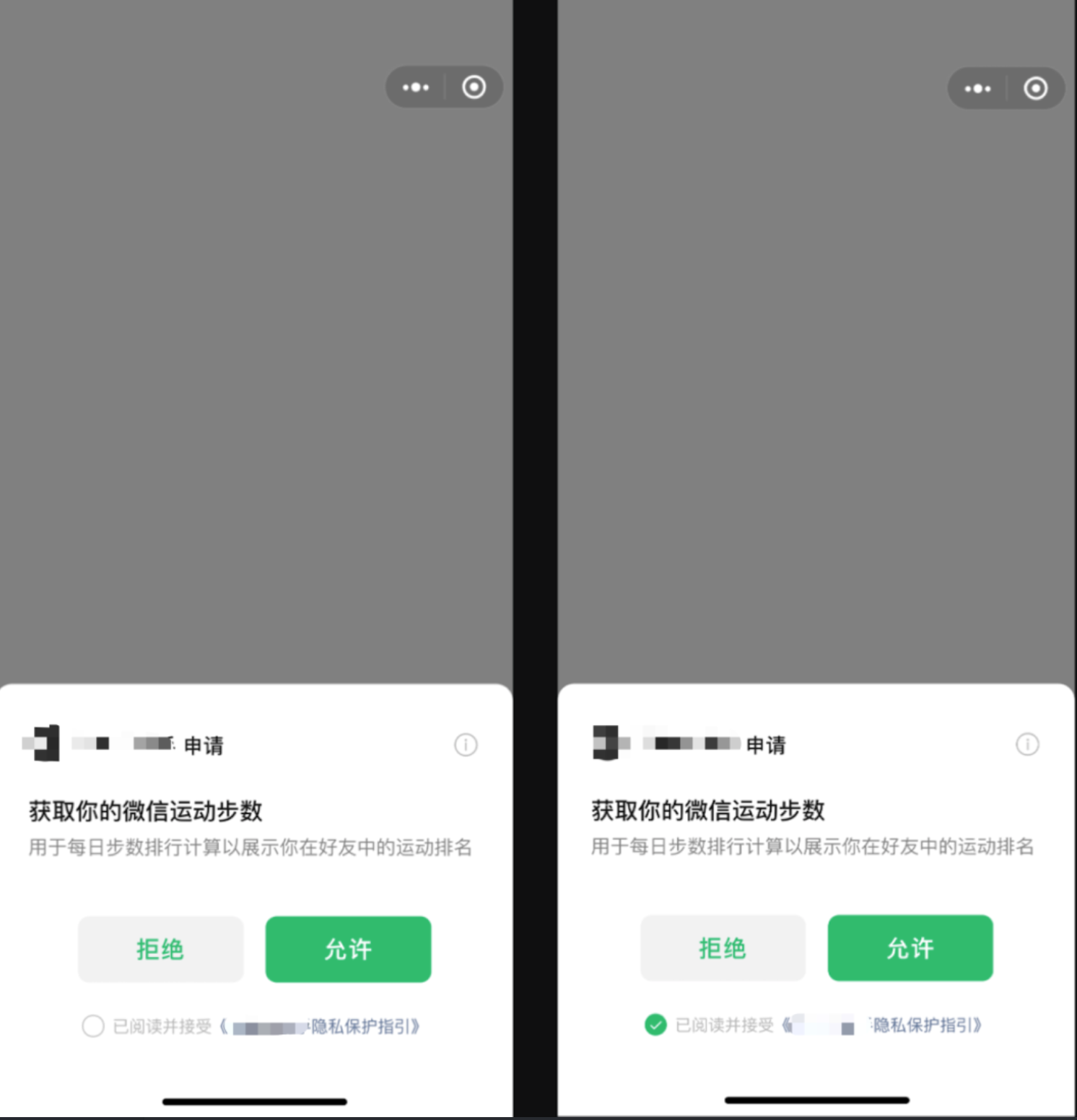
The official privacy pop-up will have two styles:
- Style coupled with the authorization pop-up: In this style, the user must check the privacy agreement checkbox to perform the allow action. If the user declines in the pop-up, the error message is "User declined" (Error code: 103).
- Direct pop-up style: This style directly requests the user's authorization for the privacy agreement. If the user declines in the pop-up, the error message is "User has not agreed to the privacy agreement" (Error code: 104).
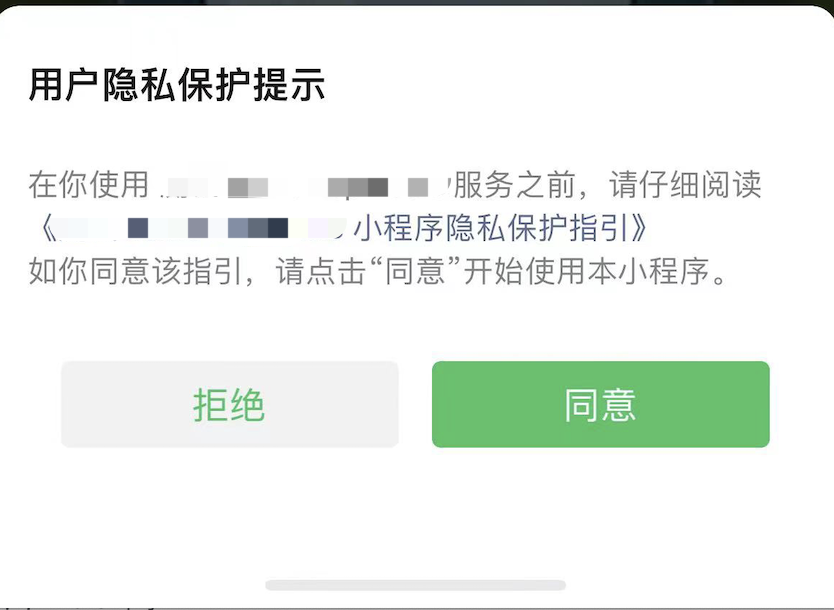
The style coupled with the authorization pop-up will be supported in subsequent versions of the base library (the supporting version will be announced in future updates). In lower versions of the base library, all pop-ups will adopt the direct pop-up style.