- The multi-platform framework is built upon technologies of the same origin as Mini Program. Most Mini Program components are usable in multi-platform applications. However, certain components can no longer be supported because the product carrier has changed to an App. Developers must handle the compatibility of these components.
1. Components Requiring Developer Adaptation and Compatibility
- The following features must be implemented using new interfaces or components.
| Name |
Description |
Notes |
| button |
Button |
Supported, but all WeChat open capabilities associated with open-type are not supported |
| image |
Image |
Supported, but the long-press recognition feature is not yet supported |
- The WeChat open capabilities associated with the
open-type in the button component are all unsupported.
2. image
- The
show-menu-by-longpress feature of the image component (long-press an image to display options such as Send to Friend, Favorite, Save Image, Search, Open Profile/Go to Group Chat/Open Mini Program) is not currently supported.
3. web-view
- Starting from iOS >= 1.0.17 and Android >= 1.0.8, the UA retrieved when web-view opens H5 will no longer include identifiers related to
WeChat. Additionally, SAAASDK has been added to indicate the cross-platform runtime environment.
- If developers use jssdk in H5 within cross-platform applications to interact with Mini Program, they must upgrade jssdk to 1.6.2.
- Note 1: When opening H5 via web-view in cross-platform applications, there is no need to configure the business domain on the platform; it can be opened directly.
- Note 2: Skyline does not currently support the web-view component. It is recommended to configure
"renderer": "webview" separately for pages that host web-view. For details, see documentation.
- For the list of interfaces supported by jssdk, see
| API |
Description |
| wx.miniProgram.navigateTo |
Parameters are consistent with the Mini Program API |
| wx.miniProgram.navigateBack |
Parameters are consistent with the Mini Program API |
| wx.miniProgram.switchTab |
Parameters are consistent with the Mini Program API |
| wx.miniProgram.reLaunch |
Parameters are consistent with the Mini Program API |
| wx.miniProgram.redirectTo |
Parameters are consistent with the Mini Program API |
| wx.miniProgram.postMessage |
Sends a message to Mini Program. The component's message event is triggered at the following specific moments: when Mini Program goes back, when the component is destroyed, when sharing, and when copying the link (2.31.1) |
| wx.miniProgram.getEnv |
Gets the current environment |
Other JSSDK APIs
| API Module |
API Description |
Specific API |
Multi-Platform Application Support |
| Check if client supports JS |
|
checkJSApi |
Supported on Android |
| Image APIs |
Take photo or upload |
chooseImage |
Supported on Android |
|
Preview image |
previewImage |
|
|
Upload image |
uploadImage |
|
|
Get local image data |
getLocalImgData |
|
| Audio APIs |
Start recording |
startRecord |
|
|
Stop recording |
stopRecord |
|
|
Monitor automatic stop of recording |
onVoiceRecordEnd |
|
|
Play voice |
playVoice |
|
|
Pause playback |
pauseVoice |
|
|
Stop playback |
stopVoice |
|
|
Monitor voice playback completion |
onVoicePlayEnd |
|
|
Upload API |
uploadVoice |
|
|
Download API |
downloadVoice |
|
| Smart APIs |
Recognize audio |
translateVoice |
|
| Device Information |
Get network status |
getNetworkType |
Supported on Android |
| Location |
Open location using built-in map |
openLocation |
|
|
Get location |
getLocation |
Supported on Android (requires checking "Extended LBS SDK" in project.miniapp.json) |
| Shake to discover nearby |
Start iBeacon |
startSearchBeacons |
|
|
Stop iBeacon |
stopSearchBeacons |
|
|
Monitor iBeacon |
onSearchBeacons |
|
| WeChat Scan |
Invoke WeChat Scan |
scanQRCode |
|
| WeChat Card & Voucher |
Retrieve list of cards to use |
chooseCard |
|
|
Bulk add card API |
addCard |
|
|
View cards in WeChat Card Case |
openCard |
|
| Long-press Recognition |
Mini Program Circular Code |
None |
|
4. video
To implement screen casting functionality using the video component in an App, you need to apply for the multicast permission. The related operations are as follows:
- Use your Apple Developer main account to access https://developer.apple.com/contact/request/networking-multicast and apply for the multicast permission.
- Check your developer account after approximately 3 days. An additional capability, Multicast Networking, will appear; select the Multicast Networking permission.
- Regenerate the provisioning profile and download the new one. Then, repack the IPA using the new provisioning profile.
Note
- On the Android side, using this component relies on Media SDK. You need to check the Media SDK extension in
project.miniapp.json.
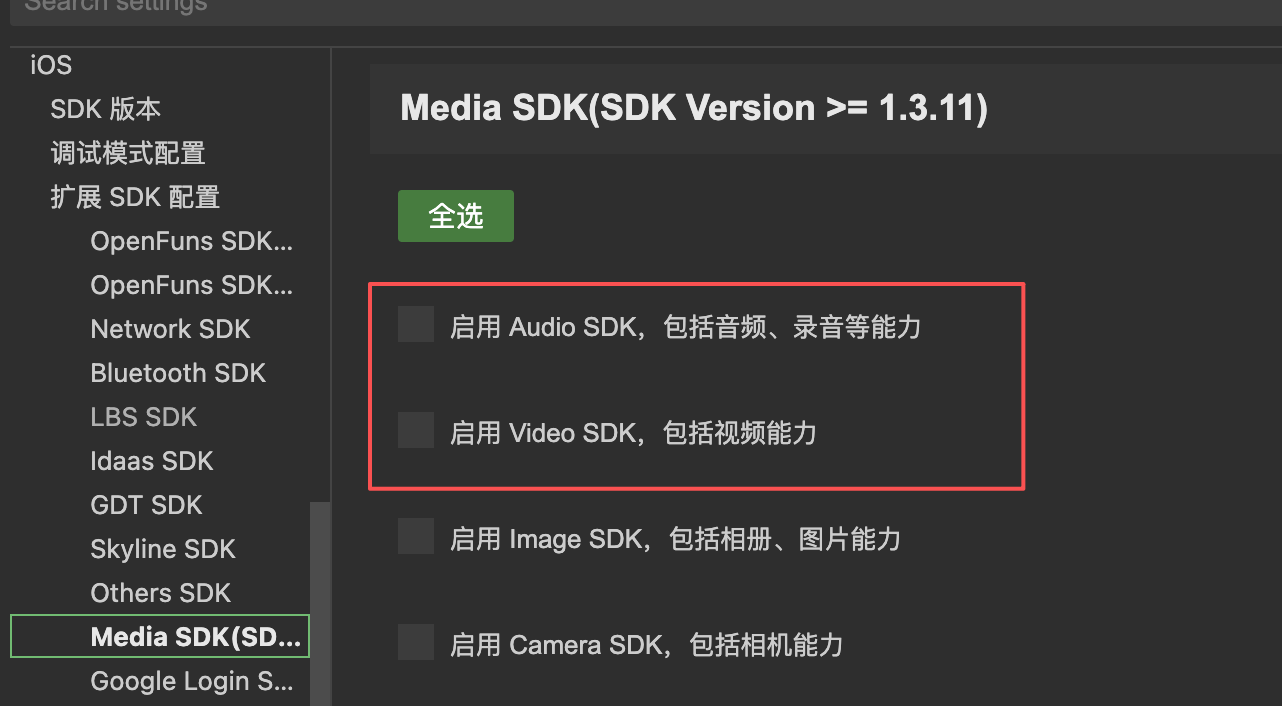
- On the iOS side, using this component relies on the
video and audio extension SDKs. Both need to be checked.
2. Unsupported Components
- Includes interfaces that have no planned support and those currently under development. For details, see Component Overview.