I. Notes Before Use
1. Account Preparation
Multi-platform applications now support "Splash Ads" and "Rewarded Ads" for Apps. This capability is built upon the Tencent Youlianghui - Traffic Management service. Developers are required to register an account on the official Tencent Youlianghui platform and create media and ad placements. To better understand the overall logic, please carefully read the content of this chapter:
- First, go to the Tencent Youlianghui console to register a developer account and complete enterprise qualification authentication.
- Proceed to "Traffic Cooperation" to create media and ad placements, and obtain the corresponding media ID and ad placement ID. For specific usage details, please refer to the instructions below.
2. SDK Version Requirements
- Splash ads: iOS SDK version must be ≥ 1.0.20; Android SDK version must be ≥ 1.0.14
- Rewarded ads: iOS SDK version must be ≥ 1.3.21; Android SDK version must be ≥ 1.3.17
- Video feed ads and banner ads: iOS SDK version must be ≥ 1.6.10; Android SDK version must be ≥ 1.6.7
Therefore, developers must upgrade their SDK version to the above-specified versions to utilize the relevant capabilities of the GDT SDK.
3. Notes
- The GDT SDK validates the
bundleId. If thebundleIddoes not match the one specified when creating the media, ads will fail to display successfully. - Therefore, to retrieve ads properly, developers must select "Certificate Signing" when building the IPA; "Ad Hoc" signing must not be selected.
- Additionally, this multi-platform app must be linked to a mobile application. In other words, the
bundleIddisplayed when building the IPA should not be the official testbundleId. - Furthermore, newly created ad placements will not be able to retrieve ads for 30 minutes. Developers should be aware of this delay.
- Finally, the Tencent Youlianghui account must complete enterprise qualification verification for the created
appidandplacementIdto retrieve ads successfully. Developers should also be aware of this requirement. - Supplementary note: Apps that have enabled Tencent Youlianghui ads currently do not support publishing on Google Play. Therefore, if your App needs to be published on Google Play, do not check the "GDT SDK" option.
4. Compliance Guidelines
In accordance with regulatory requirements, when using the SDK, you must disclose the purpose of its usage to end users in the "Privacy Policy." Additionally, no SDK may be initialized before end users have agreed to the "Privacy Policy." Ensure that the application you develop or operate has a "Privacy Policy" that complies with regulatory standards. You must also clearly inform end users that your application utilizes advertising services. You are required to comply with the following agreements:
- Tencent Ads YouLiangHui Developer Agreement
- Tencent Ads YouLiangHui Developer Violation Penalties
- Developer Personal Information Protection Compliance Guidelines
- YouLiangHui SDK Personal Information Protection Rules
- Data Protection Agreement
II. Splash Ad Operation Guide
The operation guide in this section covers only the operations within Developer Tools. For more information on operating the Tencent GDT console, please visit its official website to view the relevant guides.
- Tencent GDT - Account Registration
- Tencent GDT - Create New Media
- Tencent GDT - Create New Ad Slot, select "Splash Ad" when creating a new ad slot.
The operation guide for Developer Tools is as follows:
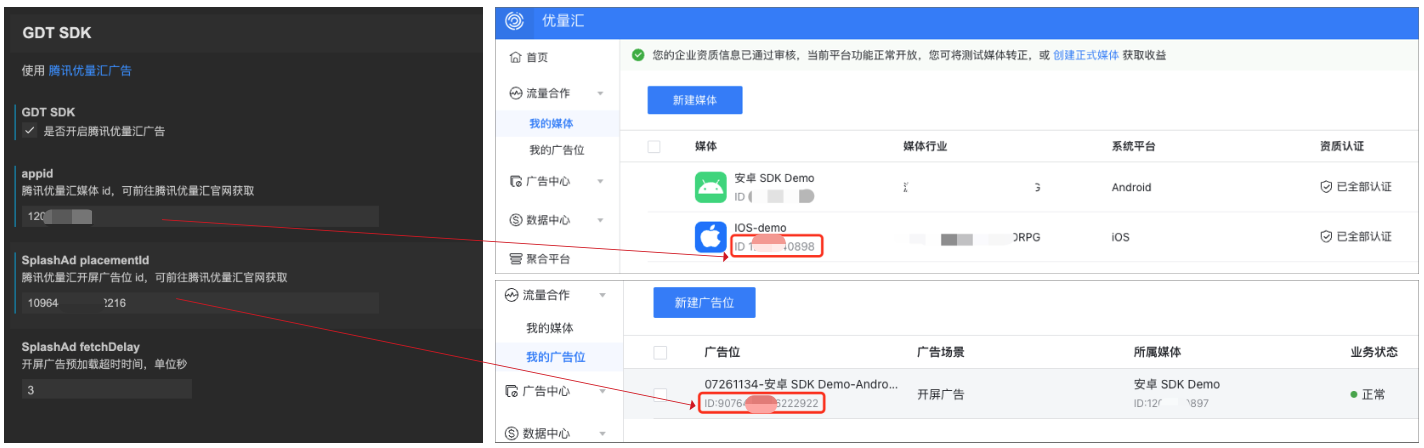
- Configure
project.miniapp.jsonto enable the GDT SDK, and fill in the corresponding Media ID and Ad ID.
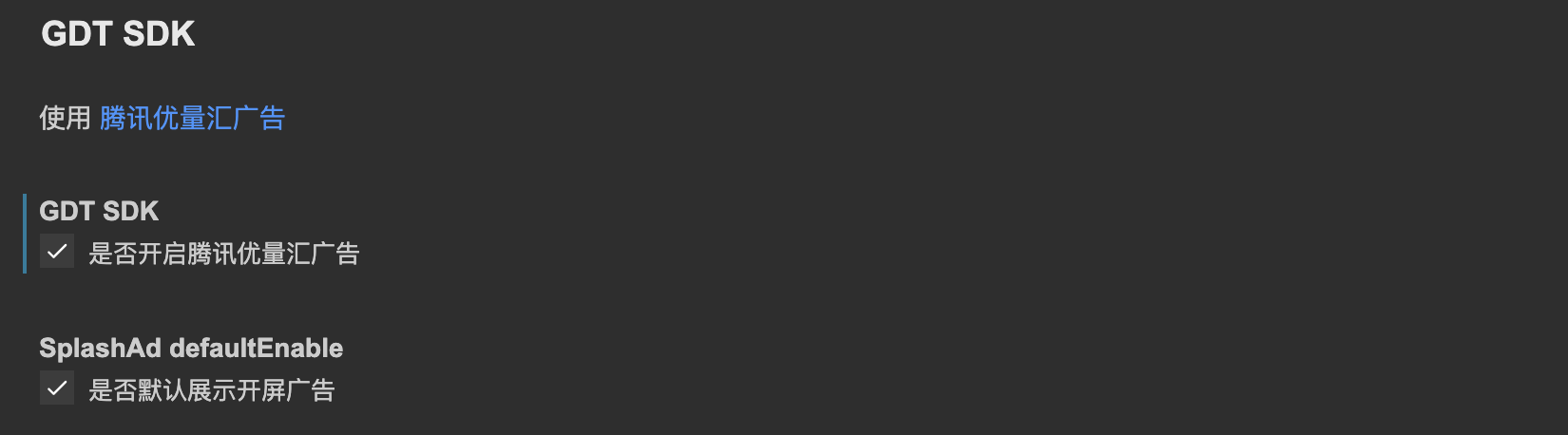
- Starting from iOS >= 1.2.9, developers can configure whether to display splash ads by default after setting up splash ads. The SDK also provides wx.miniapp.setEnableAdSplash to allow developers to implement custom control.
III. Rewarded Video Ads Operation Guide
This section covers operations performed exclusively within the Developer Tools. For instructions on using the Tencent Youlianghui (GDT) console, please refer to the relevant guidance on their official website.
- Tencent GDT - Account Registration
- Tencent GDT - Create New Media Account
- Tencent GDT - Create New Ad Slot, select Rewarded Video Ad when creating a new ad slot
The operation guide for Developer Tools is as follows:
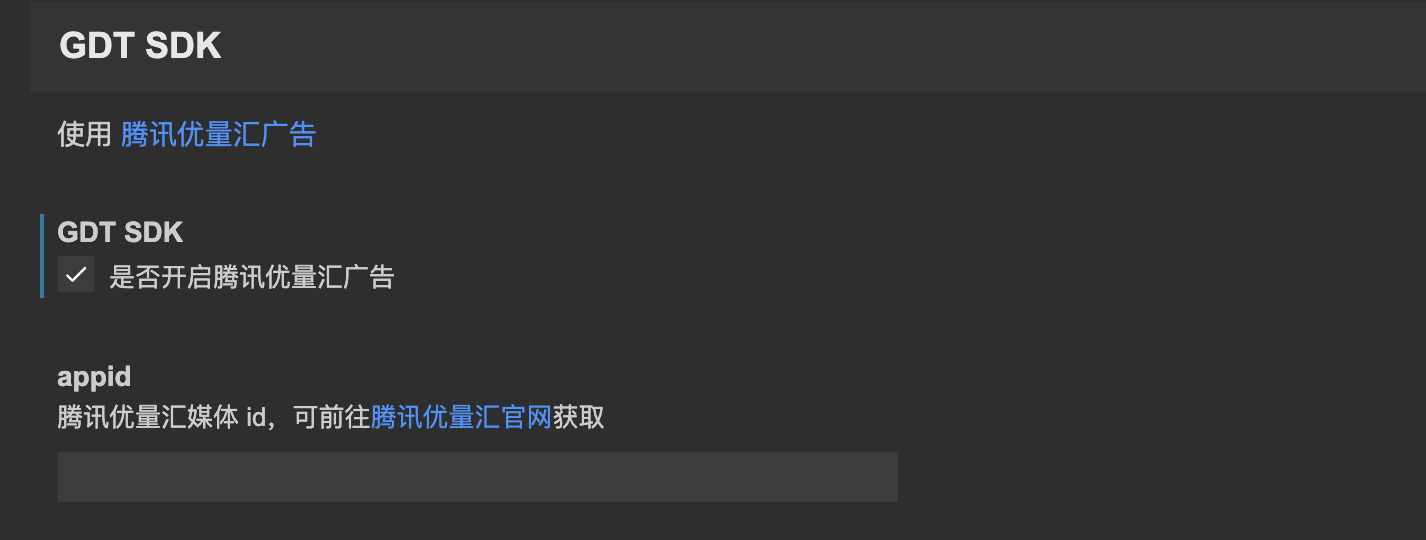
- Enable GDT SDK in
project.miniapp.jsonand enter the corresponding media ID
- Then, call
wx.miniapp.createRewardedVideoAdto create the rewarded video ad component, whereadUnitIdrefers to the ad slot ID
3.1 wx.miniapp.createRewardedVideoAd
Creates a rewarded video ad component. Note that the rewarded video ad created by calling this method is a singleton. For usage examples, refer to wx.createRewardedVideoAd.
Parameters
| Attribute | Type | Default | Required | Description |
|---|---|---|---|---|
| adUnitId | string | Yes | Ad unit ID | |
| multiton | boolean | No | Whether to enable multi-instance mode; only false is supported |
Return Value
Refer to RewardedVideoAd in Mini Program
- Load rewarded video ad
- Show rewarded video ad
- Destroy rewarded video ad instance
- Listen for rewarded video ad load event
- Remove listener for rewarded video ad load event
- Listen for rewarded video ad error event
- Remove listener for rewarded video ad error event
- Listen for user click on
Close Adbutton event - Remove listener for user click on
Close Adbutton event
4. Operational Guide for Video Stream Ads and Banner Ads
- Since there are differences in the usage of ad components between App ads and Mini Program, it is necessary to carefully read the official documentation of Tencent Youlianghui before integrating video stream ads and banner ads.
- The documentation for video stream ads is available here: https://e.qq.com/dev/help_detail.html?cid=3435&pid=10093
- The documentation for banner ads is available here: https://e.qq.com/dev/help_detail.html?cid=3434&pid=10084
- Simply fill in the correct
placement-id. A call example is shown below:
<view> --- The following is the video stream (express) ad ----</view>
<miniapp-ad placement-id="" binderror="onAdError" bindload="onAdShowSuccess" bindclick="onAdClick" bindexposure="onAdExposure" bindclose="onAdClose"></miniapp-ad>
<view> -------</view>
<view> --- The following is the banner ad ----</view>
<miniapp-ad ad-type="banner" placement-id="" binderror="onAdError" bindload="onAdShowSuccess" bindclick="onAdClick" bindexposure="onAdExposure" bindclose="onAdClose"></miniapp-ad>
<view> -------</view>
- Note: When creating an ad slot, you must select "Youlianghui Rendering" for the ad style and "Ads in Other Locations" for the scene point.
