To facilitate developers in more easily integrating the Mini Program Login Service, the Developer Tools support one-click completion of the configuration required for integrating the "Multi-End Identity Management Service," which specifically includes the following.
I. Configuration Details for Mini Program Login Service
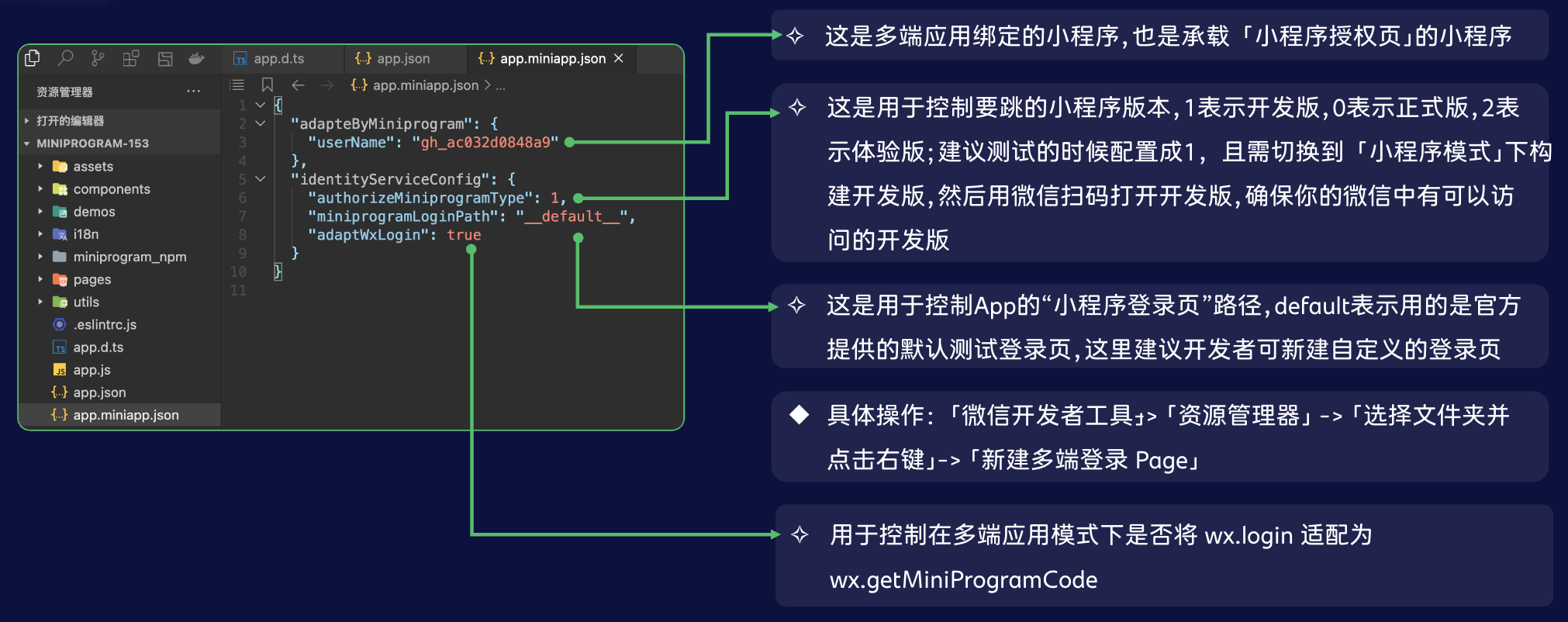
1.1 app.miniapp.json
| identityServiceConfig | Type | Description | Notes |
|---|---|---|---|
| authorizeMiniprogramType | 0 | 1 | 2 | Specifies the Mini Program version to jump to when wx.weixinMiniProgramLogin is called | 0: Release version, 1: Development version, 2: Trial version |
| miniprogramLoginPath | String | Controls the default login page displayed when the system login state is expired if wx.getMiniProgramCode is called | __default__ only supports debugging in the real device environment. When debugging in the devtools, you can create a "Multi-Platform Login Page" yourself |
| adaptWxLogin | Boolean | When set to true, the developer can automatically adapt the wx.login logic to wx.getMiniProgramCode without modifying the project code |
1.2 app.json
| miniApp | Type | Description | Notes |
|---|---|---|---|
| useAuthorizePage | Boolean | Used by wx.weixinMiniProgramLogin to insert a " Mini Program Authorization Page" in Mini Program |
2. JSAPI Configuration
2.1 wx.weixinMiniProgramLogin
- This API requires adding the Mini Program authorization Page
2.2 wx.getMiniProgramCode
- This API requires the Add Mini Program Authorization Page
- And the Add Multi-Platform Login Page
2.3 Quick Adaptation of wx.login
- Add Mini Program Authorization Page
- Add Multi-Platform Login Page
- And Adapt wx.login to wx.getMiniProgramCode
III. Configuration Operations
Add Mini Program Authorization Page
The Multi-Platform Identity Management Service supports "Multi-Platform Login" in multi-platform applications. The flow is as follows: when a user clicks Multi-Platform Login, they will be redirected to the Mini Program bound to the module of the multi-platform application. After obtaining Mini Program authorization, the user can return to the multi-platform application, and the developer can obtain the jscode information of the Mini Program. Therefore, the following configurations are required:
- Insert a " Mini Program Authorization Page" into the Mini Program. The addition logic of this Page is controlled by
useAuthorizePagein app.json, which means:
// app.json
{
 "miniApp": {
 "useAuthorizePage": true // true indicates inserting the authorization Page into the Mini Program; false indicates not inserting the authorization Page into the Mini Program
}
}
- In addition, you must also configure
identityServiceConfiginformation in app.miniapp.json.authorizeMiniprogramTypecontrols the version of the Mini Program invoked during login (Note: It is recommended to set this to 1 during testing, and to 0 after the Mini Program is officially released). That is:
// app.miniapp.json
{
 "identityServiceConfig": {
 "authorizeMiniprogramType": 1, // Specifies the Mini Program version to redirect to (0: Official Version, 1: Development Version, 2: Trial Version)
}
}
Add Multi-Endpoint Login Page
The "Multi-Endpoint Login Page" controls the default login page displayed when the system login state expires during a call to wx.getMiniProgramCode.
- By default, to facilitate quick debugging for developers, you can set
miniprogramLoginPathto__default__. When building the App, a default "Multi-Endpoint Login Page" will be inserted to complete thewx.getMiniProgramCodecall.
Note: __default__ is only supported for debugging on real devices. When debugging in the developer tools, you must create your own "Multi-Endpoint Login Page".
// app.miniapp.json
{
    "identityServiceConfig": {
        "miniprogramLoginPath": "__default__"  // This field controls the default login page shown if the login state expires when wx.getMiniProgramCode is called
    }
}
Default "Multi-Endpoint Login Page":
- To further reduce the cost for developers in creating login pages for multi-endpoint applications, WeChat Developer Tools also provides a template for the multi-endpoint login page. Developers can customize this login page based on the template. Steps: "WeChat Developer Tools" -> "Explorer" -> "Select a folder and right-click" -> "New Multi-Endpoint Login Page"
Adapt wx.login to wx.getMiniProgramCode
-
Developers can replace wx.login with wx.getMiniProgramCode on their own. However, considering that this code must also serve as the code for Mini Program, and wx.login still needs to be invoked in Mini Program, developers must use conditional compilation syntax for compatibility.
-
To further reduce the compatibility logic processing required by developers, a new
adaptWxLoginparameter has been added to app.miniapp.json to control whether wx.login is adapted to wx.getMiniProgramCode in Multi-platform App mode. That is:
// app.miniapp.json
{
 "identityServiceConfig": {
 "adaptWxLogin": true
}
}
4. One-Click Configuration of the Mini Program Login Service
Developers can follow the above guidelines step by step, or utilize the " Mini Program Login Service Configuration" feature provided by the developer to complete the relevant configuration in one click.
4.1 Download WeChat DevTools
- Download the latest version of WeChat DevTools (Development Version Nightly Build). The version number must be
1.06.2405312or higher.
4.2 Enter Multi-Platform Application Mode and Configure Mini Program Login Service
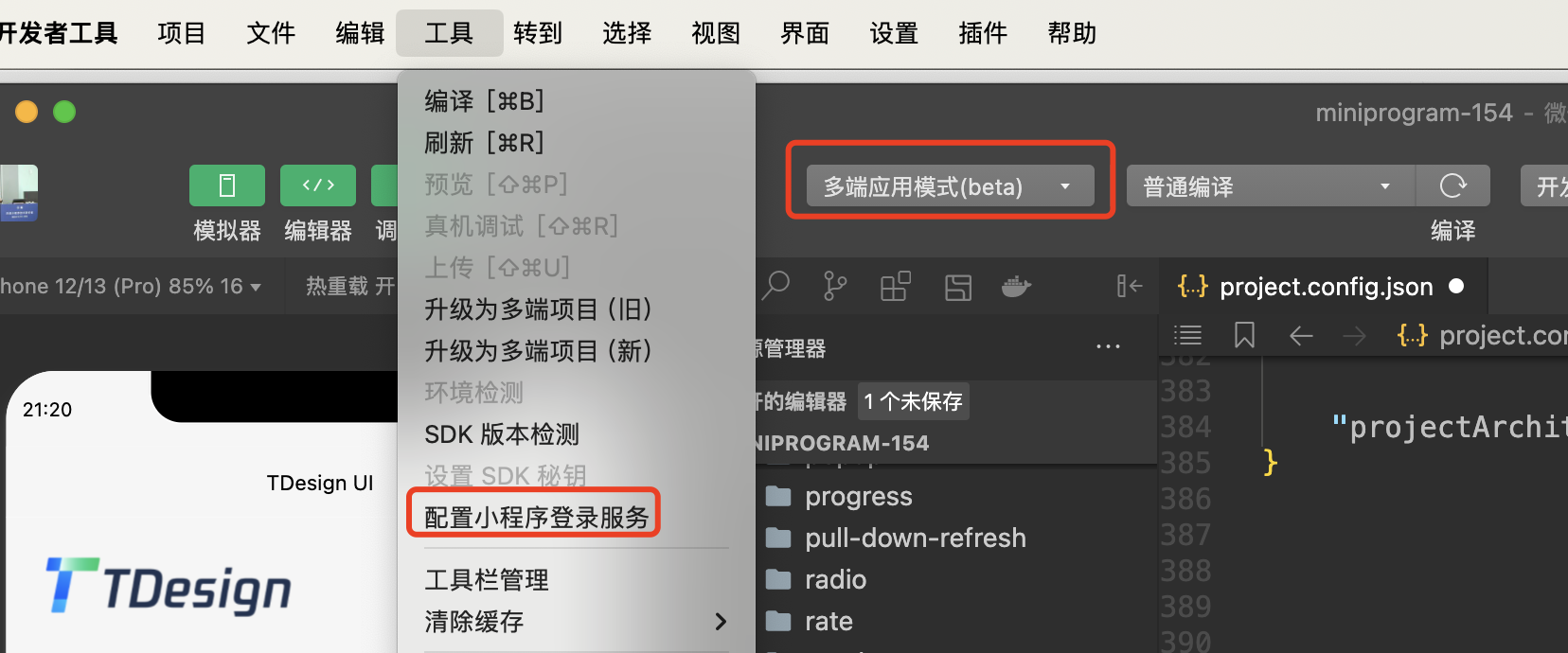
- Upgrade the original Mini Program project to a multi-platform project and switch to Multi-Platform Application Mode
- Go to "Menu Bar - Tools - Configure Mini Program Login Service"
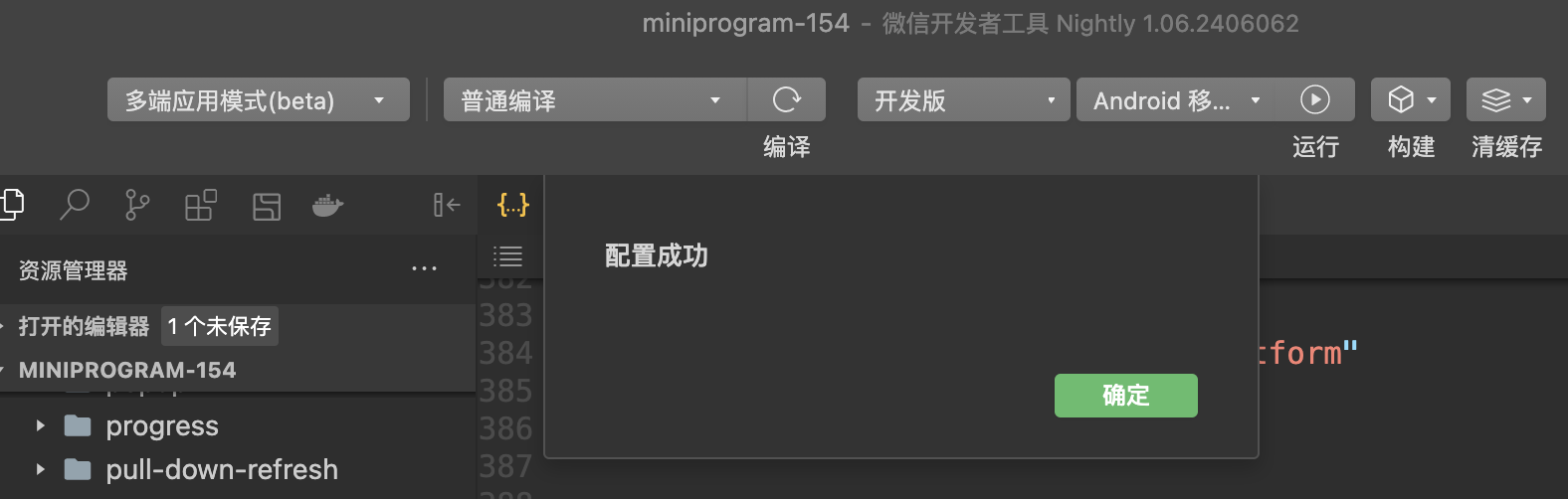
- Click "OK" to complete the Mini Program login service configuration in one step
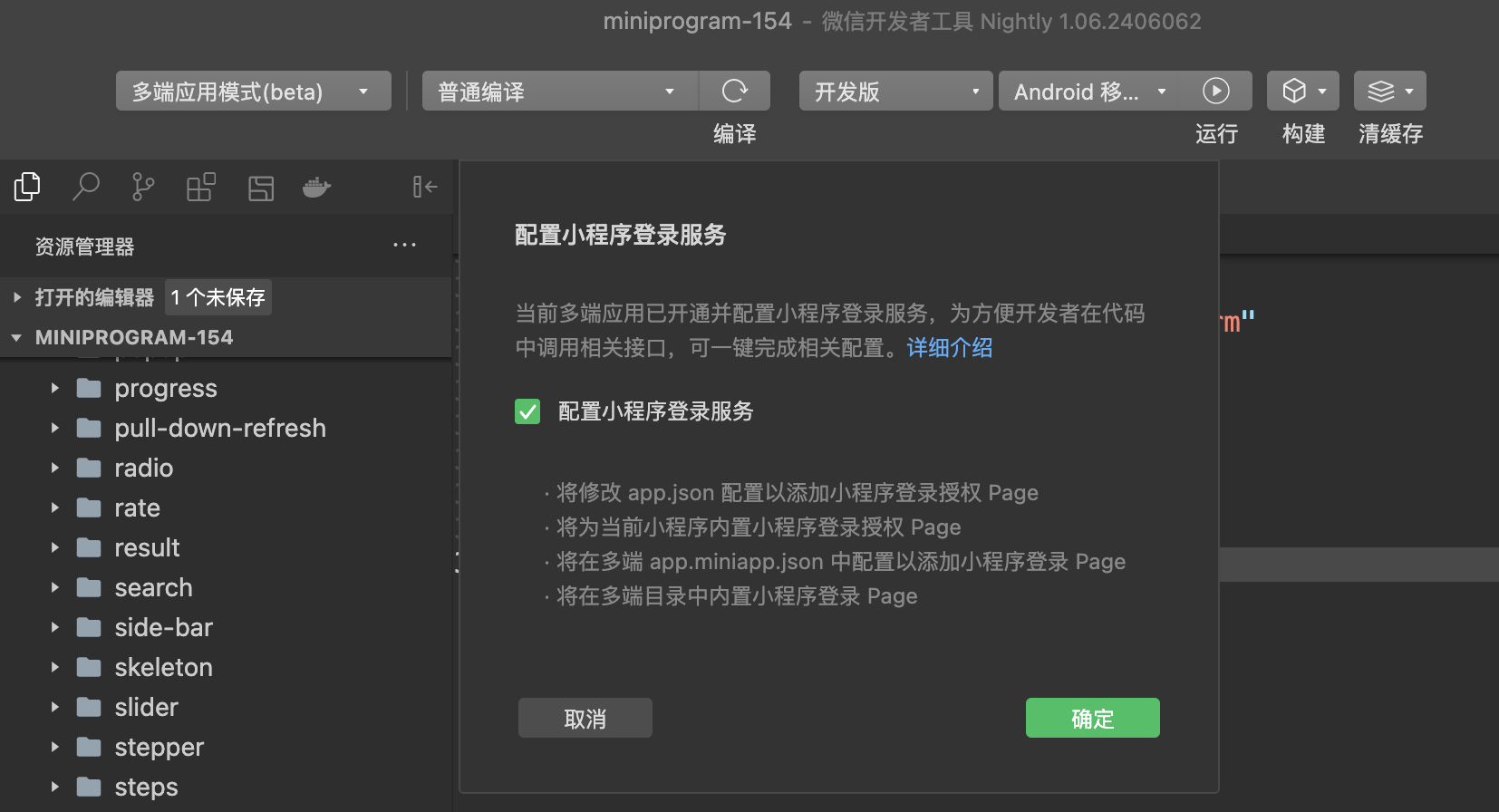
- Please wait a moment for the configuration to be successfully completed
4.3 Special Notes
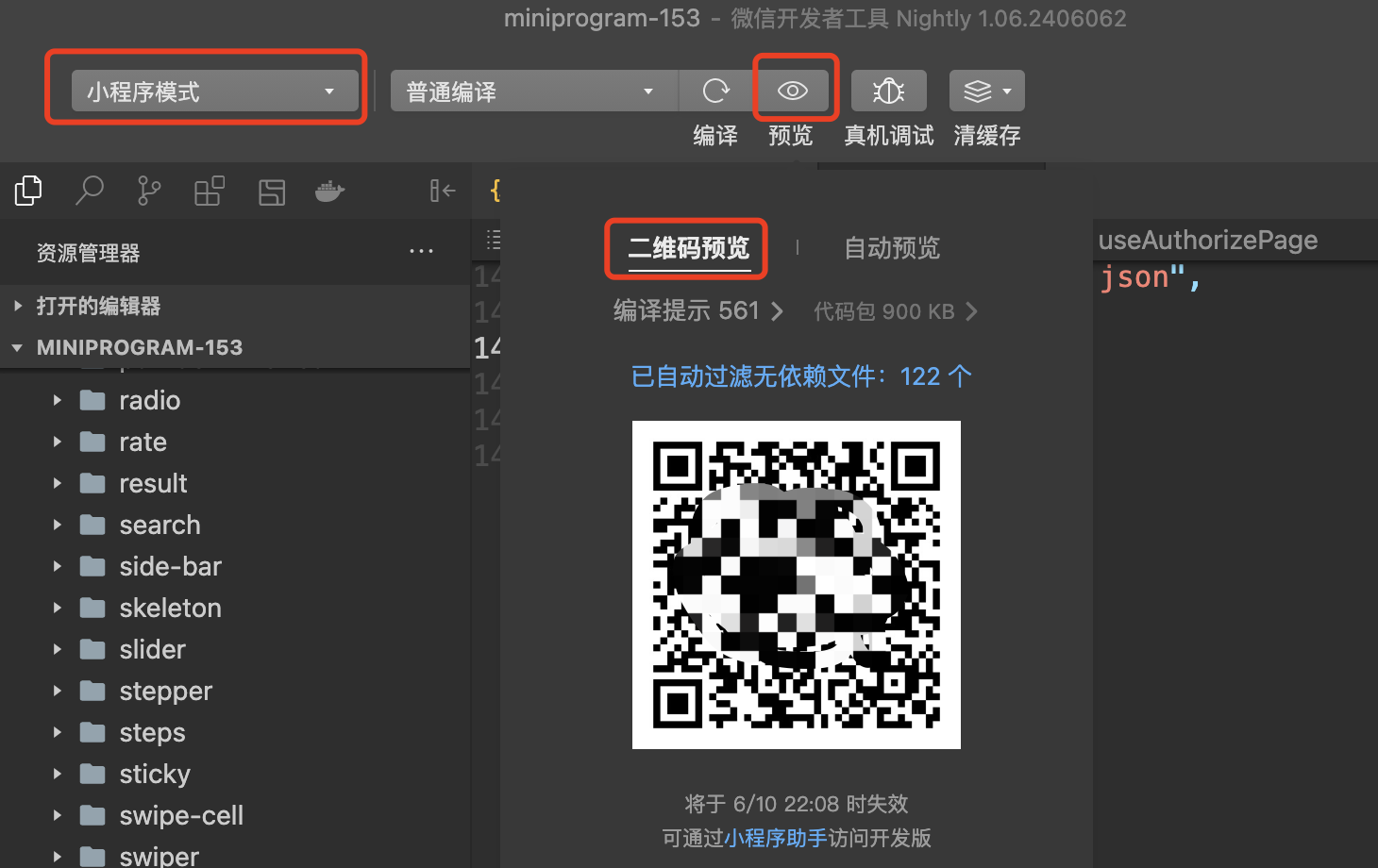
- The relevant configurations have been set up for developers by the DevTools. However, to take effect, developers must not only rebuild the App in Multi-Platform Application Mode but also switch back to Mini Program mode and rebuild a new Mini Program version!!!
- By default, the Mini Program login configured for developers redirects to the "Development Version" of Mini Program for logging in. Therefore, developers must switch back to Mini Program mode, then "Preview" again, and scan the code with WeChat to ensure that your phone has the latest "Development Version Mini Program " that includes the " Mini Program Authorization Page".