Supported on iOS >= 0.8.1, Android >= 0.8.2.
In accordance with the requirements of the Ministry of Industry and Information Technology (MIIT) regarding the special rectification of Apps infringing upon user rights and interests, Apps submitted to app markets must meet the following condition: a Privacy Policy agreement prompt must be displayed when the App starts, explaining the user data collected by the App. This article provides a detailed guide on how to configure the "Privacy Policy and Agreement" prompt box.
- If you need to configure multiple languages for the Privacy Policy prompt box, see Multilingual Adaptation.
- Both Android and iOS Privacy Policy prompt box configurations now support "Browsing Mode." For details, refer to the description below.
1. Style Description
The "Privacy Policy Prompt Box" after template configuration is shown in the figure below:
II. Dialog Box Behavior Description
The dialog box appears only when the configuration is correct and the user has never confirmed it. The information about whether the user has confirmed is stored locally on the App. Reinstalling the App after uninstallation will be treated as the user not having confirmed.
- If the user clicks Confirm, the App will navigate to the Home page.
- If the user clicks Cancel, the App will automatically exit.
3. How to Configure
3.1 Enable Privacy Policy Dialog
Open project.miniapp.json in the Developer Tools and configure the "Privacy Policy Dialog" settings for Android and iOS.
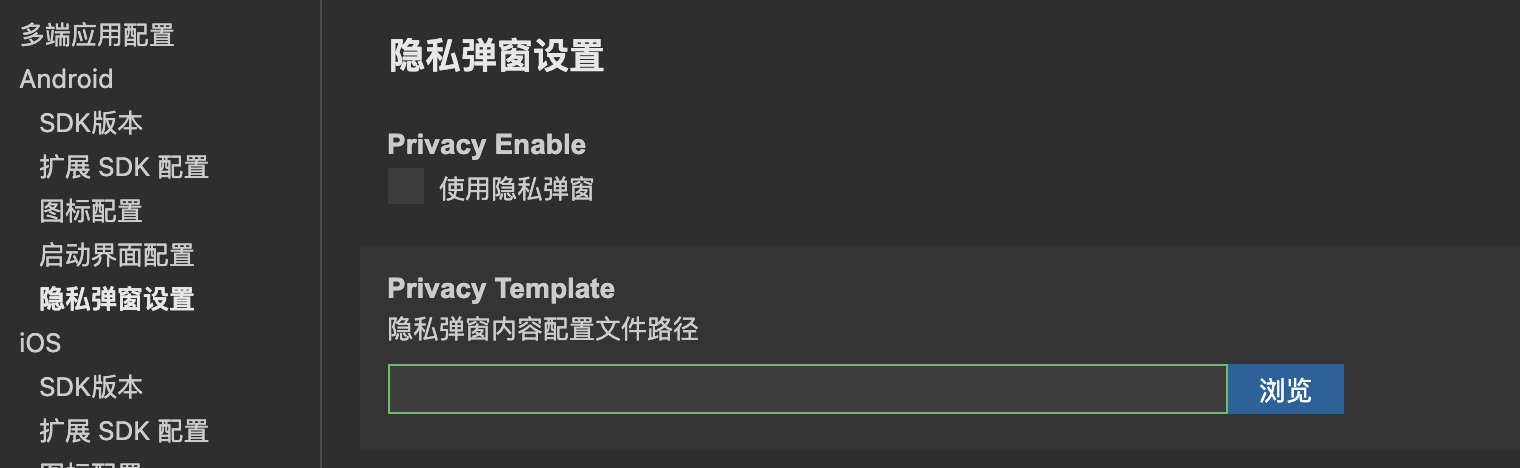
- Privacy Enable: Once checked, this determines whether to enable the privacy policy dialog.
- Privacy Template: Select the configuration file for the popup content. (Refer to 3.2 for the file format)
3.2 Configuring Prompt Box Content
Developers can configure privacy popup-related information by creating a new JSON file. For example, here is a reference example for creating miniapp-privacy.json:
{
  "title": "Privacy Policy Agreement",
  "confirm": "Agree and Accept",
  "cancel": "Not Agree Yet",
  "message": "Please read and fully understand the terms of the "Service Agreement" and "Privacy Policy" carefully, including but not limited to: To provide better services to you, we need to collect information such as your device identifier and operation logs for analyzing and optimizing application performance. __a____b__ For more details. If you agree, please click the button below to start accepting our services. Please read and fully understand the terms of the "Service Agreement" and "Privacy Policy" carefully, including but not limited to: To provide better services to you, we need to collect information such as your device identifier and operation logs for analyzing and optimizing application performance. __a____b__ For more details. If you agree, please click the button below to start accepting our services. Please read and fully understand the terms of the "Service Agreement" and "Privacy Policy" carefully, including but not limited to: To provide better services to you, we need to collect information such as your device identifier and operation logs for analyzing and optimizing application performance. __a____b__ For more details. If you agree, please click the button below to start accepting our services. Please read and fully understand the terms of the "Service Agreement" and "Privacy Policy" carefully, including but not limited to: To provide better services to you, we need to collect information such as your device identifier and operation logs for analyzing and optimizing application performance. __a__ For more details. If you agree, please click the button below to start accepting our services.",
  "messageLinks": {
      "__a__": {
          "text": "《Service Agreement》",
          "url": "https://developers.weixin.qq.com/platform"
      },
      "__b__": {
          "text": "《Privacy Policy》",
          "url": "https://developers.weixin.qq.com/platform"
      }
  },
  "styles": {
    "title": {
      "color": "#000000"
    },
    "confirmButton": {
      "color": "#000000"
    },
    "cancelButton": {
      "color": "#000000"
    },
    "message": {
      "color": "#000000"
    },
    "messageLinks": {
      "color": "#0000ff"
    }
  }
}
Field Descriptions
| Field | Description |
|---|---|
| title | - Refers to the title at the top of this dialog |
| confirm | - Refers to the text of the confirm button in this dialog |
| cancel | - Refers to the text of the cancel button in this dialog |
| message | - Refers to the text in the content area of this dialog |
| messageLinks | - Refers to the external link configuration key-value pairs for the dialog content area. Key: The placeholder in the content area. Value: text is the text used to replace the placeholder. url is an HTTPS URL, where developers can host the specific content of the protocol |
| styles | - Supports configuring the font color of the text |
The title, message, confirm, and cancel fields all support the following configuration
{
  "title": { // title / message / cancelButton / cancelButton
    "color": "#111111", // Font color
    "top": 25, // Distance from the top of the dialog
    "left": 50, // Distance from the left side of the dialog
    "width": 100, // Width
    "height": 50, // Height
    "backgroundColor": "#ffffff", // Background color
    "borderRadius": 18 // Border radius
  }
}
Additional textAlign configuration supported for message (iOS SDK >= 1.5.6)
{
  "message": {
    "textAlign": "center", // Text alignment, defaults to center. Options: left, center, right
  }
}
styles
{
  "styles": {
    "borderRadius": 16, // border radius
    "backgroundColor": "#ffffff", // background color
    "showLine": false, // whether to show the button divider line
    "width": 300, // width
    "height": 500, // height
    "top": 25, // distance from the top of the screen
    "left": 50, // distance from the left side of the screen
    "title": {...},
    "message": {...},
    "cancelButton": {...},
    "confirmButton": {...}
  }
}
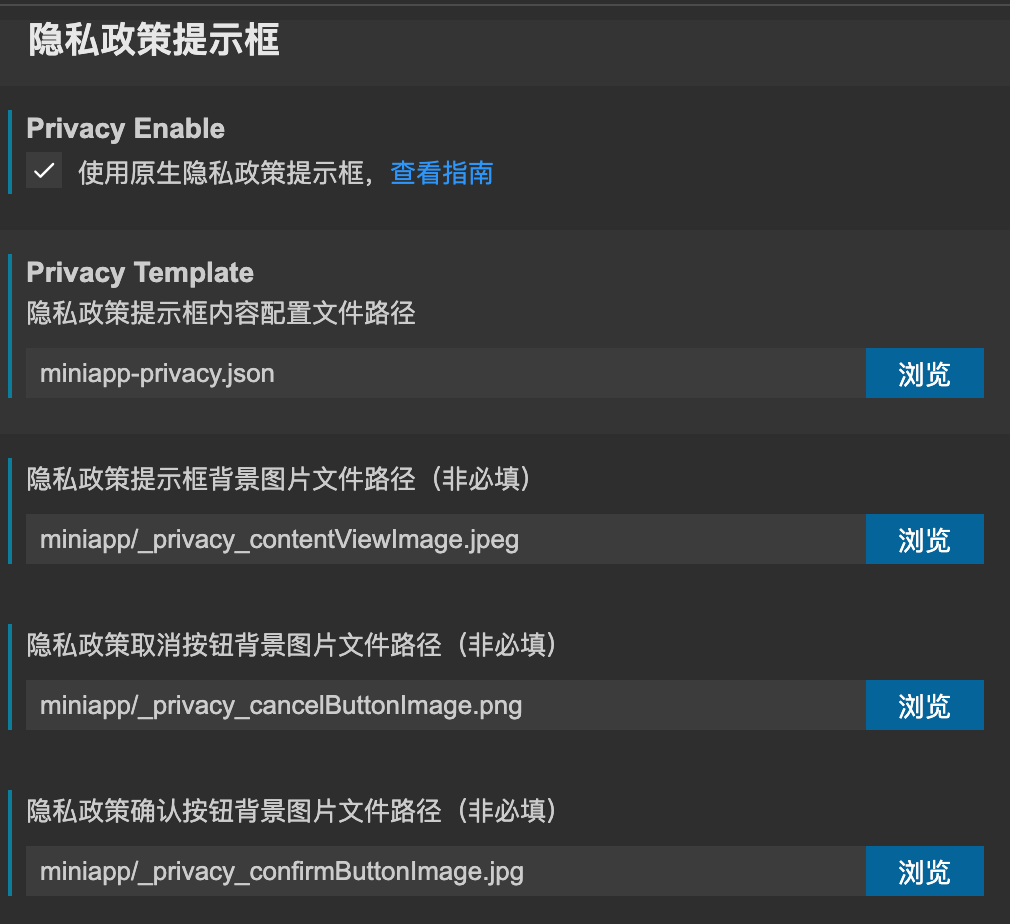
3.3 Tip Box Background Image Configuration
Developers can configure the background images for pop-ups and buttons in project.miniapp.json.
Note: On Android, if width/height are not set, the image size will stretch the pop-up and button dimensions.
3.4 Dialog Content Path Configuration
After completing the configuration of the content JSON file, you need to add the configuration file by setting the Privacy Dialog Content Configuration File Path.
3.5 Browse Mode Configuration
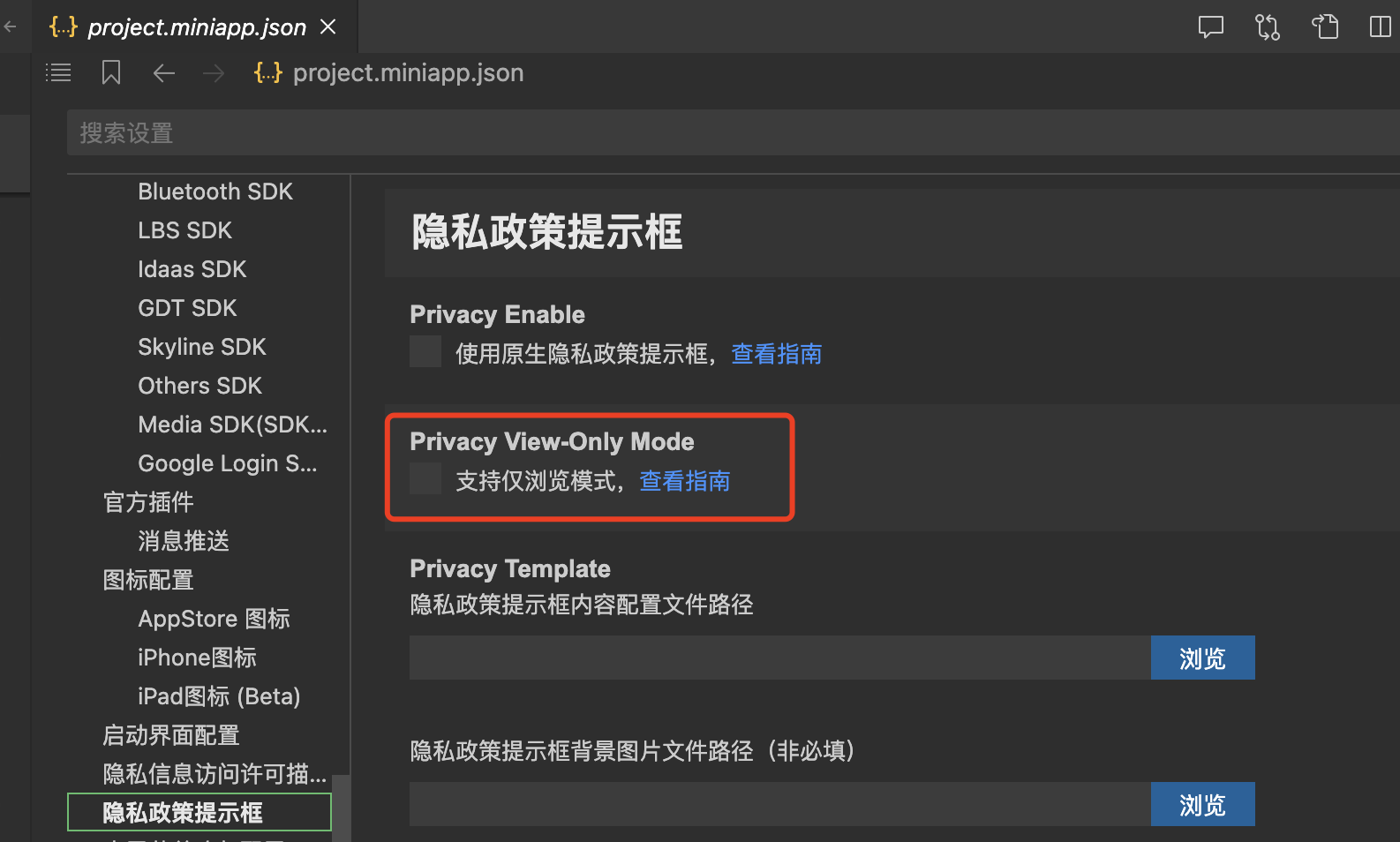
- Browse mode refers to a scenario where, if the user does not agree to the privacy policy, the application does not terminate. Instead, the user can continue accessing the application (normal network access is allowed with user authorization), but cannot use WeChat capabilities related to openSDK, such as WeChat Login. Additionally, developers must implement logic in their business to disable calls to APIs related to personal information when the user is in Browse Mode.
- Developers must configure "Browse Mode" in the
project.miniapp.jsonfile within the Developer Tools. The default value isfalse, meaning the application exits if the user does not agree to the privacy policy. If "Support Browse Mode Only" is checked, the application will not exit when the user disagrees with the privacy policy; the user can access the application normally, but developers must ensure in their business logic that no user information is retrieved. - Note: After enabling Browse Mode in
project.miniapp.json, a rebuild is required for the changes to take effect.
- Furthermore, to facilitate developers in implementing the aforementioned features, the platform provides
wx.miniapp.getPrivacySettingandwx.miniapp.agreePrivacyAuthorization. These are used to query "whether the user has agreed to the privacy policy" and "confirm the user's agreement to the privacy policy," respectively.
Usage Example:
-
After the user enters the application, developers must call
wx.miniapp.getPrivacySettingto check if the user has agreed to the privacy policy. If not (i.e., the user has chosen Browse Mode), developers must ensure in their business logic that no APIs related to personal information are called while in Browse Mode. -
When using certain features, such as WeChat Login, obtaining location, or accessing the album, developers must display a custom dialog informing the user that agreeing to the privacy policy is required to use these capabilities. Once the user clicks to agree, developers can call
wx.miniapp.agreePrivacyAuthorization, after which APIs involving personal information can be called normally.
Supplement:
- See the documentation for API details: wx.miniapp.getPrivacySetting, wx.miniapp.agreePrivacyAuthorization
iOS Browse Mode Supplement
- If the SDK version is < 1.6.2, the Browse Mode logic is as follows: In Browse Mode, the landing page for the user looks like the image below. Clicking "Go to Read Privacy Policy" will re-display the privacy policy dialog. At this point, if the user agrees to the privacy policy, they can smoothly enter the App.

3.6 Android Revoking Privacy Pop-up Consent Configuration
Due to regulations from application stores, applications must provide the capability to revoke user privacy consent settings. Therefore, the wx.miniapp.revokePrivacySetting API is provided to revoke privacy pop-up authorization information and restore the state to one requiring re-authorization. Developers must close the application themselves after calling wx.miniapp.revokePrivacySetting within the app, prompting the user to restart the application.
- For API details, please refer to the documentation: wx.miniapp.revokePrivacySetting
3.7 Set the Privacy Agreement URL Opening Method
A new parameter showExternal has been added to messageLinks to control how the url is opened. By default, it opens within the built-in browser; developers can configure it to open in an external browser as needed.
- The
showExternalparameter is of typebool.trueindicates "Open in browser", whilefalseindicates "Do not open in browser". - Note: For this parameter to take effect, the required SDK versions are: iOS >= 1.4.3, Android >= 1.4.1