To facilitate multi-platform application debugging for developers, WeChat DevTools supports debugging with different types of resource packages. The application launch types vary across different versions of resource packages. The relevant descriptions are as follows:
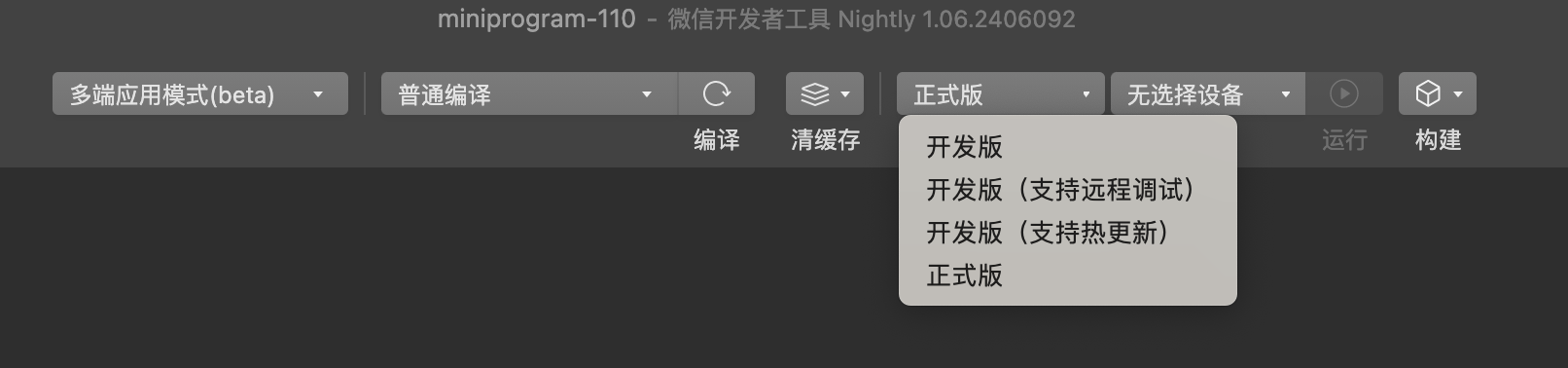
1. Production Build
The compiled resource package undergoes processes such as compression and obfuscation, resulting in a very small package size and faster App startup speeds. Additionally, this type of resource package does not include SourceMap, making it suitable for official releases or pre-release testing scenarios.
2. Development Version
Running it corresponds to the development version mode of Mini Program; the resource package code is not compressed, and reasonable error stacks are visible. This type of resource package includes SourceMaps. Compared to the production version, the resource package will be larger, making it suitable for the early-stage development and self-testing phase.
III. Development Version (Remote Debugging)
Once executed, it functions like the true device debugging mode under the " Mini Program Mode" in Developer Tools, allowing you to perform breakpoint debugging on a physical device. Due to the larger resource package and slower App startup process, this version is suitable for the early development and self-testing phases.
- The App and Developer Tools connect via a LAN. Developers must ensure that the environment where the App is running and the Developer Tools are on the same Local Area Network (LAN).
4. Development Version (Hot Update)
To address the issue of long resource package compilation times due to a large number of project resources, developers can use Hot Update mode to quickly refresh the app's Mini Program resource package.
The app will fetch the resources required for the current Mini Program run in real-time from the Developer Tools. Once code modifications are completed in the Developer Tools and the Compile action is triggered, the app will synchronously refresh (Hot Reload in the tools does not support refreshing; recompilation is required). After the refresh, the app will fetch the latest compiled Mini Program resources from the Developer Tools.
- Note that the app connects to the Developer Tools via LAN. Please ensure that the environment where the app is running and the Developer Tools are on the same local area network (LAN).
Finally, after selecting the corresponding version, select the specific device to run and debug. For more details, refer to: