The app.json file located in the Mini Program root directory is used for global configuration of Weixin Mini Program. The file contains a JSON object with the following properties:
Configuration Items
| Property | Type | Required | Description | Minimum Version |
|---|---|---|---|---|
| entryPagePath | string | No | The default home page when Mini Program starts up | |
| pages | string[] | Yes | List of page paths | |
| window | Object | No | Global default window settings | |
| tabBar | Object | No | Settings for the bottom tab bar | |
| networkTimeout | Object | No | Network timeout duration | |
| debug | boolean | No | Whether to enable debug mode; disabled by default | |
| functionalPages | boolean | No | Whether to enable plugin feature pages; disabled by default | 2.1.0 |
| subpackages | Object[] | No | Configuration for subpackage structure | 1.7.3 |
| workers | string | No | The directory where the Worker code is placed |
1.9.90 |
| requiredBackgroundModes | string[] | No | Features required to operate in the background, such as "music playback" | |
| requiredPrivateInfos | string[] | No | Privacy-related location APIs that need to be called | |
| plugins | Object | No | Plugins utilized in the Mini Program | 1.9.6 |
| preloadRule | Object | No | Rules for pre-downloading sub-modules | 2.3.0 |
| resizable | boolean | No | Whether PC Mini Program supports users adjusting the window size freely (including maximizing it); whether iPad Mini Program supports screen rotation. Disabled by default | 2.3.0 |
| usingComponents | Object | No | Global configuration for custom components | Developer Tools 1.02.1810190 |
| permission | Object | No | Settings related to Mini Program API permissions | WeChat Client 7.0.0 |
| sitemapLocation | string | Yes | Specifies the location of sitemap.json | |
| style | string | No | Indicates the use of upgraded weui styles | 2.8.0 |
| useExtendedLib | Object | No | Specifies the extended libraries that need to be referenced | 2.2.1 |
| entranceDeclare | Object | No | Opening WeChat messages via Mini Program | WeChat Client 7.0.9 |
| darkmode | boolean | No | Mini Program supports DarkMode functionality | 2.11.0 |
| themeLocation | string | No | Specifies the location of the theme.json file; required when darkmode is set to true | Developer Tools 1.03.2004271 |
| lazyCodeLoading | string | No | Configures the on-demand loading of custom component code | 2.11.1 |
| singlePage | Object | No | Configuration related to single-page mode | 2.12.0 |
| supportedMaterials | Object | No | Configuration related to chat materials Mini Program | 2.14.3 |
| serviceProviderTicket | string | No | Ticket for customized service providers | |
| embeddedAppIdList | string[] | No | List of appIds for half-screen display | 2.20.1 |
| halfPage | Object | No | Settings for half-screen video live streaming scenarios | 2.18.0 |
| debugOptions | Object | No | Debugging-related configurations | 2.22.1 |
| enablePassiveEvent | Object or boolean | No | Determines whether touch event listening should be in passive mode | 2.24.1 |
| resolveAlias | Object | No | Rules for mapping custom modules | |
| renderer | string | No | The globally default rendering backend | 2.30.4 |
| rendererOptions | Object | No | Options for the rendering backend | 2.31.1 |
| componentFramework | string | No | Component framework; see relevant documentation for details | 2.30.4 |
| miniApp | Object | No | Configuration related to Mini Program authorization pages when integrating identity management services in multi-platform mode; see relevant documentation for details | |
| static | Object | No | By default, all resource files are packaged and published to all platforms. The static field allows specifying that certain directories/files should only be published to specific platforms (in multi-platform scenarios); see relevant documentation | |
| convertRpxToVw | boolean | No | Configures whether to convert rpx units to vw units. Enabling this can resolve precision issues caused by rpx units | 3.3.0 |
| chatTools | Object | No | Configuration for sub-packaging of chat tools | 3.7.8 |
entryPagePath
Specifies the default launch path (home page) for Mini Program. Common scenarios include launching from the WeChat chat list or the Mini Program list. If left unspecified, it defaults to the first item in the pages list. Page path parameters are not supported.
{
 "entryPagePath": "pages/index/index"
}
pages
Used to specify which pages make up Mini Program. Each item corresponds to the path (including filename) of a page. The filename does not need to include the file extension, as the framework will automatically look for the corresponding .json, .js, .wxml, and .wxss files for processing.
When entryPagePath is not specified, the first item in the array represents the initial page (home page) of Mini Program.
Any addition or removal of pages in Mini Program requires modifying the pages array.
If the development directory is structured as follows:
├── app.js
├── app.json
├── app.wxss
├── pages
│ │── index
│ │ ├── index.wxml
│ │ ├── index.js
│ │ ├── index.json
│ │ └── index.wxss
│ └── logs
│ ├── logs.wxml
│ └── logs.js
└── utils
Then the following should be written in app.json:
{
 "pages": ["pages/index/index", "pages/logs/logs"]
}
window
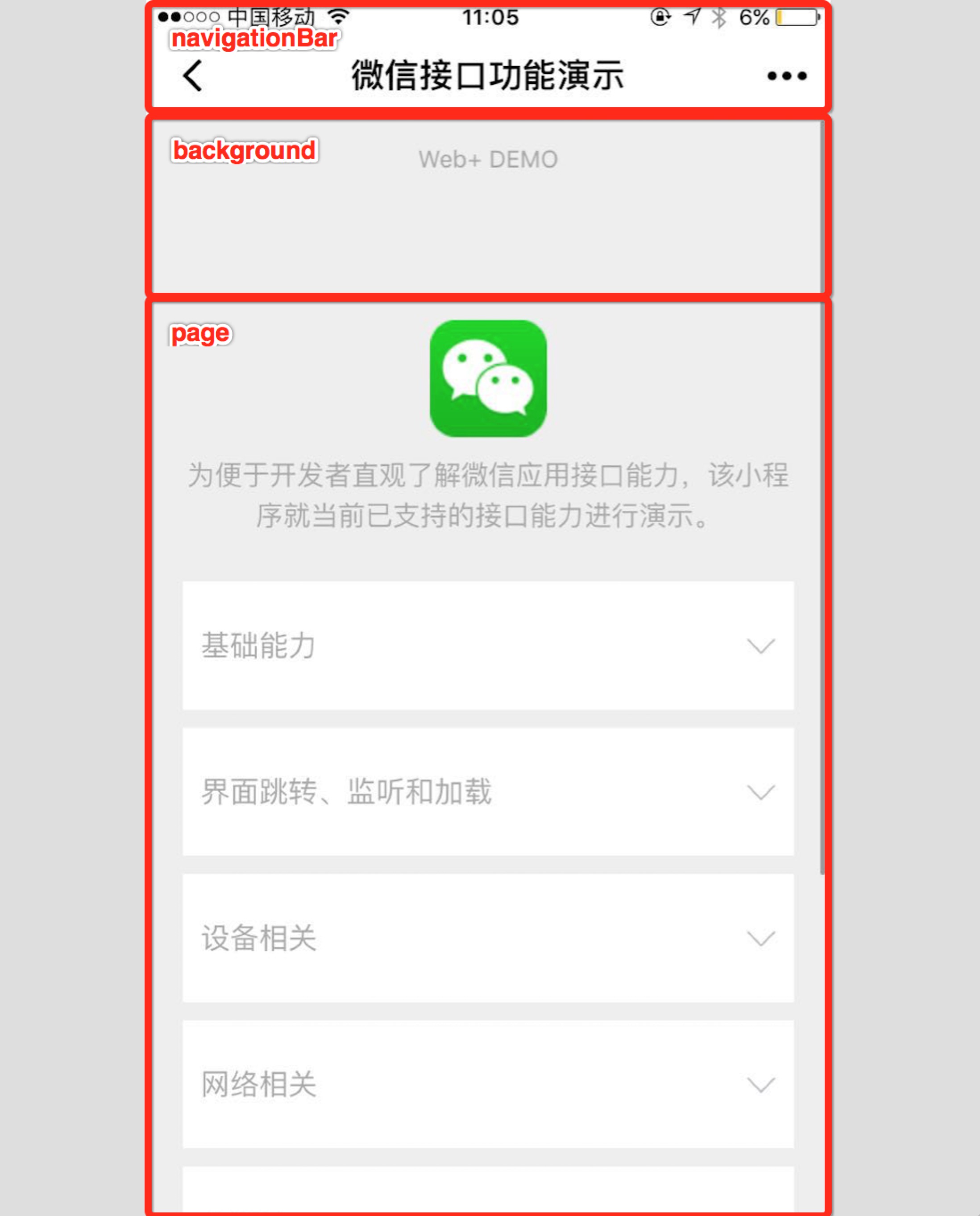
Used to set the status bar, navigation bar, title, and background color of the window for Mini Program.
| Attribute | Type | Default Value | Description | Minimum Version |
|---|---|---|---|---|
| navigationBarBackgroundColor | HexColor | #000000 | Background color of the navigation bar, e.g., #000000 |
N/A |
| navigationBarTextStyle | string | white | Color for the navigation bar title and status bar; only black / white are supported |
N/A |
| navigationBarTitleText | string | Text content of the navigation bar title | N/A | |
| navigationStyle | string | default | Style of the navigation bar; only the following values are supported:default for the standard stylecustom for a custom navigation bar with only the top-right capsule button retained. See Note 2. |
iOS/Android WeChat Client 6.6.0, Windows/Mac WeChat Foundation Library 3.6.1 |
| homeButton | boolean | false | Displays the home button in the navigation bar on pages that are not the home page, not at the bottom of the page stack, or not within a tabbar | WeChat Client 8.0.24 |
| backgroundColor | HexColor | #ffffff | Background color of the window | N/A |
| backgroundTextStyle | string | dark | Style for the pull-down loading indicator; only dark / light are supported |
N/A |
| backgroundColorTop | string | #ffffff | Background color of the top part of the window; supported only on iOS | WeChat Client 6.5.16 |
| backgroundColorBottom | string | #ffffff | Background color of the bottom part of the window; supported only on iOS | WeChat Client 6.5.16 |
| enablePullDownRefresh | boolean | false | Whether to enable global pull-down refresh. See Page.onPullDownRefresh for details |
N/A |
| onReachBottomDistance | number | 50 | Distance from the bottom of the page when the pull-up to bottom event is triggered, in pixels. See Page.onReachBottom for details |
N/A |
| pageOrientation | string | portrait | Screen rotation setting; supports auto / portrait / landscape See Responding to Display Area Changes |
2.4.0 (auto) / 2.5.0 (landscape) |
| restartStrategy | string | homePage | Configuration for the restart strategy | 2.8.0 |
| initialRenderingCache | string | -------------- | Configuration for the page’s initial rendering cache; supports static / dynamic |
2.11.1 |
| visualEffectInBackground | string | none | Hides the page content when the app enters the system background to protect user privacy. Supports hidden / none. |
2.15.0 |
| handleWebviewPreload | string | static | Controls the timing of preloading the next page (1003913#_2-4-%E6%8E%A7%E5%88%B6%E9%A2%84%E5%8A%A0%E8%BD%BD%E4%B8%8B%E4%B8%AA%E9%A1%B5%E9%9D%A2%E7%9A%84%E6%97%B6%E6%9C%BA)**. Supports static / manual / auto. |
2.15.0 |
| defaultLanguage | string | No | Specifies the source language for automatic translation. | 3.17.3 |
- •Note 1: HexColor (hexadecimal color value), e.g., "#ff00ff"
- •Note 2: Regarding
navigationStyle- •On iOS/Android clients prior to version 7.0.0,
navigationStyleonly takes effect inapp.json. - •Starting from version 6.7.2 of iOS/Android clients,
navigationStyle: customis invalid for the web-view component. - •When
customis enabled, compatibility with older client versions must be ensured. Switching the developer tool’s base library version to 1.7.0 (not the minimum version, for debugging purposes only) can help restore the old UI style.
- •On iOS/Android clients prior to version 7.0.0,
restartStrategy
基础库 2.8.0 开始支持,低版本需做兼容处理。
Configuration for restart strategies (1003955#_2-1-%E9%87%8D%E6%96%B0%E5%90%AF%E5%8A%A8%E7%AD%96%E7%95%A5)
| Optional Value | Meaning |
|---|---|
| homePage | (Default) If exiting from this page Mini Program, the next launch will be a cold start from the home page. |
| homePageAndLatestPage | If exiting from this page Mini Program, this page will be loaded immediately after the next cold start, with its parameters unchanged (not applicable to tab pages). |
For example:
{
 "window": {
 "navigationBarBackgroundColor": "#ffffff",
 "navigationBarTextStyle": "black",
 "navigationBarTitleText": "WeChat API Function Demo",
 "backgroundColor": "#eeeeee",
 "backgroundTextStyle": "light"
}
}
tabBar
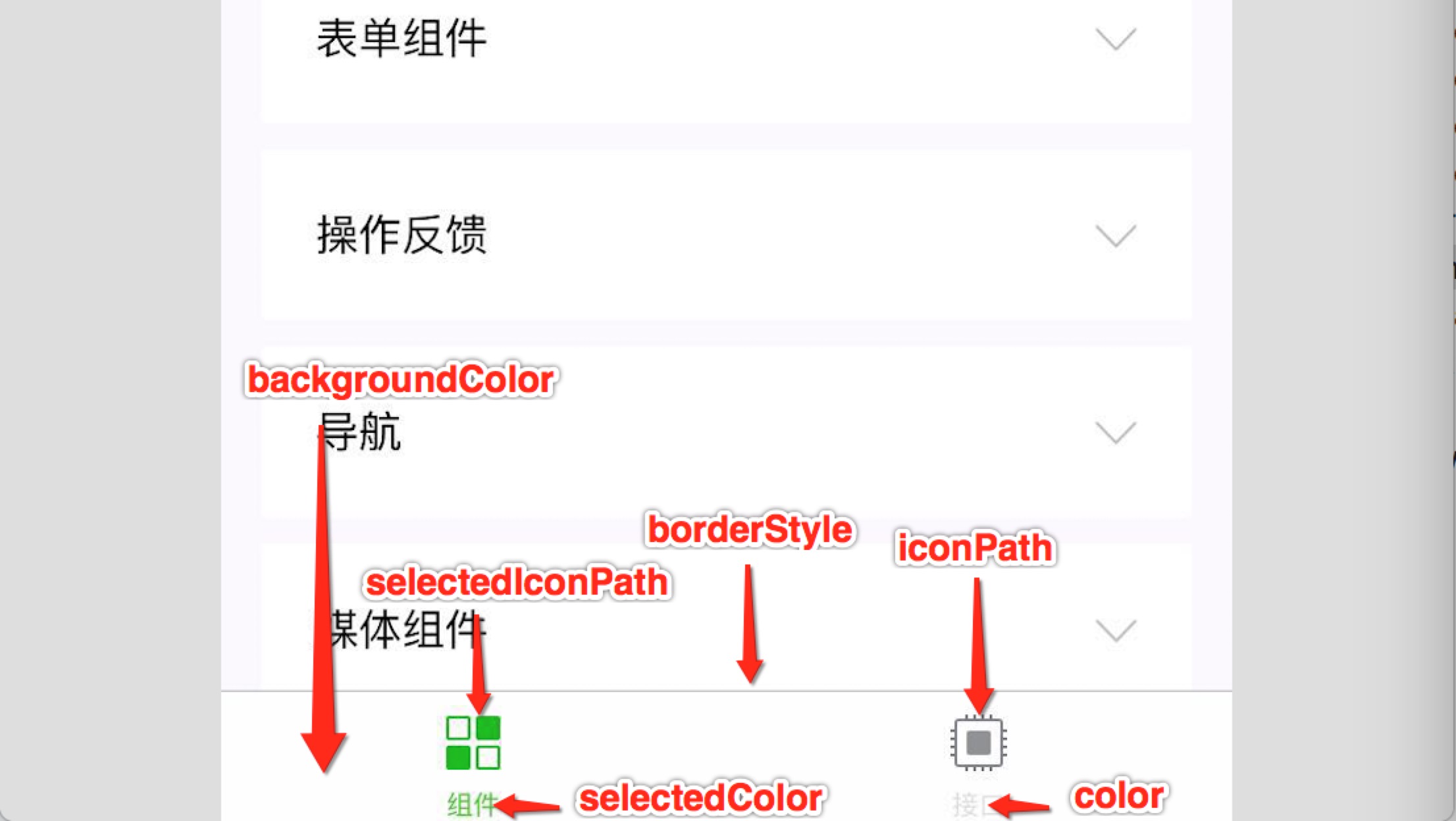
If Mini Program is a multi-tab application (with a tab bar at the bottom or top of the client window for switching pages), you can use the tabBar configuration options to specify the appearance of the tab bar and the corresponding pages displayed when tabs are switched.
| Attribute | Type | Required | Default | Description | Minimum Version |
|---|---|---|---|---|---|
| color | HexColor | Yes | — | Default color of text on tabs; only hexadecimal colors are supported. | — |
| selectedColor | HexColor | Yes | — | Color of text on tabs when selected; only hexadecimal colors are supported. | — |
| backgroundColor | HexColor | Yes | — | Background color of tabs; only hexadecimal colors are supported. | — |
| borderStyle | string | No | black | Color of the upper border of the tab bar; only black / white are supported. |
— |
| list | Array | Yes | — | List of tabs. Refer to the list attribute description. Minimum of 2, maximum of 5 tabs. |
— |
| position | string | No | bottom | Position of the tab bar; only bottom / top are supported. |
— |
| custom | boolean | No | false | Customize the tab bar. See details. | 2.5.0 |
The list field accepts an array, which must contain at least 2 and no more than 5 tabs. Tabs are sorted in the order of the array, with each item being an object whose property values are as follows:
| Attribute | Type | Required | Description |
|---|---|---|---|
| pagePath | string | Yes | Page path, which must be defined first in the pages section. |
| text | string | Yes | Text for the button on the tab. |
| iconPath | string | No | Image path. The icon size is limited to 40kb, with a recommended size of 81px * 81px. Network images are not supported. The icon will not be displayed when position is set to top. |
| selectedIconPath | string | No | Image path when the item is selected. The icon size is limited to 40kb, with a recommended size of 81px * 81px. Network images are not supported. The icon will not be displayed when position is set to top. |
networkTimeout
Timeout values for various network requests, all in milliseconds.
| Attribute | Type | Required | Default Value | Description |
|---|---|---|---|---|
| request | number | No | 60000 | Timeout for wx.request, in milliseconds. |
| connectSocket | number | No | 60000 | Timeout for wx.connectSocket, in milliseconds. |
| uploadFile | number | No | 60000 | Timeout for wx.uploadFile, in milliseconds. |
| downloadFile | number | No | 60000 | Timeout for wx.downloadFile, in milliseconds. |
debug
You can enable the debug mode in the Developer Tools. Debugging information will be displayed in the console as info entries, covering page registration, routing, data updates, event triggers, and more. This helps developers quickly identify common issues.
functionalPages
基础库 2.1.0 开始支持,低版本需做兼容处理。
The plugin owner Mini Program needs to set this option to enable plugin feature pages.
subpackages
Supported starting from WeChat Client 6.6.0 and Base Library 1.7.3 and later versions.
Used to declare the project’s subpackage structure when enabling subpackage loading.
Using
subPackagesis also accepted.
workers
基础库 1.9.90 开始支持,低版本需做兼容处理。
Specifies the directory where the Worker code for handling multi-threaded tasks is located.
requiredBackgroundModes
Supported starting from WeChat Client 6.7.2 and later versions.
Declares the capabilities required to run in the background, as an array. The following items are currently supported:
- •
audio: Playing music in the background - •
location: Getting location data in the background
For example:
{
 "pages": ["pages/index/index"],
 "requiredBackgroundModes": ["audio", "location"]
}
Note: Once background-running capabilities are declared here, they take effect immediately on the developer and trial versions. Approval is still required for the official version.
requiredPrivateInfos
For Mini Program released after July 14, 2022, this field must be declared when using the following 8 location-related APIs; otherwise, these APIs will not function properly. Mini Program released before July 14, 2022, are not affected.
Declares the location-related APIs that need to be used, as an array. The following items are currently supported:
- •getFuzzyLocation: Obtaining approximate location information
- •getLocation: Obtaining precise location information
- •onLocationChange: Listening for real-time location changes
- •startLocationUpdate: Receiving location updates (in the foreground)
- •startLocationUpdateBackground: Receiving location updates (in both foreground and background)
- •chooseLocation: Opening the map to select a location
- •choosePoi: Opening a POI list to select a location
- •chooseAddress: Retrieving the user’s address information
For example:
{
 "pages": ["pages/index/index"],
 "requiredPrivateInfos": [
 "getLocation",
 "onLocationChange",
 "startLocationUpdateBackground",
 "chooseAddress"
]
}
Note: To use these APIs, you must enable the corresponding permissions in the Mini Program admin panel under 「Development」 - 「Development Management」 - 「API Settings」.
plugins
基础库 1.9.6 开始支持,低版本需做兼容处理。
Declares the plugins that Mini Program requires.
preloadRule
基础库 2.3.0 开始支持,低版本需做兼容处理。
Declares the rules for preloading subpackages.
resizable
基础库 2.3.0 开始支持,低版本需做兼容处理。
Mini Program running on iPad can be configured to support screen rotation.
For Mini Program running on PC, users can resize the window to any proportion or maximize it through the Mini Program menu.
usingComponents
Supported starting from Developer Tools 1.02.1810190 and later versions.
Custom components declared in app.json are treated as global custom components and can be used directly in pages or custom components within Mini Program without additional declaration. It is recommended to declare only those custom components that are used across almost all pages.
Note 1: Global custom components are considered dependencies of all pages, meaning they will be initialized upon every page launch, which affects startup performance and increases the size of the main package. Custom components referenced only by specific pages or subpackages should preferably be declared in the page configuration. Note 2: Declaring low-usage custom components globally will significantly impact the effectiveness of on-demand injection.
permission
Supported starting from WeChat Client 7.0.0 and later versions.
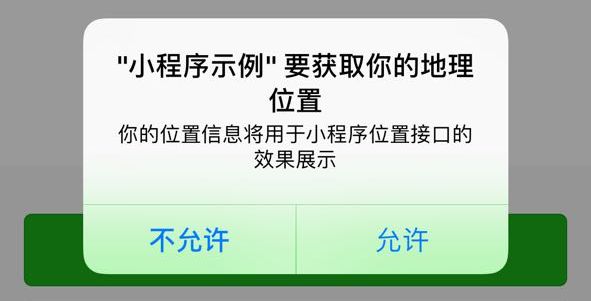
Settings related to Mini Program API permissions. The field type is Object, with the following structure:
| Attribute | Type | Required | Default Value | Description |
|---|---|---|---|---|
| scope.userLocation | PermissionObject | No | Permission declaration related to location |
PermissionObject Structure
| Attribute | Type | Required | Default Value | Description |
|---|---|---|---|---|
| desc | string | Yes | Mini Program A description of the API purpose displayed when requesting permission. Maximum 30 characters |
For example:
{
 "pages": ["pages/index/index"],
 "permission": {
 "scope.userLocation": {
 "desc": "Your location information will be used for Mini Program demonstrating the functionality of the location API" // Continuous background positioning while driving on highways
}
}
}
sitemapLocation
Specifies the location of sitemap.json; the default is 'sitemap.json', which refers to the file with that name in the same directory as app.json.
sitemap.json has been deprecated.
style
基础库 2.8.0 开始支持,低版本需做兼容处理。
Starting from WeChat Client 7.0, the UI interface underwent a major redesign. Mini Program also saw style upgrades for its basic components. Configuring "style": "v2" in app.json indicates that the new version of component styles is enabled.
The components affected by this change include button, icon, radio, checkbox, switch, and slider. You can experience them in the Mini Program examples.
useExtendedLib
基础库 2.2.1 开始支持,低版本需做兼容处理。
Supported starting from the latest nightly version of the developer tools, as well as from version 2.2.1 of the core library that supports npm.
Specifies the extended libraries to be included. Currently, the following are supported:
- •
kbone: Multi-platform development framework - •
weui: WeUI component library
By specifying these, the latest version of the corresponding npm package for the extended library is introduced without increasing the size of Mini Program 's package. The rc tool version supports sub-package references. The usage is as follows:
{
 "useExtendedLib": {
 "kbone": true,
 "weui": true
}
}
entranceDeclare
Supported starting from WeChat Client 7.0.9 and later versions; not supported on iOS yet.
Chat location messages are opened using a ride-hailing-style Mini Program. Refer to details here.
"entranceDeclare": {
 "locationMessage": {
 "path": "pages/index/index",
 "query": "foo=bar"
}
}
darkmode
Supported starting from Developer Tools version 1.03.2004271 and later, as well as from core library version 2.11.0 and later.
WeChat iOS Client version 7.0.12 and Android Client version 7.0.13 officially support DarkMode. Configuring "darkmode": true indicates that the current Mini Program can adapt to DarkMode. All basic components will display different default styles based on the system theme, and the navigation bar and tab bar will also switch automatically according to the developer's configuration.
After configuration, please complete additional adaptations beyond the basic styles according to the DarkMode Adaptation Guide.
{
 "darkmode": true
}
themeLocation
Customizes the path to theme.json. When "darkmode": true is configured, this file is required.
{
 "themeLocation": "/path/to/theme.json"
}
lazyCodeLoading
Currently, only the value requiredComponents is supported, indicating the activation of Mini Program 's “On-demand Injection” feature.
{
 "lazyCodeLoading": "requiredComponents"
}
singlePage
Supported starting from core library version 2.11.3 and later. Currently, Sharing to Moments (Beta) opens in single-page mode.
Configurations related to single-page mode
| Attribute | Type | Required | Default Value | Description |
|---|---|---|---|---|
| navigationBarFit | String | No | Automatically adjusted by default. If the original page has a custom navigation bar, it is set to float; otherwise, it is set to squeezed | Indicates the interaction state between the navigation bar and the page. A value of float means the navigation bar floats above the page and overlaps with it; a value of squeezed means the page is compressed by the navigation bar and does not overlap with it |
embeddedAppIdList
Specifies the list of Mini Program apps that can be opened using wx.openEmbeddedMiniProgram.
{
 "embeddedAppIdList": ["wxe5f52902cf4de896"]
}
halfPage
| Attribute | Type | Required | Default Value | Description |
|---|---|---|---|---|
| firstPageNavigationStyle | string | No | Uses a custom header for the full-screen status of the first page opened via video account live streaming. Values include default / custom |
{
 "halfPage": {
 "firstPageNavigationStyle": "custom"
}
}
debugOptions
Mini Program Configuration items related to debugging
| Attribute | Type | Required | Default Value | Description |
|---|---|---|---|---|
| enableFPSPanel | boolean | No | false | Whether to enable the FPS Panel |
{
 "debugOptions": {
 "enableFPSPanel": "false"
}
}
enablePassiveEvent
The default value of passive for touch-related events is false. If Mini Program does not use the catchtouch* events, this option can be set to true to improve scrolling performance. For more details, refer to MDN.
This option can be set directly to true, or individual events can be controlled separately.
{
 "enablePassiveEvent": true
}
| Property | Type | Required | Default Value | Description |
|---|---|---|---|---|
| touchstart | boolean | No | false | Whether to set the touchstart event as passive |
| touchmove | boolean | No | false | Whether to set the touchmove event as passive |
| wheel | boolean | No | false | Whether to set the wheel event as passive |
{
 "enablePassiveEvent": {
 "touchstart": true
}
}
Note
After enabling enablePassiveEvent, using certain built-in components may result in unexpected behavior, though it will not cause the page to turn blank.
When touchmove is set to true, the following built-in components might exhibit unexpected behavior:
- movable-area
- movable-view
- video
- canvas (Windows, Mac Mini Program)
- picker-view-column
When wheel is set to true, the following built-in components might exhibit unexpected behavior:
- swiper (Mac Mini Program)
- map
It is recommended to set enablePassiveEvent to false for relevant events on pages using these components to avoid unexpected behavior.
Starting from 2.25.1, two new methods, getPassiveEvent and setPassiveEvent, have been added to page/component instances to retrieve/switch the passive configuration of the current page or component at runtime.
Component({
 methods: {
 getPassive() {
 this.getPassiveEvent((passive) => {
 const {touchstart, touchmove, wheel} = passive
})
},
 setPassive() {
 const passive = {
 touchstart: false,
 touchmove: true,
 wheel: false,
}
 this.setPassiveEvent(passive)
}
}
})
resolveAlias
The resolveAlias configuration option is used to customize the mapping rules for module paths.
Once configured, it will match and map the module paths specified in require according to the defined rules.
If multiple mapping rules apply, the longest matching rule will be used.
{
 "resolveAlias": {
 "~/*": "/*",
 "~/origin/*": "origin/*",
 "@utils/*": "utils/*",
 "subBUtils/*": "subpackageB/utils/*"
}
}
Note
- 1.
resolveAliasperforms path matching, and both the key and value must end with/*.
With the above path mapping rules in place, the following mappings and conversions will occur:
~/mod.js->mod.js~/origin/mod.js->origin/mod.js@utils/mod.js->utils/mod.jssubBUtils/mod.js->subpackageB/utils/mod.js
- 1.If
miniprogramRootis specified in project.config.json,/*refers to the root directory corresponding tominiprogramRoot, rather than the root directory of the developer tool project.
renderer
Specifies the global default rendering backend for Mini Program.
Valid values: webview, skyline
Default value: webview
rendererOptions
Configuration options related to the Mini Program rendering backend
| Property | Type |
|---|---|
| skyline | SkylineOptions |
SkylineOptions
Configuration options for the Skyline rendering engine
| Property | Type | Default Value | Description |
|---|---|---|---|
| defaultDisplayBlock | boolean | false | Enable default Block layout |
| defaultContentBox | boolean | false | Enable default ContentBox box model |
| tagNameStyleIsolation | string | 'isolated' | Enable global matching for tag selectors |
| enableScrollViewAutoSize | boolean | false | Enable automatic expansion for scroll-view |
| disableABTest | boolean | false | Disable Skyline A/B testing |
{
 "rendererOptions": {
 "skyline": {
 "disableABTest": true,
 "defaultDisplayBlock": true,
 "defaultContentBox": true,
 "tagNameStyleIsolation": "legacy",
 "enableScrollViewAutoSize": true,
}
}
}
componentFramework
Specifies the component framework used by Mini Program
Valid values: exparser, glass-easel
Default value: exparser
chatTools
Specifies the separate subpackage corresponding to a chat tool
| Property | Type | Required | Description |
|---|---|---|---|
| root | string | Yes | Root directory of the subpackage |
| entryPagePath | string | Yes | Path where the chat tool starts |
| desc | string | Yes | Description of the chat tool |
| scopes | string[] | No | Scope permissions used in the subpackage |
{
 "chatTools": [
 {
 "root": "packageChatTool",
 "entryPagePath": "pages/activity_create/index",
 "desc": "Group check-in tool",
 "scopes": [
 "scope.userLocation"
]
}
]
}
defaultLanguage
Specifies the source language for automatic translation. It is recommended to configure this for Mini Program where there is less text on the main interface, as this can effectively prevent translation prompts from appearing or automatic translation from failing.
| langid | Language |
|---|---|
| zh_CN | Chinese |
| en | English |
| ar | Arabic |
| de | German |
| es | Spanish |
| fr | French |
| id | Indonesian |
| it | Italian |
| ja | Japanese |
| ko | Korean |
| ms | Malay |
| pt | Portuguese |
| ru | Russian |
| th | Thai |
| vi | Vietnamese |
| tr | Turkish |
Configuration Example
{
 "pages": ["pages/index/index", "pages/logs/index"],
 "window": {
 "navigationBarTitleText": "Demo"
},
 "tabBar": {
 "list": [
 {
 "pagePath": "pages/index/index",
 "text": "Home"
},
 {
 "pagePath": "pages/logs/logs",
 "text": "Logs"
}
]
},
 "networkTimeout": {
 "request": 10000,
 "downloadFile": 10000
},
 "debug": true,
}